
Samsung S85 Screen Replacement

crwdns2959932:0crwdnd2959932:0Avinash Salgamcrwdnd2959932:0crwdnd2959932:0crwdnd2959932:03crwdnd2959932:0crwdne2959932:0
crwdns2959936:0Mud 7, 2024crwdne2959936:0
crwdns2869540:0crwdne2869540:0: 1303
crwdns2959988:0crwdne2959988:0
- crwdns2959990:0crwdne2959990:0
- 2
- crwdns2959992:0crwdne2959992:0
- 16
- crwdns2959994:0crwdne2959994:0
- 94
- crwdns2959996:0crwdne2959996:0
- 1,303
crwdns2955950:0crwdne2955950:0: 1
crwdns2960002:01crwdne2960002:0.
crwdns2959984:0crwdne2959984:0: 1 2
crwdns2959972:01crwdne2959972:0
crwdns2959970:02crwdne2959970:0
crwdns2959986:0crwdne2959986:0: 0 1
crwdns2959958:0crwdne2959958:0
crwdns2959976:01crwdne2959976:0
crwdns2915892:0crwdne2915892:0
crwdns2959928:0crwdne2959928:0 ↓This guide will explain how to successfully remove the screen underneath the outside shell and on top of the circuit board.
crwdns2959930:0crwdne2959930:0
crwdns2943215:0crwdne2943215:0


-
-
-
Remove 4 screws from bottom of camera
-
Remove 2 screws from side of camera
-
Remove 2 screws from side of camera
 crwdns2952109:0crwdne2952109:0
-
-
-
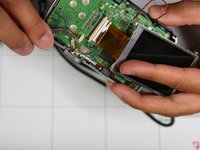
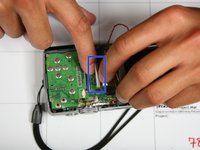
Squeeze area noted by blue square and pull outside shell apart from remaining camera.
-
-
-
Remove two screws holding screen to circuit board marked by red circles
-
-
-
crwdns2935267:0crwdne2935267:0Tweezers$4.99
-
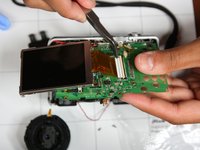
Lift screen up such that orange circuit ribbon fully extends
-
Flip white peg up noted by blue box
-
Using tweezers gently remove orange circuit ribbon from white peg. Make sure white peg remains up otherwise ribbon may tear.
-
-


To reassemble your device, follow these instructions in reverse order.
crwdns2935221:0crwdne2935221:0
crwdns2935227:0crwdne2935227:0

crwdns2935287:0crwdne2935287:0

University of Illinois Urbana-Champaign, Team 1-4, Scrogum Spring 2014 crwdns2935289:0University of Illinois Urbana-Champaign, Team 1-4, Scrogum Spring 2014crwdne2935289:0
UICU-SCROGUM-S14S1G4
crwdns2931471:04crwdne2931471:0
crwdns2935297:060crwdne2935297:0
