crwdns2933423:0crwdne2933423:0
crwdns2947577:0crwdnd2947577:0crwdne2947577:0

Samsung NX30 Screen Replacement

crwdns2942213:0crwdne2942213:0

    1. Samsung NX30 Screen Replacement, Battery: crwdns2935265:01crwdnd2935265:01crwdnd2935265:01crwdne2935265:0
      • Flip the camera over so that the bottom of the camera is up.

      • Push the battery switch towards the back of the camera.

      crwdns2952109:0crwdne2952109:0

      crwdns2917038:0crwdne2917038:0

    2. Samsung NX30 Screen Replacement: crwdns2935265:02crwdnd2935265:01crwdnd2935265:02crwdne2935265:0 Samsung NX30 Screen Replacement: crwdns2935265:02crwdnd2935265:02crwdnd2935265:02crwdne2935265:0
      • Locate the blue switch above the battery pack.

      • Slide the blue switch into the camera in the direction of the arrow on the switch. When the switch has been pushed in the battery will spring up.

      crwdns2952109:0crwdne2952109:0

      crwdns2917038:0crwdne2917038:0

    3. Samsung NX30 Screen Replacement: crwdns2935265:03crwdnd2935265:01crwdnd2935265:01crwdne2935265:0
      • Pull the battery out.

      crwdns2952109:0crwdne2952109:0

      crwdns2917038:0crwdne2917038:0

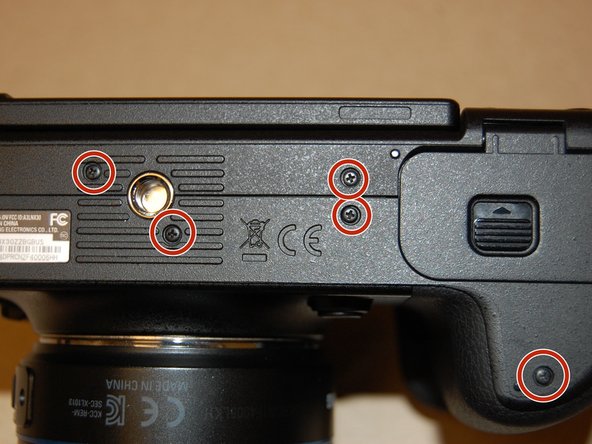
    1. Samsung NX30 Screen Replacement, Screen: crwdns2935265:04crwdnd2935265:01crwdnd2935265:03crwdne2935265:0 Samsung NX30 Screen Replacement, Screen: crwdns2935265:04crwdnd2935265:02crwdnd2935265:03crwdne2935265:0 Samsung NX30 Screen Replacement, Screen: crwdns2935265:04crwdnd2935265:03crwdnd2935265:03crwdne2935265:0
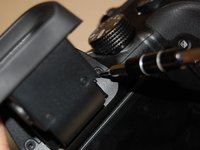
      • Unscrew the nine 4mm Phillips head screws surrounding the body of the camera. They are located on the bottom of the camera and both sides of the camera.

      crwdns2952109:0crwdne2952109:0

      crwdns2917038:0crwdne2917038:0

    2. Samsung NX30 Screen Replacement: crwdns2935265:05crwdnd2935265:01crwdnd2935265:03crwdne2935265:0 Samsung NX30 Screen Replacement: crwdns2935265:05crwdnd2935265:02crwdnd2935265:03crwdne2935265:0 Samsung NX30 Screen Replacement: crwdns2935265:05crwdnd2935265:03crwdnd2935265:03crwdne2935265:0
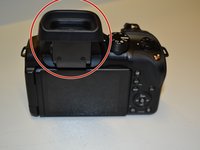
      • Pull the viewer out from the camera and then up.

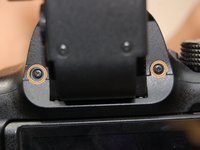
      • Unscrew the two black 4mm Phillips head screws under it.

      crwdns2952109:0crwdne2952109:0

      crwdns2917038:0crwdne2917038:0

    3. Samsung NX30 Screen Replacement: crwdns2935265:06crwdnd2935265:01crwdnd2935265:02crwdne2935265:0 Samsung NX30 Screen Replacement: crwdns2935265:06crwdnd2935265:02crwdnd2935265:02crwdne2935265:0
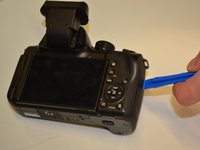
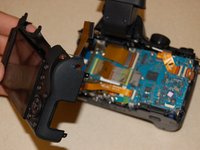
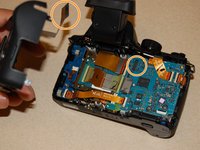
      • Once the screws are all removed, place the camera face down, with the screen facing up.

      • Pry open the body using the plastic opening tool.

      • Gently open the body.

      crwdns2952109:0crwdne2952109:0

      crwdns2917038:0crwdne2917038:0

    4. Samsung NX30 Screen Replacement: crwdns2935265:07crwdnd2935265:01crwdnd2935265:02crwdne2935265:0 Samsung NX30 Screen Replacement: crwdns2935265:07crwdnd2935265:02crwdnd2935265:02crwdne2935265:0
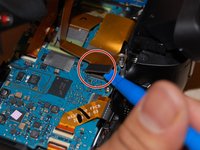
      • Then use the plastic opening tool to dislodge the Ribbon Cable, located near the top of the camera, from the Circuit Board.

      • The Ribbon Cable will be disconnected from the Circuit Board when you are done.

      crwdns2952109:0crwdne2952109:0

      crwdns2917038:0crwdne2917038:0

crwdns2915888:0crwdne2915888:0

To reassemble your device, follow these instructions in reverse order.

crwdns2935221:0crwdne2935221:0

crwdns2935227:0crwdne2935227:0

Julia Kilcup

crwdns2935283:002/03/16crwdne2935283:0

431 crwdns2915208:0crwdne2915208:0

crwdns2935297:03crwdne2935297:0

crwdns2935287:0crwdne2935287:0

UW Tacoma, Team 1-4, Rose Winter 2016 crwdns2935289:0UW Tacoma, Team 1-4, Rose Winter 2016crwdne2935289:0

UWT-ROSE-W16S1G4

crwdns2931471:04crwdne2931471:0

crwdns2935297:060crwdne2935297:0

crwdns2947412:00crwdne2947412:0

crwdns2917038:0crwdne2917038:0

crwdns2936625:0crwdne2936625:0:

crwdns2936751:024crwdne2936751:0 1

crwdns2936753:07crwdne2936753:0 32

crwdns2936753:030crwdne2936753:0 72

crwdns2942667:0crwdne2942667:0 2,551