crwdns2933423:0crwdne2933423:0
crwdns2947577:0crwdnd2947577:0crwdne2947577:0

Samsung NP-NC10-KA02US Fan Replacement

crwdns2942213:0crwdne2942213:0

  1. Samsung NP-NC10-KA02US Fan Replacement, Battery: crwdns2935265:01crwdnd2935265:01crwdnd2935265:02crwdne2935265:0 Samsung NP-NC10-KA02US Fan Replacement, Battery: crwdns2935265:01crwdnd2935265:02crwdnd2935265:02crwdne2935265:0
    • Locate the external battery on the bottom side of the device.

    • Locate the tab on the right side of the battery.

    • Shift the tab to the left.

    crwdns2952109:0crwdne2952109:0
  2. Samsung NP-NC10-KA02US Fan Replacement: crwdns2935265:02crwdnd2935265:01crwdnd2935265:01crwdne2935265:0
    • Locate the tab on the left side of the device's battery.

    • Push the left tab to the right.

    crwdns2952109:0crwdne2952109:0
  3. Samsung NP-NC10-KA02US Fan Replacement: crwdns2935265:03crwdnd2935265:01crwdnd2935265:01crwdne2935265:0
    • Pull the battery up from the device.

    crwdns2952109:0crwdne2952109:0
  4. Samsung NP-NC10-KA02US Fan Replacement, Back Plate: crwdns2935265:04crwdnd2935265:01crwdnd2935265:01crwdne2935265:0
    • Locate the 14, 3.93 mm, screws that need to be removed on the base of the computer.

    crwdns2952109:0crwdne2952109:0
  5. Samsung NP-NC10-KA02US Fan Replacement: crwdns2935265:05crwdnd2935265:01crwdnd2935265:01crwdne2935265:0
    • Remove all 14 of the 3.93 mm screws using a PH1 screw bit.

    crwdns2952109:0crwdne2952109:0
  6. Samsung NP-NC10-KA02US Fan Replacement: crwdns2935265:06crwdnd2935265:01crwdnd2935265:02crwdne2935265:0 Samsung NP-NC10-KA02US Fan Replacement: crwdns2935265:06crwdnd2935265:02crwdnd2935265:02crwdne2935265:0
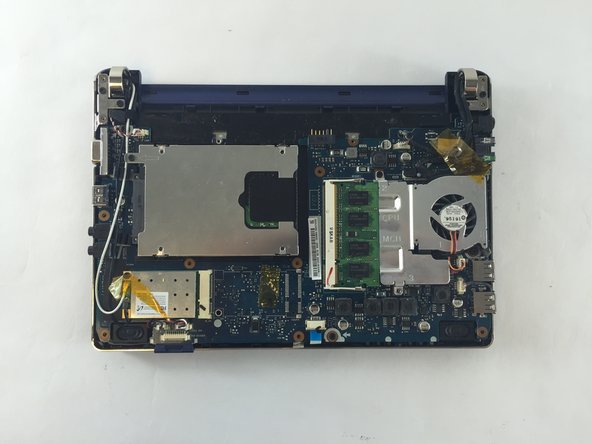
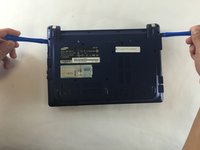
    • Using two plastic opening tools remove the back plate.

    • These plastic opening tools have a flat-head that extends as a wedge which are utilized to separate pressure fit plastic components without causing any damage to them.

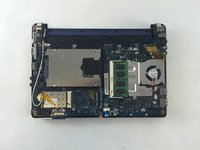
    • The back plate is now removed exposing all of the hardware components.

    crwdns2952109:0crwdne2952109:0
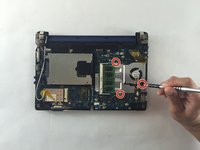
  7. Samsung NP-NC10-KA02US Fan Replacement, Fan: crwdns2935265:07crwdnd2935265:01crwdnd2935265:02crwdne2935265:0 Samsung NP-NC10-KA02US Fan Replacement, Fan: crwdns2935265:07crwdnd2935265:02crwdnd2935265:02crwdne2935265:0
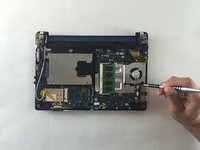
    • Remove the three screws holding the fan using a 3.9mm screwdriver.

    • All three screws need to be removed in order to continue on to next step.

    crwdns2952109:0crwdne2952109:0
  8. Samsung NP-NC10-KA02US Fan Replacement: crwdns2935265:08crwdnd2935265:01crwdnd2935265:01crwdne2935265:0
    • Unplug the wires connected to the fan using a plastic opening tool.

    crwdns2952109:0crwdne2952109:0
  9. Samsung NP-NC10-KA02US Fan Replacement: crwdns2935265:09crwdnd2935265:01crwdnd2935265:01crwdne2935265:0
    • You are now able to carefully detach the fan from the base.

    crwdns2952109:0crwdne2952109:0
crwdns2915888:0crwdne2915888:0

To reassemble your device, follow these instructions in reverse order.

crwdns2935229:02crwdne2935229:0

JHOAN USECHE

crwdns2935283:010/03/16crwdne2935283:0

372 crwdns2915208:0crwdne2915208:0

crwdns2935297:02crwdne2935297:0

crwdns2935287:0crwdne2935287:0

USF Tampa, Team 1-1, Sullivan Fall 2016 crwdns2935289:0USF Tampa, Team 1-1, Sullivan Fall 2016crwdne2935289:0

USFT-SULLIVAN-F16S1G1

crwdns2931471:03crwdne2931471:0

crwdns2935297:06crwdne2935297:0

crwdns2947412:00crwdne2947412:0

crwdns2917038:0crwdne2917038:0

crwdns2936625:0crwdne2936625:0:

crwdns2936751:024crwdne2936751:0 1

crwdns2936753:07crwdne2936753:0 5

crwdns2936753:030crwdne2936753:0 54

crwdns2942667:0crwdne2942667:0 1,045