crwdns2933423:0crwdne2933423:0
crwdns2947577:0crwdnd2947577:0crwdne2947577:0

Samsung NP-130-JA01US RAM Replacement

crwdns2869540:0crwdne2869540:0: 697

crwdns2959988:0crwdne2959988:0

crwdns2959990:0crwdne2959990:0
1
crwdns2959992:0crwdne2959992:0
22
crwdns2959994:0crwdne2959994:0
95
crwdns2959996:0crwdne2959996:0
697
crwdns2955950:0crwdne2955950:0: 0

crwdns2959998:0crwdne2959998:0

crwdns2960000:0crwdne2960000:0
crwdns2959984:0crwdne2959984:0: 1

crwdns2959972:01crwdne2959972:0

crwdns2959986:0crwdne2959986:0: 0

crwdns2959958:0crwdne2959958:0

crwdns2955944:0crwdne2955944:0: 1 - 2 crwdns2931279:0crwdne2931279:0
crwdns2955970:0crwdne2955970:0: crwdns2937585:0crwdne2937585:0
Samsung NP-130-JA01US RAM Replacement

crwdns2915892:0crwdne2915892:0

crwdns2959928:0crwdne2959928:0 ↓

This is a simple process to upgrade the RAM in the Samsung NP-130-JA01US.

Upgrading your RAM memory card will allow your unit to handle more programs at the same time, like having multiple tabs open, and reducing the time your unit needs to turn on.

RAM memory upgrade is a quick and cheap way to improve the performance of your unit.

crwdns2959930:0crwdne2959930:0

crwdns2943215:0crwdne2943215:0

    1. Samsung NP-130-JA01US RAM Replacement, Battery: crwdns2935265:01crwdnd2935265:01crwdnd2935265:01crwdne2935265:0
      • Turn off the computer.

      • Disconnect the charger cable from the computer.

      • Failure to disconnect the charger cable from the computer could result in an electric shock.

      • Flip the computer over so the underside is facing up.

      crwdns2952109:0crwdne2952109:0

      crwdns2917038:0crwdne2917038:0

    2. Samsung NP-130-JA01US RAM Replacement: crwdns2935265:02crwdnd2935265:01crwdnd2935265:02crwdne2935265:0 Samsung NP-130-JA01US RAM Replacement: crwdns2935265:02crwdnd2935265:02crwdnd2935265:02crwdne2935265:0
      • Slide the left and right slider buttons fully away from each other.

      crwdns2952109:0crwdne2952109:0

      crwdns2917038:0crwdne2917038:0

    3. Samsung NP-130-JA01US RAM Replacement: crwdns2935265:03crwdnd2935265:01crwdnd2935265:01crwdne2935265:0
      • Pull the battery out of the computer.

      crwdns2952109:0crwdne2952109:0

      crwdns2917038:0crwdne2917038:0

    1. Samsung NP-130-JA01US RAM Replacement, RAM: crwdns2935265:04crwdnd2935265:01crwdnd2935265:02crwdne2935265:0 Samsung NP-130-JA01US RAM Replacement, RAM: crwdns2935265:04crwdnd2935265:02crwdnd2935265:02crwdne2935265:0
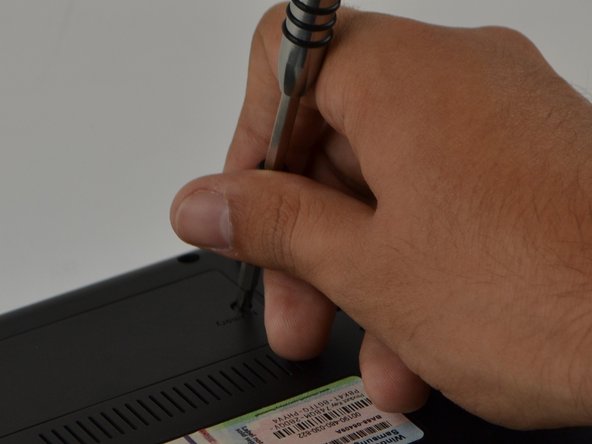
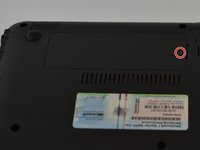
      • Locate the "Memory" panel on the bottom right corner.

      • Use the Phillips 01 screwdriver to remove the screw.

      • The screw is a Phillips 1 (PH 1) with a length of 60 millimeters (mm)

      crwdns2952109:0crwdne2952109:0

      crwdns2917038:0crwdne2917038:0

    2. Samsung NP-130-JA01US RAM Replacement: crwdns2935265:05crwdnd2935265:01crwdnd2935265:01crwdne2935265:0
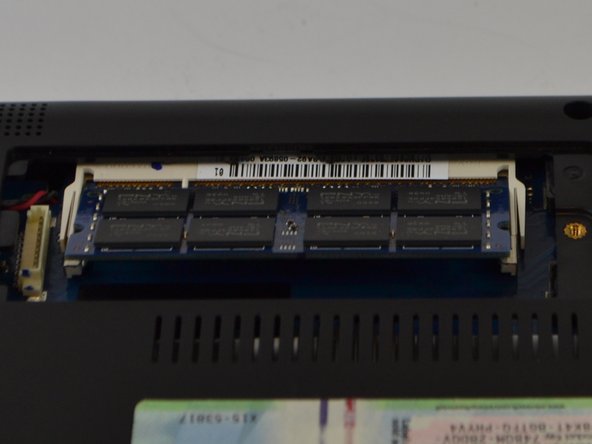
      • With your hand, lift panel and remove it.

      crwdns2952109:0crwdne2952109:0

      crwdns2917038:0crwdne2917038:0

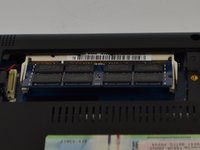
    3. Samsung NP-130-JA01US RAM Replacement: crwdns2935265:06crwdnd2935265:01crwdnd2935265:02crwdne2935265:0 Samsung NP-130-JA01US RAM Replacement: crwdns2935265:06crwdnd2935265:02crwdnd2935265:02crwdne2935265:0
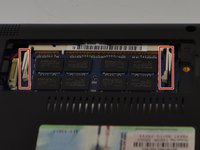
      • Slide metal prongs (marked in red squares) away from each other with your fingers.

      • The RAM chip will automatically lift up at an angle for easy ejection.

      crwdns2952109:0crwdne2952109:0

      crwdns2917038:0crwdne2917038:0

    4. Samsung NP-130-JA01US RAM Replacement: crwdns2935265:07crwdnd2935265:01crwdnd2935265:01crwdne2935265:0
      • With your hands, carefully slide the RAM chip out to remove.

      • The RAM chip is delicate, do not force it when removing it.

      crwdns2952109:0crwdne2952109:0

      crwdns2917038:0crwdne2917038:0

crwdns2915888:0crwdne2915888:0

To reassemble your device, follow these instructions in reverse order.

crwdns2935221:0crwdne2935221:0

crwdns2935227:0crwdne2935227:0

Jason Schnebelen

crwdns2935283:009/18/16crwdne2935283:0

267 crwdns2915208:0crwdne2915208:0

crwdns2935297:02crwdne2935297:0

crwdns2935287:0crwdne2935287:0

USF Tampa, Team 9-6, Lacy Fall 2016 crwdns2935289:0USF Tampa, Team 9-6, Lacy Fall 2016crwdne2935289:0

USFT-LACY-F16S9G6

crwdns2931471:03crwdne2931471:0

crwdns2935297:060crwdne2935297:0

crwdns2947412:00crwdne2947412:0

crwdns2917038:0crwdne2917038:0

crwdns2936625:0crwdne2936625:0:

crwdns2936751:024crwdne2936751:0 1

crwdns2936753:07crwdne2936753:0 22

crwdns2936753:030crwdne2936753:0 95

crwdns2959996:0crwdne2959996:0 697