crwdns2933423:0crwdne2933423:0
crwdns2947577:0crwdnd2947577:0crwdne2947577:0

Samsung L100 Setting Knob Spring

crwdns2942213:0crwdne2942213:0

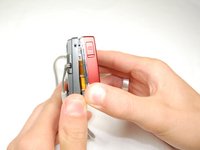
    1. Samsung L100 Setting Knob Spring, Removing Back Cover: crwdns2935265:01crwdnd2935265:01crwdnd2935265:03crwdne2935265:0 Samsung L100 Setting Knob Spring, Removing Back Cover: crwdns2935265:01crwdnd2935265:02crwdnd2935265:03crwdne2935265:0 Samsung L100 Setting Knob Spring, Removing Back Cover: crwdns2935265:01crwdnd2935265:03crwdnd2935265:03crwdne2935265:0
      • Remove the six external screws from the camera using a Phillips #0 screwdriver.

      • After the screws has been removed, the bottom of the back half of the external case should be loosened from the camera.

      • Be careful, make sure you don't lose the screws.

      crwdns2952109:0crwdne2952109:0

      crwdns2917038:0crwdne2917038:0

    2. Samsung L100 Setting Knob Spring: crwdns2935265:02crwdnd2935265:01crwdnd2935265:02crwdne2935265:0 Samsung L100 Setting Knob Spring: crwdns2935265:02crwdnd2935265:02crwdnd2935265:02crwdne2935265:0
      • Open the battery cover that's located on the bottom right side of the camera and carefully remove the battery.

      crwdns2952109:0crwdne2952109:0

      crwdns2917038:0crwdne2917038:0

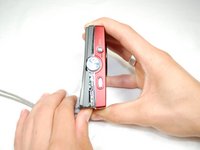
    3. Samsung L100 Setting Knob Spring: crwdns2935265:03crwdnd2935265:01crwdnd2935265:03crwdne2935265:0 Samsung L100 Setting Knob Spring: crwdns2935265:03crwdnd2935265:02crwdnd2935265:03crwdne2935265:0 Samsung L100 Setting Knob Spring: crwdns2935265:03crwdnd2935265:03crwdnd2935265:03crwdne2935265:0
      • Slide your fingernail or a plastic spudger in the groove from the bottom to the top right side of the camera.

      crwdns2952109:0crwdne2952109:0

      crwdns2917038:0crwdne2917038:0

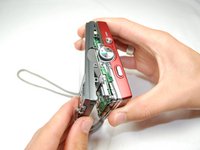
    4. Samsung L100 Setting Knob Spring: crwdns2935265:04crwdnd2935265:01crwdnd2935265:01crwdne2935265:0
      • Carefully squeeze the top right corner of the camera and pry off the external cover.

      • If you hear a "cracking" sound. This is normal.

      • Continue to pull the external cover and it will come off cleanly.

      • Be cautious of the flash capacitor. It carries an electrical charge, that may give you an unpleasant shock.

      crwdns2952109:0crwdne2952109:0

      crwdns2917038:0crwdne2917038:0

    5. Samsung L100 Setting Knob Spring: crwdns2935265:05crwdnd2935265:01crwdnd2935265:01crwdne2935265:0
      • Carefully pull off the back cover, parts behind the back of the case might fall out.

      crwdns2952109:0crwdne2952109:0

      crwdns2917038:0crwdne2917038:0

    1. Samsung L100 Setting Knob Spring, Flash Circuit Board: crwdns2935265:06crwdnd2935265:01crwdnd2935265:01crwdne2935265:0
      • Remove the screws holding the circuit board.

      • After you remove the screws, carefully remove the circuit board.

      crwdns2952109:0crwdne2952109:0

      crwdns2917038:0crwdne2917038:0

    2. Samsung L100 Setting Knob Spring: crwdns2935265:07crwdnd2935265:01crwdnd2935265:02crwdne2935265:0 Samsung L100 Setting Knob Spring: crwdns2935265:07crwdnd2935265:02crwdnd2935265:02crwdne2935265:0
      • Remove the front cover, it comes off easily.

      • Buttons might fall out when you remove the front cover.

      crwdns2952109:0crwdne2952109:0

      crwdns2917038:0crwdne2917038:0

    3. Samsung L100 Setting Knob Spring: crwdns2935265:08crwdnd2935265:01crwdnd2935265:01crwdne2935265:0
      • Face camera towards you.

      • Remove the two screws from circuit board on the left side of the lens.

      crwdns2952109:0crwdne2952109:0

      crwdns2917038:0crwdne2917038:0

    4. Samsung L100 Setting Knob Spring: crwdns2935265:09crwdnd2935265:01crwdnd2935265:01crwdne2935265:0
      • Carefully hold up the circuit board, while it's still connected to the camera.

      • Remove all five screws that's on top of the camera.

      crwdns2952109:0crwdne2952109:0

      crwdns2917038:0crwdne2917038:0

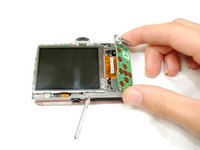
    5. Samsung L100 Setting Knob Spring: crwdns2935265:010crwdnd2935265:01crwdnd2935265:03crwdne2935265:0 Samsung L100 Setting Knob Spring: crwdns2935265:010crwdnd2935265:02crwdnd2935265:03crwdne2935265:0 Samsung L100 Setting Knob Spring: crwdns2935265:010crwdnd2935265:03crwdnd2935265:03crwdne2935265:0
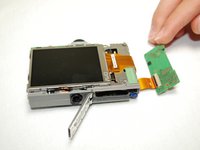
      • Carefully push up the top of the circuit board.

      • Pull up flash circuit board from top of camera.

      crwdns2952109:0crwdne2952109:0

      crwdns2917038:0crwdne2917038:0

    1. Samsung L100 Setting Knob Spring, Setting Knob Spring: crwdns2935265:011crwdnd2935265:01crwdnd2935265:01crwdne2935265:0
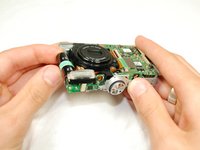
      • Face the bottom of the Flash Circuit board towards you.

      • Remove the one screw that's located on the left side of the lens.

      crwdns2952109:0crwdne2952109:0

      crwdns2917038:0crwdne2917038:0

    2. Samsung L100 Setting Knob Spring: crwdns2935265:012crwdnd2935265:01crwdnd2935265:01crwdne2935265:0
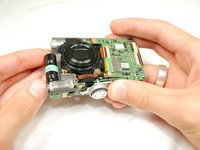
      • Take the flash circuit board and turn it over.

      • Remove the plastic setting knob.

      • Make sure to keep copper spring inside of the slot.

      crwdns2952109:0crwdne2952109:0

      crwdns2917038:0crwdne2917038:0

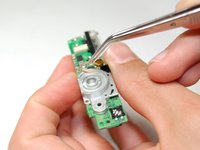
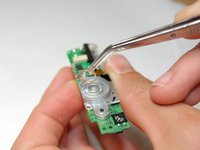
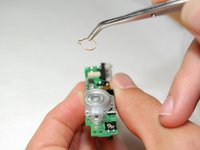
    3. Samsung L100 Setting Knob Spring: crwdns2935265:013crwdnd2935265:01crwdnd2935265:03crwdne2935265:0 Samsung L100 Setting Knob Spring: crwdns2935265:013crwdnd2935265:02crwdnd2935265:03crwdne2935265:0 Samsung L100 Setting Knob Spring: crwdns2935265:013crwdnd2935265:03crwdnd2935265:03crwdne2935265:0
      crwdns2935267:0crwdne2935267:0
      Tweezers
      $4.99
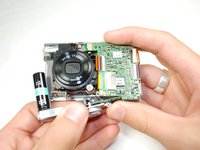
      • Take out and replace the Setting Knob Spring with tweezers.

      crwdns2952109:0crwdne2952109:0

      crwdns2917038:0crwdne2917038:0

crwdns2915888:0crwdne2915888:0

To reassemble your device, follow these instructions in reverse order.

crwdns2935221:0crwdne2935221:0

andyhe

crwdns2935283:004/15/10crwdne2935283:0

81 crwdns2915208:0crwdne2915208:0

crwdns2935295:0crwdne2935295:0

crwdns2935287:0crwdne2935287:0

Cal Poly, Team 6-17, Maness Spring 2010 crwdns2935289:0Cal Poly, Team 6-17, Maness Spring 2010crwdne2935289:0

CPSU-MANESS-S10S6G17

crwdns2931471:04crwdne2931471:0

crwdns2935297:010crwdne2935297:0

crwdns2947412:00crwdne2947412:0

crwdns2917038:0crwdne2917038:0

crwdns2936625:0crwdne2936625:0:

crwdns2936751:024crwdne2936751:0 1

crwdns2936753:07crwdne2936753:0 9

crwdns2936753:030crwdne2936753:0 35

crwdns2942667:0crwdne2942667:0 3,565