
Samsung Impression Keyboard Replacement

crwdns2959932:0crwdnd2959932:0Ross McKelviecrwdnd2959932:0crwdnd2959932:0crwdnd2959932:09crwdnd2959932:0crwdne2959932:0
crwdns2959936:0Sun 15, 2026crwdne2959936:0
crwdns2869540:0crwdne2869540:0: 2.9K
crwdns2959988:0crwdne2959988:0
- crwdns2959990:0crwdne2959990:0
- 3
- crwdns2959992:0crwdne2959992:0
- 20
- crwdns2959994:0crwdne2959994:0
- 92
- crwdns2959996:0crwdne2959996:0
- 2,934
crwdns2955950:0crwdne2955950:0: 0
crwdns2959998:0crwdne2959998:0
crwdns2960000:0crwdne2960000:0crwdns2959984:0crwdne2959984:0: 0 1
crwdns2959956:0crwdne2959956:0
crwdns2959968:01crwdne2959968:0
crwdns2959986:0crwdne2959986:0: 2 3
crwdns2959982:02crwdne2959982:0
crwdns2959978:03crwdne2959978:0
crwdns2869444:0crwdne2869444:0
crwdns2869445:0crwdne2869445:0
crwdns2862611:0crwdne2862611:0
crwdns2862612:0crwdne2862612:0
crwdns2862633:0crwdne2862633:0
crwdns2862634:0crwdne2862634:0
crwdns2915892:0crwdne2915892:0
crwdns2959928:0crwdne2959928:0 ↓How to remove & replace the phone's keyboard.
crwdns2959930:0crwdne2959930:0
crwdns2943215:0crwdne2943215:0

-
-
-
Orient the phone with the screen facing downward.
-
Slide the panel away from the camera using your thumb. This will expose the battery.
 crwdns2952109:0crwdne2952109:0
-
-
-
Insert the tip of the spudger on the left side of the battery.
-
Pry the battery out. It will pivot in the direction of the white arrow.
-
-
-
-
-
Remove the six 3.5 mm screws using a Phillips #000 screwdriver. Unscrew in a counterclockwise direction.
-
-
-
Gently pry around the edges with the spudger to remove back panel.
-
The side buttons will become loose and will fall out, so put these in a safe place.
-
-
-
-
-
-
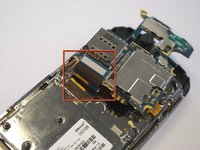
Gently remove the black wire to free the circuit board.
-
Remove the wire by gently prying up the gold terminator attached to the green circuit board.
-
-
-
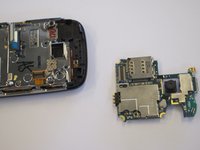
Gently tug the black and blue ribbon upwards to release the circuit board.
-
-
-
-
-
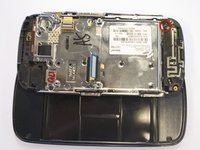
Use a Phillips screwdriver to remove the six 3.5 mm screws by rotating.
-
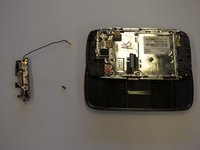
The antenna assembly will snap off.
-
-
-
-
-
Remove the two base screws along the edge of the silver piece, where you just removed the black end piece.
-
The screws are 2.7mm in length.
-
The bottom black end cap will snap out.
-
-
-
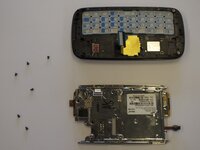
Remove the six 2.7 mm screws holding the silver plate on and set aside (fig. 1).
-
Separate the silver plate and phone frame (fig. 2).
-
-
-
The silver piece you are left with is the physical keyboard assembly.
-
-







To reassemble your device, follow these instructions in reverse order.

crwdns2935287:0crwdne2935287:0

Cal Poly, Team 8-10, Regan Spring 2011 crwdns2935289:0Cal Poly, Team 8-10, Regan Spring 2011crwdne2935289:0
CPSU-REGAN-S11S8G10
crwdns2931471:04crwdne2931471:0
crwdns2935297:0132crwdne2935297:0
