crwdns2933423:0crwdne2933423:0
crwdns2947577:0crwdnd2947577:0crwdne2947577:0

Samsung HMX-F90 Record Button Replacement

crwdns2869540:0crwdne2869540:0: 905

crwdns2959988:0crwdne2959988:0

crwdns2959990:0crwdne2959990:0
3
crwdns2959992:0crwdne2959992:0
20
crwdns2959994:0crwdne2959994:0
89
crwdns2959996:0crwdne2959996:0
905
crwdns2955950:0crwdne2955950:0: 0

crwdns2959998:0crwdne2959998:0

crwdns2960000:0crwdne2960000:0
crwdns2959984:0crwdne2959984:0: 0

crwdns2959956:0crwdne2959956:0

crwdns2959986:0crwdne2959986:0: 0

crwdns2959958:0crwdne2959958:0

crwdns2955944:0crwdne2955944:0: 15 - 20 crwdns2931279:0crwdne2931279:0
crwdns2955970:0crwdne2955970:0: crwdns2937801:0crwdne2937801:0
Samsung HMX-F90 Record Button Replacement

crwdns2915892:0crwdne2915892:0

crwdns2959928:0crwdne2959928:0 ↓

After several times of using buttons, they can become stuck or faulty. This guide can be used to loosen or replace the record button.

crwdns2959930:0crwdne2959930:0

crwdns2943215:0crwdne2943215:0

    1. Samsung HMX-F90 Record Button Replacement, Battery: crwdns2935265:01crwdnd2935265:01crwdnd2935265:03crwdne2935265:0 Samsung HMX-F90 Record Button Replacement, Battery: crwdns2935265:01crwdnd2935265:02crwdnd2935265:03crwdne2935265:0 Samsung HMX-F90 Record Button Replacement, Battery: crwdns2935265:01crwdnd2935265:03crwdnd2935265:03crwdne2935265:0
      • Pull the release tab away from the battery.

      • Slide the battery towards the release tab and then pull the battery away from the camcorder.

      crwdns2952109:0crwdne2952109:0

      crwdns2917038:0crwdne2917038:0

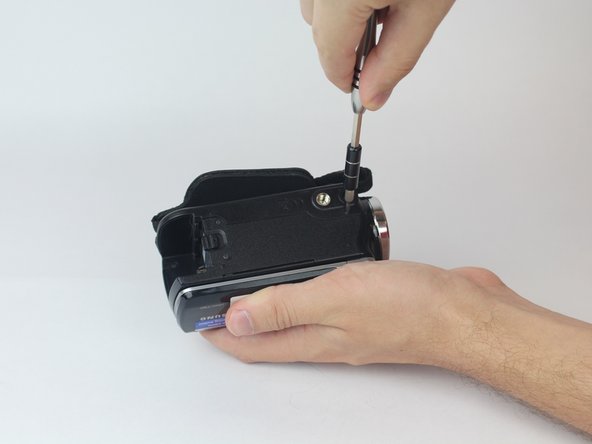
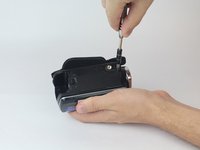
    1. Samsung HMX-F90 Record Button Replacement, Strap Side Outer Casing: crwdns2935265:02crwdnd2935265:01crwdnd2935265:02crwdne2935265:0 Samsung HMX-F90 Record Button Replacement, Strap Side Outer Casing: crwdns2935265:02crwdnd2935265:02crwdnd2935265:02crwdne2935265:0
      • Rotate the camcorder so that the strap side is facing you.

      • Locate and remove the three 4.5mm Phillips #00 screws around the hand strap.

      crwdns2952109:0crwdne2952109:0

      crwdns2917038:0crwdne2917038:0

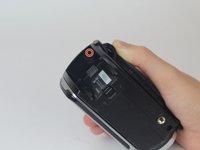
    2. Samsung HMX-F90 Record Button Replacement: crwdns2935265:03crwdnd2935265:01crwdnd2935265:02crwdne2935265:0 Samsung HMX-F90 Record Button Replacement: crwdns2935265:03crwdnd2935265:02crwdnd2935265:02crwdne2935265:0
      • Rotate the camcorder so that the battery slot is facing you.

      • Located in the top left corner of the battery slot, remove the 4.5mm Phillips #00 screw.

      crwdns2952109:0crwdne2952109:0

      crwdns2917038:0crwdne2917038:0

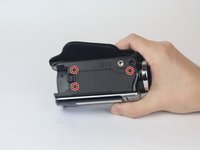
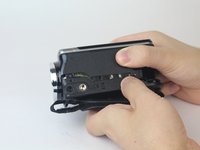
    3. Samsung HMX-F90 Record Button Replacement: crwdns2935265:04crwdnd2935265:01crwdnd2935265:02crwdne2935265:0 Samsung HMX-F90 Record Button Replacement: crwdns2935265:04crwdnd2935265:02crwdnd2935265:02crwdne2935265:0
      • Rotate the camcorder so you are looking at the bottom of the camcorder.

      • Locate and remove the last three 4.5mm Phillips #00 screws.

      crwdns2952109:0crwdne2952109:0

      crwdns2917038:0crwdne2917038:0

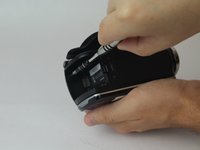
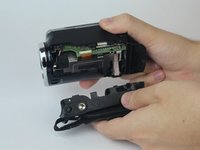
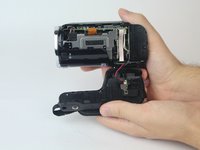
    4. Samsung HMX-F90 Record Button Replacement: crwdns2935265:05crwdnd2935265:01crwdnd2935265:03crwdne2935265:0 Samsung HMX-F90 Record Button Replacement: crwdns2935265:05crwdnd2935265:02crwdnd2935265:03crwdne2935265:0 Samsung HMX-F90 Record Button Replacement: crwdns2935265:05crwdnd2935265:03crwdnd2935265:03crwdne2935265:0
      • With both hands, pull the side strap apart from the rest of the camcorder.

      crwdns2952109:0crwdne2952109:0

      crwdns2917038:0crwdne2917038:0

    1. Samsung HMX-F90 Record Button Replacement, Record Button: crwdns2935265:06crwdnd2935265:01crwdnd2935265:03crwdne2935265:0 Samsung HMX-F90 Record Button Replacement, Record Button: crwdns2935265:06crwdnd2935265:02crwdnd2935265:03crwdne2935265:0 Samsung HMX-F90 Record Button Replacement, Record Button: crwdns2935265:06crwdnd2935265:03crwdnd2935265:03crwdne2935265:0
      crwdns2935267:0crwdne2935267:0
      Tweezers
      $4.99
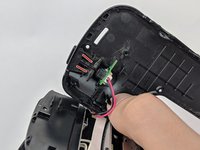
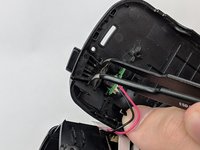
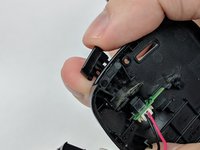
      • Locate plastic clips of the record button.

      • With tweezers squeeze together the two plastic clips and push the button out.

      • Wiggle and pull the record button to remove completely.

      crwdns2952109:0crwdne2952109:0

      crwdns2917038:0crwdne2917038:0

crwdns2915888:0crwdne2915888:0

To reassemble your device, follow these instructions in reverse order.

crwdns2935221:0crwdne2935221:0

Amir Harb

crwdns2935283:009/26/17crwdne2935283:0

705 crwdns2915208:0crwdne2915208:0

crwdns2935297:06crwdne2935297:0

crwdns2935287:0crwdne2935287:0

USF Tampa, Team S13-G1, Boczar Fall 2017 crwdns2935289:0USF Tampa, Team S13-G1, Boczar Fall 2017crwdne2935289:0

USFT-BOCZAR-F17S13G1

crwdns2931471:04crwdne2931471:0

crwdns2935297:072crwdne2935297:0

crwdns2947412:00crwdne2947412:0

crwdns2917038:0crwdne2917038:0

crwdns2936625:0crwdne2936625:0:

crwdns2936751:024crwdne2936751:0 3

crwdns2936753:07crwdne2936753:0 20

crwdns2936753:030crwdne2936753:0 89

crwdns2959996:0crwdne2959996:0 905