crwdns2933423:0crwdne2933423:0
crwdns2947577:0crwdnd2947577:0crwdne2947577:0

Samsung Gravity TXT SIM Card Replacement

crwdns2942213:0crwdne2942213:0

    1. Samsung Gravity TXT SIM Card Replacement, Battery: crwdns2935265:01crwdnd2935265:01crwdnd2935265:02crwdne2935265:0 Samsung Gravity TXT SIM Card Replacement, Battery: crwdns2935265:01crwdnd2935265:02crwdnd2935265:02crwdne2935265:0
      • Pry the back cover off with a plastic opening tool, or your fingernail, in the indentation on the bottom of the device.

      crwdns2952109:0crwdne2952109:0

      crwdns2917038:0crwdne2917038:0

    2. Samsung Gravity TXT SIM Card Replacement: crwdns2935265:02crwdnd2935265:01crwdnd2935265:01crwdne2935265:0
      • Lift the back cover away from the main body of the phone.

      crwdns2952109:0crwdne2952109:0

      crwdns2917038:0crwdne2917038:0

    3. Samsung Gravity TXT SIM Card Replacement: crwdns2935265:03crwdnd2935265:01crwdnd2935265:01crwdne2935265:0
      • Insert your finger in the groove below the battery.

      • Press the battery toward the audio jack while lifting upward and away from the phone.

      • Remember to place the battery back with the copper contacts on the battery lined up with those on the phone.

      crwdns2952109:0crwdne2952109:0

      crwdns2917038:0crwdne2917038:0

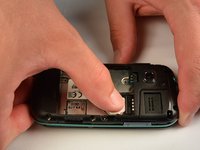
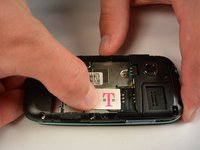
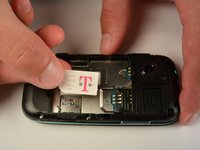
    1. Samsung Gravity TXT SIM Card Replacement, SIM Card: crwdns2935265:04crwdnd2935265:01crwdnd2935265:03crwdne2935265:0 Samsung Gravity TXT SIM Card Replacement, SIM Card: crwdns2935265:04crwdnd2935265:02crwdnd2935265:03crwdne2935265:0 Samsung Gravity TXT SIM Card Replacement, SIM Card: crwdns2935265:04crwdnd2935265:03crwdnd2935265:03crwdne2935265:0
      • Using your finger, push the SIM Card down and slide out of the slot.

      • Slide the SIM card out enough to grab it firmly.

      • Remove the SIM card away from the phone.

      • Follow the visual on the bottom of the SIM card slot to put the SIM card back in the correct orientation.

      • When sliding the SIM Card back in the slot, make sure the card goes all the way in the slot until it hits the stopper.

      crwdns2952109:0crwdne2952109:0

      crwdns2917038:0crwdne2917038:0

crwdns2915888:0crwdne2915888:0

To reassemble your device, follow these instructions in reverse order.

crwdns2935221:0crwdne2935221:0

Mounir Karmada

crwdns2935283:007/07/15crwdne2935283:0

465 crwdns2915208:0crwdne2915208:0

crwdns2935297:04crwdne2935297:0

crwdns2935287:0crwdne2935287:0

IUPUI, Team 1-1, Renguette SU 2015 crwdns2935289:0IUPUI, Team 1-1, Renguette SU 2015crwdne2935289:0

IUPUI-RENGUETTE-SU15S1G1

crwdns2931471:05crwdne2931471:0

crwdns2935297:096crwdne2935297:0

crwdns2947412:00crwdne2947412:0

crwdns2917038:0crwdne2917038:0

crwdns2936625:0crwdne2936625:0:

crwdns2936751:024crwdne2936751:0 9

crwdns2936753:07crwdne2936753:0 24

crwdns2936753:030crwdne2936753:0 46

crwdns2942667:0crwdne2942667:0 1,287