crwdns2933423:0crwdne2933423:0
crwdns2947577:0crwdnd2947577:0crwdne2947577:0

Samsung Gear S2 Battery Replacement

crwdns2942213:0crwdne2942213:0

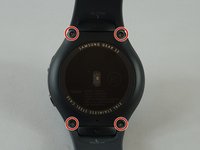
    1. Samsung Gear S2 Battery Replacement, Watch Strap: crwdns2935265:01crwdnd2935265:01crwdnd2935265:02crwdne2935265:0 Samsung Gear S2 Battery Replacement, Watch Strap: crwdns2935265:01crwdnd2935265:02crwdnd2935265:02crwdne2935265:0
      • Flip the watch over so that the face is down.

      • Using a Y#0 screwdriver, unscrew the four 3.5 millimeter tri-head screws.

      • Remember to turn off the watch to avoid being shocked.

      crwdns2952109:0crwdne2952109:0

      crwdns2917038:0crwdne2917038:0

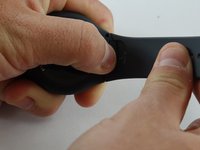
    2. Samsung Gear S2 Battery Replacement: crwdns2935265:02crwdnd2935265:01crwdnd2935265:02crwdne2935265:0 Samsung Gear S2 Battery Replacement: crwdns2935265:02crwdnd2935265:02crwdnd2935265:02crwdne2935265:0
      • Using your finger, push forward on the release while pulling up on the strap.

      • You may find it helpful to use the flat end of a spudger to push on the release instead of your finger.

      crwdns2952109:0crwdne2952109:0

      crwdns2917038:0crwdne2917038:0

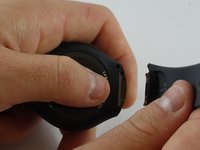
    3. Samsung Gear S2 Battery Replacement: crwdns2935265:03crwdnd2935265:01crwdnd2935265:02crwdne2935265:0 Samsung Gear S2 Battery Replacement: crwdns2935265:03crwdnd2935265:02crwdnd2935265:02crwdne2935265:0
      • Repeat the procedure from step 2 for the other strap.

      crwdns2952109:0crwdne2952109:0

      crwdns2917038:0crwdne2917038:0

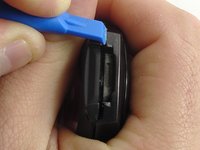
    1. Samsung Gear S2 Battery Replacement, Back: crwdns2935265:04crwdnd2935265:01crwdnd2935265:02crwdne2935265:0 Samsung Gear S2 Battery Replacement, Back: crwdns2935265:04crwdnd2935265:02crwdnd2935265:02crwdne2935265:0
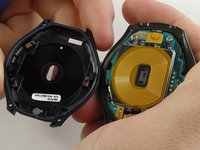
      • Insert a plastic opening tool between the top and bottom portions of the case, and gently pry off the back.

      • Do not insert the tool more than 3 millimeters into the case. Inserting more than 3 mm may damage the seal and electric components.

      crwdns2952109:0crwdne2952109:0

      crwdns2917038:0crwdne2917038:0

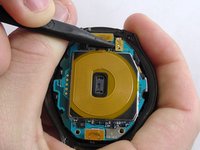
    1. Samsung Gear S2 Battery Replacement, Motherboard: crwdns2935265:05crwdnd2935265:01crwdnd2935265:02crwdne2935265:0 Samsung Gear S2 Battery Replacement, Motherboard: crwdns2935265:05crwdnd2935265:02crwdnd2935265:02crwdne2935265:0
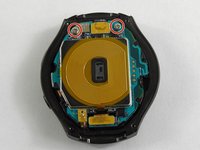
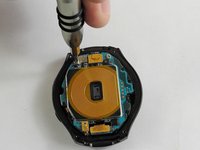
      • Using a Philips head #00 screwdriver, remove the two 3.6 millimeter screws.

      crwdns2952109:0crwdne2952109:0

      crwdns2917038:0crwdne2917038:0

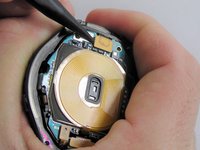
    2. Samsung Gear S2 Battery Replacement: crwdns2935265:06crwdnd2935265:01crwdnd2935265:03crwdne2935265:0 Samsung Gear S2 Battery Replacement: crwdns2935265:06crwdnd2935265:02crwdnd2935265:03crwdne2935265:0 Samsung Gear S2 Battery Replacement: crwdns2935265:06crwdnd2935265:03crwdnd2935265:03crwdne2935265:0
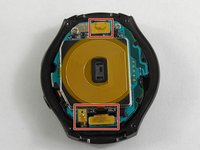
      • Using a spudger, pry up the three cables.

      crwdns2952109:0crwdne2952109:0

      crwdns2917038:0crwdne2917038:0

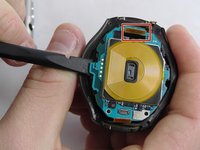
    3. Samsung Gear S2 Battery Replacement: crwdns2935265:07crwdnd2935265:01crwdnd2935265:02crwdne2935265:0 Samsung Gear S2 Battery Replacement: crwdns2935265:07crwdnd2935265:02crwdnd2935265:02crwdne2935265:0
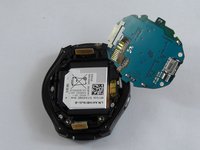
      • Using the flat end of a spudger, pry up the motherboard.

      • Make sure the cable is fed through the hole to avoid damaging it.

      • The motherboard is attached to the battery casing, so place the motherboard in the orientation shown once freed.

      crwdns2952109:0crwdne2952109:0

      crwdns2917038:0crwdne2917038:0

    1. Samsung Gear S2 Battery Replacement, Battery: crwdns2935265:08crwdnd2935265:01crwdnd2935265:02crwdne2935265:0 Samsung Gear S2 Battery Replacement, Battery: crwdns2935265:08crwdnd2935265:02crwdnd2935265:02crwdne2935265:0
      crwdns2935267:0crwdne2935267:0
      Tweezers
      $4.99
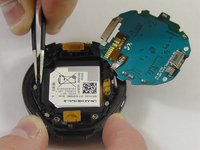
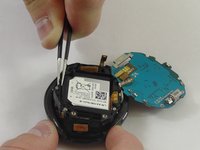
      • Using tweezers, lift the battery casing.

      • Make sure the cables are fed through their gaps to avoid damaging them.

      crwdns2952109:0crwdne2952109:0

      crwdns2917038:0crwdne2917038:0

    2. Samsung Gear S2 Battery Replacement: crwdns2935265:09crwdnd2935265:01crwdnd2935265:02crwdne2935265:0 Samsung Gear S2 Battery Replacement: crwdns2935265:09crwdnd2935265:02crwdnd2935265:02crwdne2935265:0
      • Flip the battery casing over and using a spudger, push on the battery to free it from the casing.

      • Once the battery is free, use the flat end of a spudger to lift up the battery cable.

      crwdns2952109:0crwdne2952109:0

      crwdns2917038:0crwdne2917038:0

crwdns2915888:0crwdne2915888:0

To reassemble your device, follow these instructions in reverse order.

crwdns2935221:0crwdne2935221:0

crwdns2935229:0103crwdne2935229:0

Jacob Baldwin

crwdns2935283:002/20/17crwdne2935283:0

3.459 crwdns2915208:0crwdne2915208:0

crwdns2935297:05crwdne2935297:0

crwdns2935287:0crwdne2935287:0

USF Tampa, Team S2-G3, Sullivan Spring 2017 crwdns2935289:0USF Tampa, Team S2-G3, Sullivan Spring 2017crwdne2935289:0

USFT-SULLIVAN-S17S2G3

crwdns2931471:03crwdne2931471:0

crwdns2935297:034crwdne2935297:0

crwdns2947412:039crwdne2947412:0

Excellent guidelines, and do you have steps for s3 frontier

pedro tiburcio - crwdns2934203:0crwdne2934203:0 crwdns2950251:0crwdne2950251:0
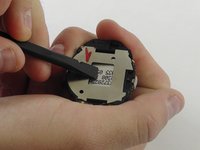
A reference to the battery part number would be great.

Harold Turner - crwdns2934203:0crwdne2934203:0 crwdns2950251:0crwdne2950251:0
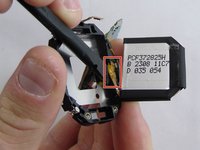
I have the Gear S2 3G version R730V and purchased a battery thinking these instructions would work, but once I opened the watch it is not the same as the one above. Does anyone have instructions on how to replace the batter on the R730V??

Irene - crwdns2934203:0crwdne2934203:0 crwdns2950251:0crwdne2950251:0

crwdns2917038:0crwdne2917038:0

crwdns2936625:0crwdne2936625:0:

crwdns2936751:024crwdne2936751:0 3

crwdns2936753:07crwdne2936753:0 41

crwdns2936753:030crwdne2936753:0 176

crwdns2942667:0crwdne2942667:0 162,261