crwdns2933423:0crwdne2933423:0
crwdns2947577:0crwdnd2947577:0crwdne2947577:0

Samsung Galaxy SIII Mini VE Power Button Replacement

crwdns2942213:0crwdne2942213:0

  1. Samsung Galaxy SIII Mini VE Power Button Replacement, Removing Rear Casing: crwdns2935265:01crwdnd2935265:01crwdnd2935265:03crwdne2935265:0 Samsung Galaxy SIII Mini VE Power Button Replacement, Removing Rear Casing: crwdns2935265:01crwdnd2935265:02crwdnd2935265:03crwdne2935265:0 Samsung Galaxy SIII Mini VE Power Button Replacement, Removing Rear Casing: crwdns2935265:01crwdnd2935265:03crwdnd2935265:03crwdne2935265:0
    • Flip your phone so you are facing the back.

    • Locate the notch at the top and gently use your finger or an opening tool to remove the rear casing.

    crwdns2952109:0crwdne2952109:0

    crwdns2917038:0crwdne2917038:0

  2. Samsung Galaxy SIII Mini VE Power Button Replacement, Removing Battery: crwdns2935265:02crwdnd2935265:01crwdnd2935265:02crwdne2935265:0 Samsung Galaxy SIII Mini VE Power Button Replacement, Removing Battery: crwdns2935265:02crwdnd2935265:02crwdnd2935265:02crwdne2935265:0
    • Use your finger or an opening tool to pry the battery out of the phone.

    crwdns2952109:0crwdne2952109:0

    crwdns2917038:0crwdne2917038:0

  3. Samsung Galaxy SIII Mini VE Power Button Replacement, Removing Screws: crwdns2935265:03crwdnd2935265:01crwdnd2935265:01crwdne2935265:0
    • Use the Phillips #000 Screwdriver to remove the 10, 4mm screws holding the plastic frame in place.

    crwdns2952109:0crwdne2952109:0

    crwdns2917038:0crwdne2917038:0

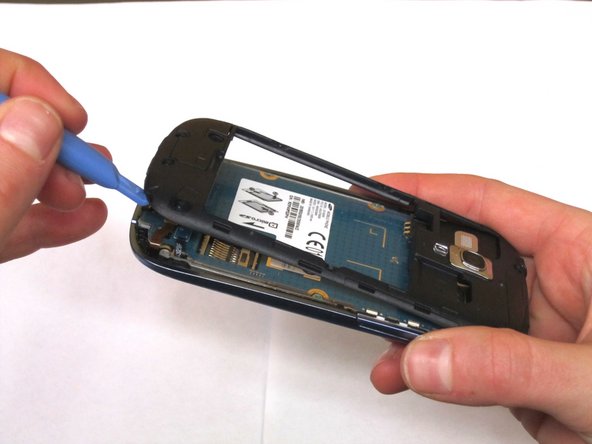
  4. Samsung Galaxy SIII Mini VE Power Button Replacement: crwdns2935265:04crwdnd2935265:01crwdnd2935265:02crwdne2935265:0 Samsung Galaxy SIII Mini VE Power Button Replacement: crwdns2935265:04crwdnd2935265:02crwdnd2935265:02crwdne2935265:0
    • Using an opening tool, gently separate the plastic framing from the phone.

    crwdns2952109:0crwdne2952109:0

    crwdns2917038:0crwdne2917038:0

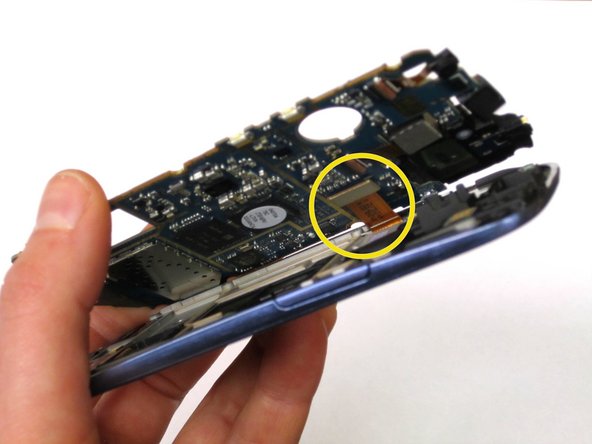
  5. Samsung Galaxy SIII Mini VE Power Button Replacement, Removing Circuit Board: crwdns2935265:05crwdnd2935265:01crwdnd2935265:03crwdne2935265:0 Samsung Galaxy SIII Mini VE Power Button Replacement, Removing Circuit Board: crwdns2935265:05crwdnd2935265:02crwdnd2935265:03crwdne2935265:0 Samsung Galaxy SIII Mini VE Power Button Replacement, Removing Circuit Board: crwdns2935265:05crwdnd2935265:03crwdnd2935265:03crwdne2935265:0
    crwdns2935267:0crwdne2935267:0
    Tweezers
    $4.99
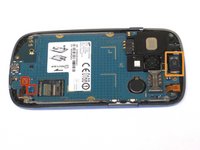
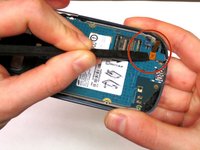
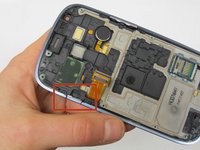
    • Unhook the two electrical connections at the bottom of the phone using your fingernail or a spudger.

    • Next, use the spudger and tweezers to remove the speaker at the top of the phone.

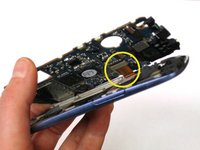
    • Once the 3 components have detached, the circuit board should release from the phone except for 1 connection on the underside.

    • Detach this connection using the spudger.

    crwdns2952109:0crwdne2952109:0

    crwdns2917038:0crwdne2917038:0

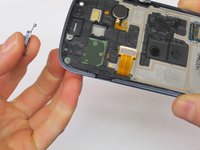
  6. Samsung Galaxy SIII Mini VE Power Button Replacement, Power Button: crwdns2935265:06crwdnd2935265:01crwdnd2935265:02crwdne2935265:0 Samsung Galaxy SIII Mini VE Power Button Replacement, Power Button: crwdns2935265:06crwdnd2935265:02crwdnd2935265:02crwdne2935265:0
    • The power button is connected by two plastic posts, simply lift the button away from the phone using your fingers.

    crwdns2952109:0crwdne2952109:0

    crwdns2917038:0crwdne2917038:0

crwdns2915888:0crwdne2915888:0

To reassemble your device, follow these instructions in reverse order.

crwdns2935221:0crwdne2935221:0

crwdns2935229:06crwdne2935229:0

Megan

crwdns2935283:010/23/14crwdne2935283:0

1,255 crwdns2915208:0crwdne2915208:0

crwdns2935297:06crwdne2935297:0

crwdns2935287:0crwdne2935287:0

Michigan Tech, Team 1-8, Lauer Fall 2014 crwdns2935289:0Michigan Tech, Team 1-8, Lauer Fall 2014crwdne2935289:0

MTU-LAUER-F14S1G8

crwdns2931471:03crwdne2931471:0

crwdns2935297:06crwdne2935297:0

crwdns2947412:00crwdne2947412:0

crwdns2917038:0crwdne2917038:0

crwdns2936625:0crwdne2936625:0:

crwdns2936751:024crwdne2936751:0 0

crwdns2936753:07crwdne2936753:0 9

crwdns2936753:030crwdne2936753:0 34

crwdns2942667:0crwdne2942667:0 4,217