crwdns2915892:0crwdne2915892:0
Use this guide to replace the charging assembly in the event of an inability to charge.
crwdns2942213:0crwdne2942213:0
-
-
-
Press and hold the END key to power the phone down.
 crwdns2952109:0crwdne2952109:0
-
-
-
Remove the back cover of the cell phone using a plastic opening tool.
-
-
-
Pry the battery out using a plastic opening tool.
-
-
-
-
crwdns2935267:0crwdne2935267:0Tweezers$4.99
-
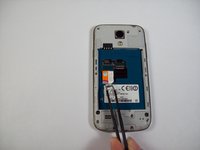
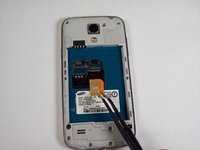
Using tweezers, remove the SIM card by sliding it towards the bottom of the device.
-
-
-
-
-
-
Using a nylon spudger, push through the hole at the top of the memory card holder to slide it out.
-
-
-
-
crwdns2935267:0crwdne2935267:0Tweezers$4.99
-
Remove the 10 4.0 mm Phillips screws on the back of the phone using the #00 Phillips screwdriver.
-
Not needed, but Tweezers can be helpful in removing the screws from their holes, as their size makes removal a tad difficult.
-
-
-
Starting at the USB port, slide a plastic tool around the perimeter of the phone between the rear housing and frame. As you work your way around the edge you will feel the clips release.
-
-
-
Carefully separate the rear housing and the mid-frame to reveal the inside of the phone.
-
-
-
Remove the 2 flex cables shown that attach to the USB board, Tweezers can be especially helpful here.
-
-
-
Gently pry underneath the charging port using the plastic opening tool to separate it from the double sided tape below.
-
-
-
Once its released, gently lift the main board and remove the USB board containing the charging port.
-
-




To reassemble your device, follow these instructions in reverse order.
crwdns2935221:0crwdne2935221:0
crwdns2935229:035crwdne2935229:0

crwdns2935287:0crwdne2935287:0

USF Tampa, Team 9-2, Blackwell Fall 2014 crwdns2935289:0USF Tampa, Team 9-2, Blackwell Fall 2014crwdne2935289:0
USFT-BLACKWELL-F14S9G2
crwdns2931471:05crwdne2931471:0
crwdns2935297:060crwdne2935297:0
crwdns2947412:04crwdne2947412:0
if i open the device like this, can i solder cables on the usb port to connect a wireless charging reciever?
Getriebesand - crwdns2934203:0crwdne2934203:0 crwdns2950251:0crwdne2950251:0
I was looking for the same solution, and I think it is possible, a closer look at the USB port from various spare parts suppliers, I was in doubt if mine would look the same as the one displayed here, after disassembling my phone, it turned out to be this one: http://bit.ly/1GR4SzP
And it is possible, when messuring connection points, it turns out CN2 on the bord is the +, and - you can fit onto the side of the USB connector itself.
Kenneth H. Nielsen - crwdns2934203:0crwdne2934203:0 crwdns2950251:0crwdne2950251:0
I have created a Guide describing the addition of wireless charging, it is in no way affecting the phones stability.
Kenneth H. Nielsen - crwdns2934203:0crwdne2934203:0 crwdns2950251:0crwdne2950251:0
Works great with the S4 mini I9195 LTE version, but mind the different spare part (as linked above: http://bit.ly/1GR4SzP).
megaoetzwuchst - crwdns2934203:0crwdne2934203:0 crwdns2950251:0crwdne2950251:0
