crwdns2933423:0crwdne2933423:0
crwdns2947577:0crwdnd2947577:0crwdne2947577:0

Samsung Galaxy Note Pro 12.2 SD Port Replacement

crwdns2942213:0crwdne2942213:0

    1. Samsung Galaxy Note Pro 12.2 SD Port Replacement, SD Port: crwdns2935265:01crwdnd2935265:01crwdnd2935265:01crwdne2935265:0
      • Turn off your device before starting your repair.

      • Carefully remove the back cover with the plastic opening tool.

      • It is best to start with one corner and work your way around the device slowly.

      crwdns2952109:0crwdne2952109:0

      crwdns2917038:0crwdne2917038:0

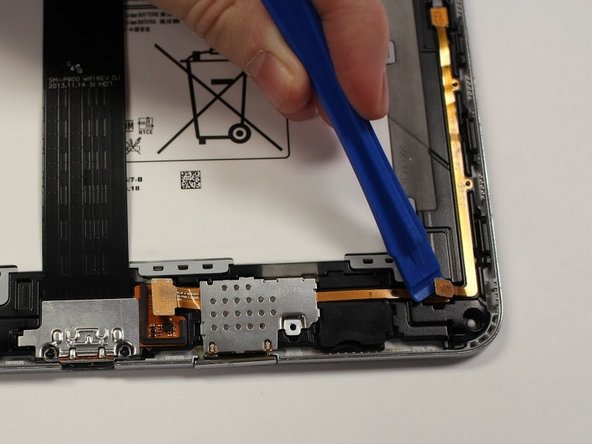
    2. Samsung Galaxy Note Pro 12.2 SD Port Replacement: crwdns2935265:02crwdnd2935265:01crwdnd2935265:02crwdne2935265:0 Samsung Galaxy Note Pro 12.2 SD Port Replacement: crwdns2935265:02crwdnd2935265:02crwdnd2935265:02crwdne2935265:0
      • Pop up the orange tab connected to the SD port with the plastic opening tool.

      crwdns2952109:0crwdne2952109:0

      crwdns2917038:0crwdne2917038:0

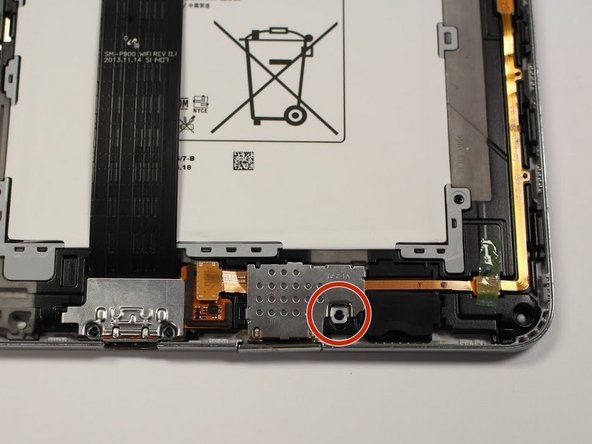
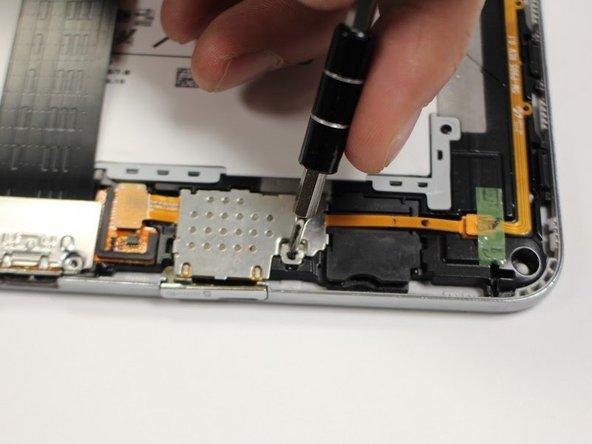
    3. Samsung Galaxy Note Pro 12.2 SD Port Replacement: crwdns2935265:03crwdnd2935265:01crwdnd2935265:02crwdne2935265:0 Samsung Galaxy Note Pro 12.2 SD Port Replacement: crwdns2935265:03crwdnd2935265:02crwdnd2935265:02crwdne2935265:0
      • Remove the one 3mm Phillips #00 screw connected to the SD port.

      crwdns2952109:0crwdne2952109:0

      crwdns2917038:0crwdne2917038:0

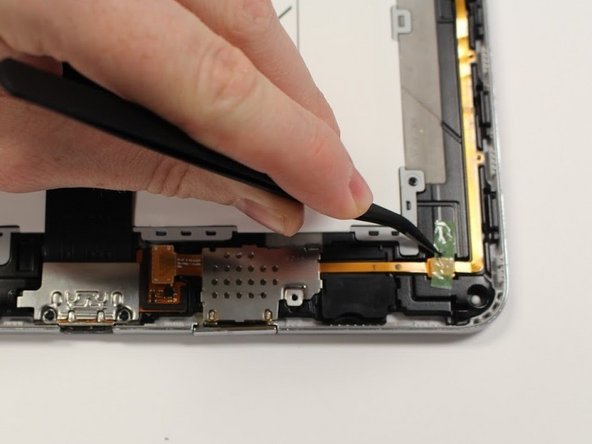
    4. Samsung Galaxy Note Pro 12.2 SD Port Replacement: crwdns2935265:04crwdnd2935265:01crwdnd2935265:02crwdne2935265:0 Samsung Galaxy Note Pro 12.2 SD Port Replacement: crwdns2935265:04crwdnd2935265:02crwdnd2935265:02crwdne2935265:0
      crwdns2935267:0crwdne2935267:0
      Tweezers
      $4.99
      • Pop open the orange wire tab connected to the SD port with the plastic opening tool.

      • If there is tape covering your tab, remove it with the tweezers before you pop open the tab.

      crwdns2952109:0crwdne2952109:0

      crwdns2917038:0crwdne2917038:0

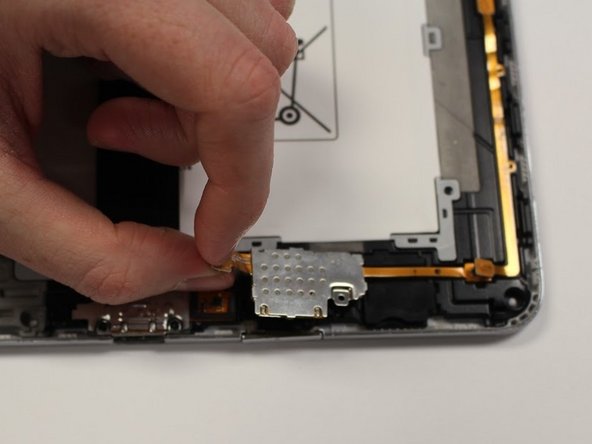
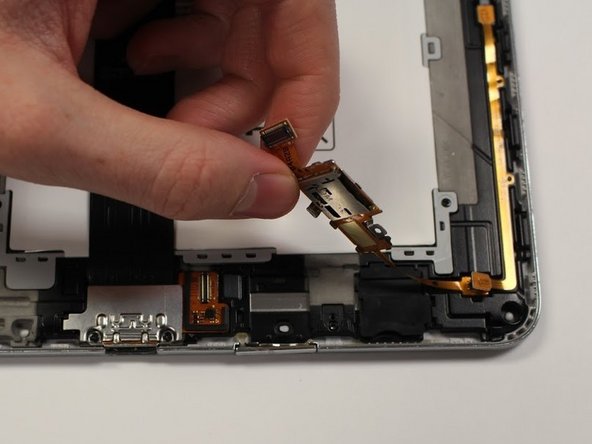
    5. Samsung Galaxy Note Pro 12.2 SD Port Replacement: crwdns2935265:05crwdnd2935265:01crwdnd2935265:02crwdne2935265:0 Samsung Galaxy Note Pro 12.2 SD Port Replacement: crwdns2935265:05crwdnd2935265:02crwdnd2935265:02crwdne2935265:0
      • Using the orange tab, pull the SD port up and away from the device.

      crwdns2952109:0crwdne2952109:0

      crwdns2917038:0crwdne2917038:0

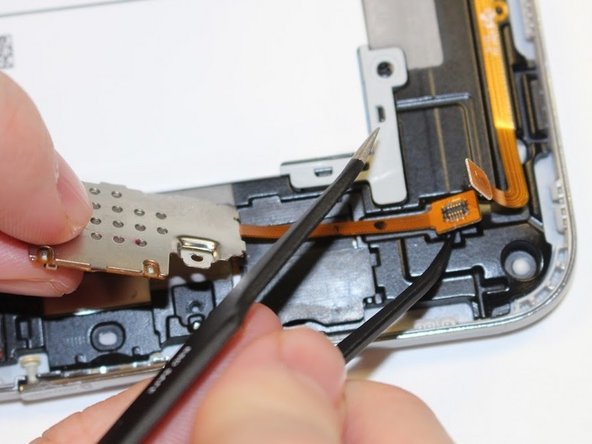
    6. Samsung Galaxy Note Pro 12.2 SD Port Replacement: crwdns2935265:06crwdnd2935265:01crwdnd2935265:01crwdne2935265:0
      • Using the plastic end of the tweezers pop up the orange tab connecting the SD port to the device.

      • There is a little indent below the orange tab to help get under this piece. It may be difficult to remove, push up hard.

      crwdns2952109:0crwdne2952109:0

      crwdns2917038:0crwdne2917038:0

crwdns2915888:0crwdne2915888:0

To reassemble your device, follow these instructions in reverse order.

crwdns2935221:0crwdne2935221:0

Tina Kong

crwdns2935283:009/22/17crwdne2935283:0

1,278 crwdns2915208:0crwdne2915208:0

crwdns2935297:05crwdne2935297:0

crwdns2935287:0crwdne2935287:0

Central Washington University, Team S1-G4, Pengilly Fall 2017 crwdns2935289:0Central Washington University, Team S1-G4, Pengilly Fall 2017crwdne2935289:0

CWU-PENGILLY-F17S1G4

crwdns2931471:04crwdne2931471:0

crwdns2935297:060crwdne2935297:0

crwdns2947412:00crwdne2947412:0

crwdns2917038:0crwdne2917038:0

crwdns2936625:0crwdne2936625:0:

crwdns2936751:024crwdne2936751:0 6

crwdns2936753:07crwdne2936753:0 23

crwdns2936753:030crwdne2936753:0 111

crwdns2942667:0crwdne2942667:0 964