crwdns2933423:0crwdne2933423:0
crwdns2947577:0crwdnd2947577:0crwdne2947577:0

Samsung Galaxy Note II MicroSD Card Replacement

crwdns2942213:0crwdne2942213:0

    1. Samsung Galaxy Note II MicroSD Card Replacement, Rear Case: crwdns2935265:01crwdnd2935265:01crwdnd2935265:02crwdne2935265:0 Samsung Galaxy Note II MicroSD Card Replacement, Rear Case: crwdns2935265:01crwdnd2935265:02crwdnd2935265:02crwdne2935265:0
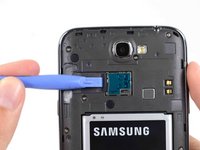
      • Pry with a plastic opening tool, or your fingernail, in the divot to the left of the rear-facing camera, near the power button.

      crwdns2952109:0crwdne2952109:0

      crwdns2917038:0crwdne2917038:0

    2. Samsung Galaxy Note II MicroSD Card Replacement: crwdns2935265:02crwdnd2935265:01crwdnd2935265:03crwdne2935265:0 Samsung Galaxy Note II MicroSD Card Replacement: crwdns2935265:02crwdnd2935265:02crwdnd2935265:03crwdne2935265:0 Samsung Galaxy Note II MicroSD Card Replacement: crwdns2935265:02crwdnd2935265:03crwdnd2935265:03crwdne2935265:0
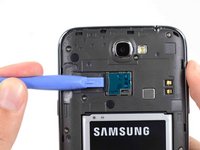
      • Lift the rear case by the corner nearest the divot and remove it from the phone.

      crwdns2952109:0crwdne2952109:0

      crwdns2917038:0crwdne2917038:0

    1. Samsung Galaxy Note II MicroSD Card Replacement, MicroSD Card: crwdns2935265:03crwdnd2935265:01crwdnd2935265:03crwdne2935265:0 Samsung Galaxy Note II MicroSD Card Replacement, MicroSD Card: crwdns2935265:03crwdnd2935265:02crwdnd2935265:03crwdne2935265:0 Samsung Galaxy Note II MicroSD Card Replacement, MicroSD Card: crwdns2935265:03crwdnd2935265:03crwdnd2935265:03crwdne2935265:0
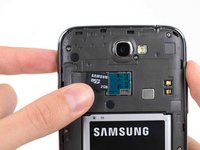
      • If you have an SD card inserted, use the flat end of a spudger, or your fingernail, to press the microSD card slightly deeper into its slot until you hear a click.

      • After the click, release the card and it will pop out of its slot.

      • Remove the microSD card.

      • For reassembly, push the microSD card into the slot until it clicks in place.

      crwdns2952109:0crwdne2952109:0

      crwdns2917038:0crwdne2917038:0

crwdns2915888:0crwdne2915888:0

To reassemble your device, follow these instructions in reverse order.

crwdns2935221:0crwdne2935221:0

crwdns2935229:015crwdne2935229:0

Sam Goldheart

crwdns2935283:010/18/12crwdne2935283:0

478.450 crwdns2915208:0crwdne2915208:0

crwdns2935297:0538crwdne2935297:0

crwdns2935287:0crwdne2935287:0

iFixit crwdns2935289:0iFixitcrwdne2935289:0

Staff

crwdns2931471:0122crwdne2931471:0

crwdns2935297:072.401crwdne2935297:0

crwdns2947412:00crwdne2947412:0

crwdns2917038:0crwdne2917038:0

crwdns2936625:0crwdne2936625:0:

crwdns2936751:024crwdne2936751:0 5

crwdns2936753:07crwdne2936753:0 24

crwdns2936753:030crwdne2936753:0 115

crwdns2942667:0crwdne2942667:0 13,147