
Samsung Galaxy Note 3 Battery Replacement

crwdns2959932:0crwdnd2959932:0Sam Goldheartcrwdnd2959932:0crwdnd2959932:0crwdne2959932:0
crwdns2959936:0Yan 14, 2019crwdne2959936:0
crwdns2869540:0crwdne2869540:0: 18K
crwdns2959988:0crwdne2959988:0
- crwdns2959990:0crwdne2959990:0
- 7
- crwdns2959992:0crwdne2959992:0
- 30
- crwdns2959994:0crwdne2959994:0
- 132
- crwdns2959996:0crwdne2959996:0
- 18,273
crwdns2955950:0crwdne2955950:0: 5
crwdns2960002:01crwdne2960002:0, crwdns2960008:04crwdne2960008:0
crwdns2960000:0crwdne2960000:0crwdns2959984:0crwdne2959984:0: 48 49
crwdns2959974:048crwdne2959974:0
crwdns2959970:049crwdne2959970:0
crwdns2959986:0crwdne2959986:0: 12 13
crwdns2959982:012crwdne2959982:0
crwdns2959978:013crwdne2959978:0
crwdns2915892:0crwdne2915892:0
crwdns2959928:0crwdne2959928:0 ↓Follow the steps in order to replace your battery.
If your battery is swollen, take appropriate precautions.
crwdns2959930:0crwdne2959930:0
crwdns2943213:0crwdne2943213:0

-
-
-
Insert a fingernail or plastic opening tool in the gap between the rear case and the base of the phone.
 crwdns2952109:0crwdne2952109:0
-
-
-
-
Slide your fingernail or plastic opening tool along the edge of the rear case.
-
Lift the case gently from the base.
-
-
-
-
-
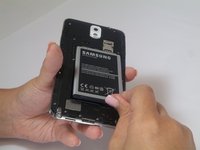
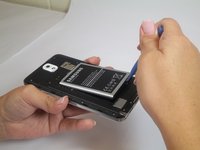
Insert a fingernail or plastic opening tool into the small gap between the battery and the phone base.
-
Lift the battery out of its recess.
-
-


To reassemble your device, follow these instructions in reverse order.
crwdns2935221:0crwdne2935221:0
crwdns2935229:048crwdne2935229:0

crwdns2947412:04crwdne2947412:0
I am a technological genius! ( with your help )
kenharper - crwdns2934203:0crwdne2934203:0 crwdns2950251:0crwdne2950251:0
Why need a opening tool lol
ycwei982 - crwdns2934203:0crwdne2934203:0 crwdns2950251:0crwdne2950251:0
Mon telephone ne garde pas la charge plus d'une heure même si j'ai changé la batterie mais reste le même problème
Sarah Sarah - crwdns2934203:0crwdne2934203:0 crwdns2950251:0crwdne2950251:0
