
Samsung Galaxy Note 10.1 Battery Replacement

crwdns2959932:0crwdnd2959932:0Tyler Salomonecrwdnd2959932:0crwdnd2959932:0crwdne2959932:0
crwdns2959936:0Mud 24, 2023crwdne2959936:0
crwdns2869540:0crwdne2869540:0: 93 mil
crwdns2959988:0crwdne2959988:0
- crwdns2959990:0crwdne2959990:0
- 6
- crwdns2959992:0crwdne2959992:0
- 53
- crwdns2959994:0crwdne2959994:0
- 248
- crwdns2959996:0crwdne2959996:0
- 93.004
crwdns2955950:0crwdne2955950:0: 15
crwdns2960004:02crwdne2960004:0, crwdns2960008:013crwdne2960008:0
crwdns2960000:0crwdne2960000:0crwdns2959984:0crwdne2959984:0: 52 53
crwdns2959974:052crwdne2959974:0
crwdns2959970:053crwdne2959970:0
crwdns2959986:0crwdne2959986:0: 23 24
crwdns2959982:023crwdne2959982:0
crwdns2959978:024crwdne2959978:0
crwdns2869444:0crwdne2869444:0
crwdns2869445:0crwdne2869445:0
crwdns2915892:0crwdne2915892:0
crwdns2959928:0crwdne2959928:0 ↓The Samsung Galaxy Note 10.1 is a popular tablet that provides a wide range of features and functions for its users. However, after prolonged use, the device's battery may begin to deteriorate, leading to decreased battery life and other issues. If you find that your Galaxy Note 10.1 isn't holding a charge as long as it used to or is experiencing other battery-related problems, a battery replacement may be necessary to restore your tablet's performance. Replacing the battery in a Galaxy Note 10.1 can solve a range of issues, including charging problems and general battery health concerns. While the process of replacing the battery does not require any special soldering skills, it does require some technical expertise and care to avoid damaging the device during the repair.
crwdns2959930:0crwdne2959930:0
crwdns2943213:0crwdne2943213:0


crwdns2943215:0crwdne2943215:0


-
-
-
This is the back of the device and where you will begin to take it apart
-
It is neccesary to remove this piece first before removing the bigger back piece.
-
Use the plastic opening tools to pry along the indicated box.
-
Lift up the silver piece to reveal the rest of the back cover.
 crwdns2952109:0crwdne2952109:0
-
-
-
Unscrew the three 5 mm screws indicated by the red circles with the Philips #00 screwdriver.
-
Using the plastic opening tools pry along the bottom of the device, moving to the sides of the cover to the top.
-
Remove the back cover.
-
-
-
-
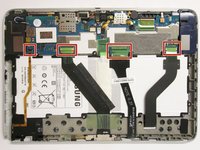
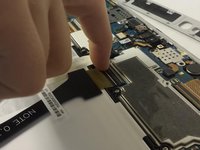
Carefully remove all of the ribbons that connect over the battery.
-
-
-
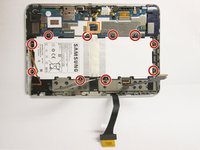
Remove all of the 3 mm screws indicated by a red circle with the #00 Philips Screwdriver.
-
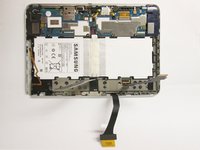
Disconnect the battery connector from the motherboard.
-
Now you may remove the battery. The replacement battery should be 3.7 Volts and 25.9 kWh.
-
-




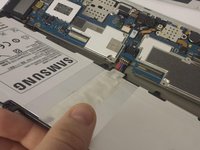
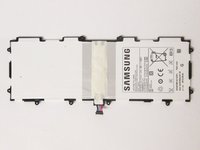
To reassemble your device, follow these instructions in reverse order.
crwdns2935221:0crwdne2935221:0
crwdns2935229:052crwdne2935229:0

crwdns2935287:0crwdne2935287:0

USF Tampa, Team 3-7, Brown Fall 2014 crwdns2935289:0USF Tampa, Team 3-7, Brown Fall 2014crwdne2935289:0
USFT-BROWN-F14S3G7
crwdns2931471:03crwdne2931471:0
crwdns2935297:060crwdne2935297:0
crwdns2947412:013crwdne2947412:0
In Step 3, mention that you need to lift up on the black locks to take out the ribbons.
John Peterson - crwdns2934203:0crwdne2934203:0 crwdns2950251:0crwdne2950251:0
Actually, on my device one lock was colored faun (beige). Lift them seen from the edge of the Note, not on the cable side.
dada64 - crwdns2934203:0crwdne2934203:0 crwdns2950251:0crwdne2950251:0
Also, mention that you can disconnect the battery from the device by gently pulling out the battery and gently lifting up the wires.
John Peterson - crwdns2934203:0crwdne2934203:0 crwdns2950251:0crwdne2950251:0
This is not a plug to be pulled in the direction of the cables but vertically off the board. Putting it back in you simply plug the contacts down first, then the cable side of the plug.
dada64 - crwdns2934203:0crwdne2934203:0 crwdns2950251:0crwdne2950251:0
When replacing the back cover, hook the bottom edge into the frame along the edge before trying to snap the rest in place along the sides.
charliesmallman55 - crwdns2934203:0crwdne2934203:0 crwdns2950251:0crwdne2950251:0
