crwdns2933423:0crwdne2933423:0
crwdns2947577:0crwdnd2947577:0crwdne2947577:0

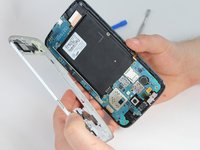
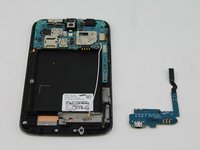
Samsung Galaxy Mega USB Board Replacement

crwdns2942213:0crwdne2942213:0

    1. Samsung Galaxy Mega USB Board Replacement, Battery: crwdns2935265:01crwdnd2935265:01crwdnd2935265:03crwdne2935265:0 Samsung Galaxy Mega USB Board Replacement, Battery: crwdns2935265:01crwdnd2935265:02crwdnd2935265:03crwdne2935265:0 Samsung Galaxy Mega USB Board Replacement, Battery: crwdns2935265:01crwdnd2935265:03crwdnd2935265:03crwdne2935265:0
      • Before starting, ensure device is completely turned off.

      • On the back of phone, locate the slot on the top left corner.

      • Insert plastic opening tool or fingernail and pull up on the back plate.

      • With the corner released, slide your finger around the device between the back plate and the phone to release connectors.

      crwdns2952109:0crwdne2952109:0

      crwdns2917038:0crwdne2917038:0

    2. Samsung Galaxy Mega USB Board Replacement: crwdns2935265:02crwdnd2935265:01crwdnd2935265:03crwdne2935265:0 Samsung Galaxy Mega USB Board Replacement: crwdns2935265:02crwdnd2935265:02crwdnd2935265:03crwdne2935265:0 Samsung Galaxy Mega USB Board Replacement: crwdns2935265:02crwdnd2935265:03crwdnd2935265:03crwdne2935265:0
      • Insert fingernail into the slot on bottom of battery and gently pull up.

      • Remove the battery.

      crwdns2952109:0crwdne2952109:0

      crwdns2917038:0crwdne2917038:0

    1. Samsung Galaxy Mega USB Board Replacement, Midframe: crwdns2935265:03crwdnd2935265:01crwdnd2935265:03crwdne2935265:0 Samsung Galaxy Mega USB Board Replacement, Midframe: crwdns2935265:03crwdnd2935265:02crwdnd2935265:03crwdne2935265:0 Samsung Galaxy Mega USB Board Replacement, Midframe: crwdns2935265:03crwdnd2935265:03crwdnd2935265:03crwdne2935265:0
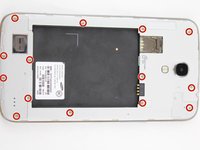
      • Remove the 14 3.45 mm Phillips #000 screws from the assembly.

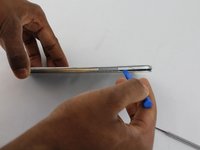
      • Gently, insert plastic opening tool into seam above the volume buttons of your phone.

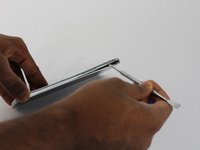
      • You may substitute metal spudger for plastic opening tool to first start the opening of the seam. This may cause exterior cosmetic damage.

      crwdns2952109:0crwdne2952109:0

      crwdns2917038:0crwdne2917038:0

    2. Samsung Galaxy Mega USB Board Replacement: crwdns2935265:04crwdnd2935265:01crwdnd2935265:02crwdne2935265:0 Samsung Galaxy Mega USB Board Replacement: crwdns2935265:04crwdnd2935265:02crwdnd2935265:02crwdne2935265:0
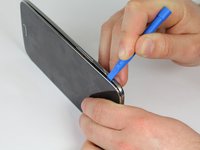
      • Slowly slide plastic opening tool around the device to release all the connectors internal to the device.

      • The device should easily come apart after the plastic opening tool is slid around the entire device.

      • During reassembly, ensure volume and power buttons align properly.

      crwdns2952109:0crwdne2952109:0

      crwdns2917038:0crwdne2917038:0

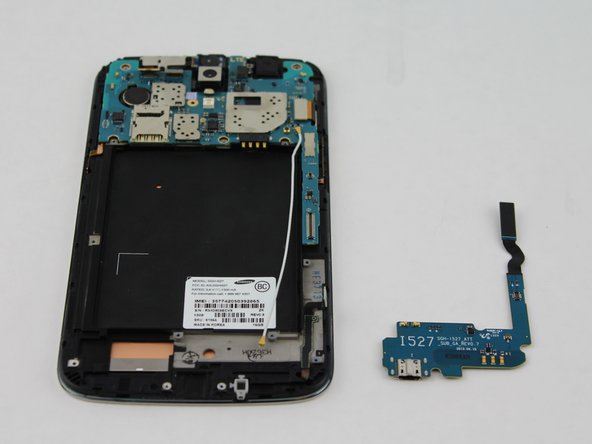
    1. Samsung Galaxy Mega USB Board Replacement, USB Board: crwdns2935265:05crwdnd2935265:01crwdnd2935265:01crwdne2935265:0
      • This circuit board is the charging port assembly.

      crwdns2952109:0crwdne2952109:0

      crwdns2917038:0crwdne2917038:0

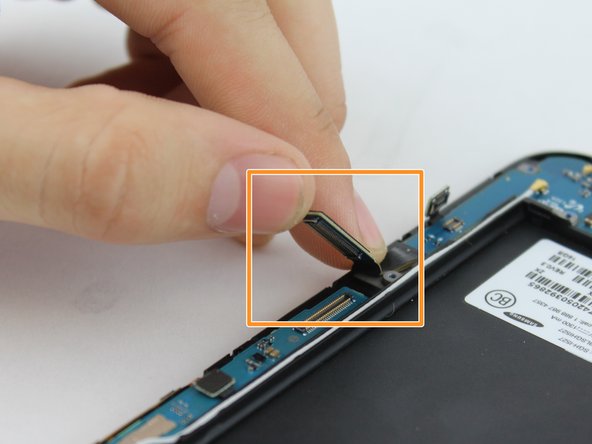
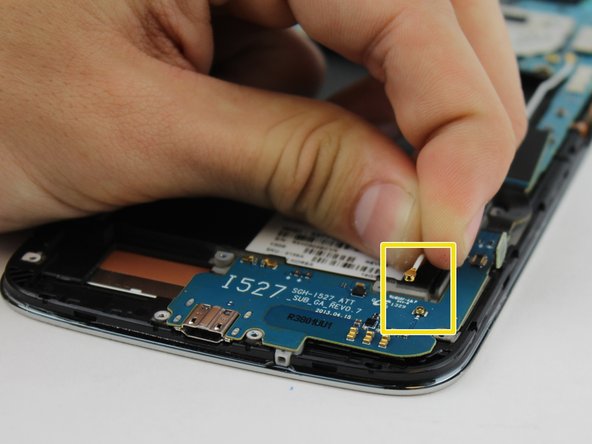
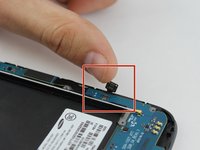
    2. Samsung Galaxy Mega USB Board Replacement: crwdns2935265:06crwdnd2935265:01crwdnd2935265:03crwdne2935265:0 Samsung Galaxy Mega USB Board Replacement: crwdns2935265:06crwdnd2935265:02crwdnd2935265:03crwdne2935265:0 Samsung Galaxy Mega USB Board Replacement: crwdns2935265:06crwdnd2935265:03crwdnd2935265:03crwdne2935265:0
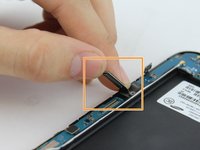
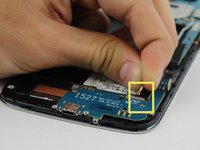
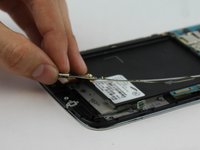
      • Lift up on the clamp with your finger to disconnect the connector.

      • Lift up on the clamp with your finger to disconnect the connection to the mother board.

      • Grasp cable head and lift up to disconnect the cable head.

      crwdns2952109:0crwdne2952109:0

      crwdns2917038:0crwdne2917038:0

    3. Samsung Galaxy Mega USB Board Replacement: crwdns2935265:07crwdnd2935265:01crwdnd2935265:02crwdne2935265:0 Samsung Galaxy Mega USB Board Replacement: crwdns2935265:07crwdnd2935265:02crwdnd2935265:02crwdne2935265:0
      • Use your fingers to gently remove charging port.

      crwdns2952109:0crwdne2952109:0

      crwdns2917038:0crwdne2917038:0

crwdns2915888:0crwdne2915888:0

To reassemble your device, follow these instructions in reverse order.

crwdns2935221:0crwdne2935221:0

crwdns2935229:010crwdne2935229:0

Aaron Fulton

crwdns2935283:002/04/16crwdne2935283:0

1.246 crwdns2915208:0crwdne2915208:0

crwdns2935297:03crwdne2935297:0

crwdns2935287:0crwdne2935287:0

USF Tampa, Team 17-2, Blackwell Winter 2016 crwdns2935289:0USF Tampa, Team 17-2, Blackwell Winter 2016crwdne2935289:0

USFT-BLACKWELL-W16S17G2

crwdns2931471:04crwdne2931471:0

crwdns2935297:096crwdne2935297:0

crwdns2947412:00crwdne2947412:0

crwdns2917038:0crwdne2917038:0

crwdns2936625:0crwdne2936625:0:

crwdns2936751:024crwdne2936751:0 1

crwdns2936753:07crwdne2936753:0 12

crwdns2936753:030crwdne2936753:0 42

crwdns2942667:0crwdne2942667:0 9,171