crwdns2933423:0crwdne2933423:0
crwdns2947577:0crwdnd2947577:0crwdne2947577:0

Samsung Galaxy A51 Back Cover Replacement

crwdns2942213:0crwdne2942213:0

    1. Samsung Galaxy A51 Back Cover Replacement, Back Cover: crwdns2935265:01crwdnd2935265:01crwdnd2935265:01crwdne2935265:0
      • Before beginning this procedure, completely power off your phone.

      • Prepare an iOpener and apply it to the back cover to soften the adhesive.

      • The adhesive of the Samsung Galaxy A51 is very strong. You can use a hair dryer or a heat gun if you aren't able to open the device with the iOpener.

      • Be careful not to overheat the phone—the AMOLED display and internal battery are both susceptible to heat damage.

      crwdns2952109:0crwdne2952109:0

      crwdns2917038:0crwdne2917038:0

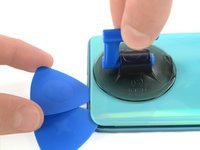
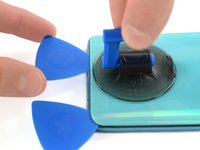
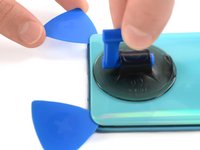
    2. Samsung Galaxy A51 Back Cover Replacement: crwdns2935265:02crwdnd2935265:01crwdnd2935265:03crwdne2935265:0 Samsung Galaxy A51 Back Cover Replacement: crwdns2935265:02crwdnd2935265:02crwdnd2935265:03crwdne2935265:0 Samsung Galaxy A51 Back Cover Replacement: crwdns2935265:02crwdnd2935265:03crwdnd2935265:03crwdne2935265:0
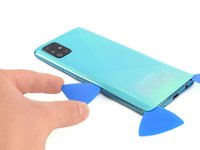
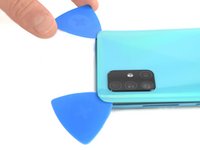
      • Insert the tip of an opening pick between the frame and the back cover at the bottom of the phone near the USB-C port.

      • If you can't get between the back cover and midframe with your opening pick, you can use a suction handle or strong tape to pull up the back cover to create a gap.

      • Slide the opening pick to the bottom right corner and leave it there.

      crwdns2952109:0crwdne2952109:0

      crwdns2917038:0crwdne2917038:0

    3. Samsung Galaxy A51 Back Cover Replacement: crwdns2935265:03crwdnd2935265:01crwdnd2935265:03crwdne2935265:0 Samsung Galaxy A51 Back Cover Replacement: crwdns2935265:03crwdnd2935265:02crwdnd2935265:03crwdne2935265:0 Samsung Galaxy A51 Back Cover Replacement: crwdns2935265:03crwdnd2935265:03crwdnd2935265:03crwdne2935265:0
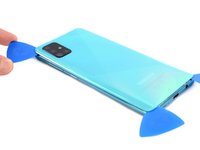
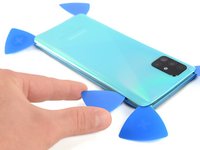
      • Insert a second opening pick and slide it from the bottom right corner to the bottom left corner to cut the adhesive.

      • Leave the opening picks in place to prevent the adhesive from resealing.

      crwdns2952109:0crwdne2952109:0

      crwdns2917038:0crwdne2917038:0

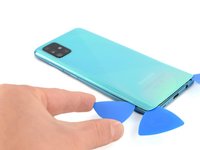
    4. Samsung Galaxy A51 Back Cover Replacement: crwdns2935265:04crwdnd2935265:01crwdnd2935265:03crwdne2935265:0 Samsung Galaxy A51 Back Cover Replacement: crwdns2935265:04crwdnd2935265:02crwdnd2935265:03crwdne2935265:0 Samsung Galaxy A51 Back Cover Replacement: crwdns2935265:04crwdnd2935265:03crwdnd2935265:03crwdne2935265:0
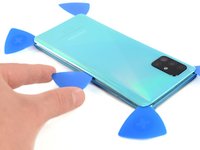
      • Insert a third opening pick under the bottom left corner of the back cover.

      • If you have any trouble, apply more heat to further soften the adhesive. Follow the iOpener instructions to avoid overheating.

      • Slide the opening pick along the left edge of the phone.

      • Leave the opening pick in the top left corner to prevent the adhesive from resealing.

      crwdns2952109:0crwdne2952109:0

      crwdns2917038:0crwdne2917038:0

    5. Samsung Galaxy A51 Back Cover Replacement: crwdns2935265:05crwdnd2935265:01crwdnd2935265:03crwdne2935265:0 Samsung Galaxy A51 Back Cover Replacement: crwdns2935265:05crwdnd2935265:02crwdnd2935265:03crwdne2935265:0 Samsung Galaxy A51 Back Cover Replacement: crwdns2935265:05crwdnd2935265:03crwdnd2935265:03crwdne2935265:0
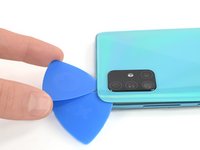
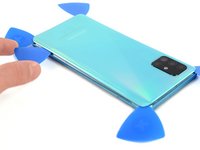
      • Insert a fourth opening pick under the top left corner of the back cover near the camera.

      • Slide the tip of the opening pick along the top edge of the phone to the right corner to cut the adhesive.

      • Leave the opening pick in the top right corner to prevent the adhesive from resealing.

      crwdns2952109:0crwdne2952109:0

      crwdns2917038:0crwdne2917038:0

    6. Samsung Galaxy A51 Back Cover Replacement: crwdns2935265:06crwdnd2935265:01crwdnd2935265:03crwdne2935265:0 Samsung Galaxy A51 Back Cover Replacement: crwdns2935265:06crwdnd2935265:02crwdnd2935265:03crwdne2935265:0 Samsung Galaxy A51 Back Cover Replacement: crwdns2935265:06crwdnd2935265:03crwdnd2935265:03crwdne2935265:0
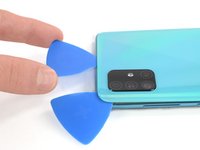
      • With opening picks in all four corners, insert a fifth and final opening pick under the top right corner of the back cover.

      • Slide the tip of the opening pick along the right edge of the phone to the bottom right corner to cut the remaining adhesive.

      crwdns2952109:0crwdne2952109:0

      crwdns2917038:0crwdne2917038:0

    7. Samsung Galaxy A51 Back Cover Replacement: crwdns2935265:07crwdnd2935265:01crwdnd2935265:01crwdne2935265:0
      • Remove the back cover.

      • After installing the back cover, apply strong, steady pressure to your phone for several minutes to help the adhesive form a good bond—a stack of heavy books works well.

      crwdns2952109:0crwdne2952109:0

      crwdns2917038:0crwdne2917038:0

crwdns2915888:0crwdne2915888:0

Secure the new back cover with pre-cut adhesive or double-sided adhesive tape.

To reassemble your device, follow these instructions in reverse order. Apply new adhesive where necessary after cleaning the relevant areas with isopropyl alcohol (>90%).

Repair didn’t go as planned? Try some basic troubleshooting, or ask our Answers community for help.

crwdns2935221:0crwdne2935221:0

crwdns2935229:026crwdne2935229:0

Adriana Zwink

crwdns2935283:012/18/19crwdne2935283:0

68,891 crwdns2915208:0crwdne2915208:0

crwdns2935297:0167crwdne2935297:0

crwdns2935287:0crwdne2935287:0

iFixit crwdns2935289:0iFixitcrwdne2935289:0

Staff

crwdns2931471:0122crwdne2931471:0

crwdns2935297:072,303crwdne2935297:0

crwdns2947412:00crwdne2947412:0

crwdns2917038:0crwdne2917038:0

crwdns2936625:0crwdne2936625:0:

crwdns2936751:024crwdne2936751:0 11

crwdns2936753:07crwdne2936753:0 53

crwdns2936753:030crwdne2936753:0 200

crwdns2942667:0crwdne2942667:0 23,947