crwdns2933423:0crwdne2933423:0
crwdns2947577:0crwdnd2947577:0crwdne2947577:0

Samsung Eternity Digitizer and Screen Replacement

crwdns2869540:0crwdne2869540:0: 7,6 B

crwdns2959988:0crwdne2959988:0

crwdns2959990:0crwdne2959990:0
2
crwdns2959992:0crwdne2959992:0
15
crwdns2959994:0crwdne2959994:0
80
crwdns2959996:0crwdne2959996:0
7.576
crwdns2955950:0crwdne2955950:0: 3

crwdns2960008:03crwdne2960008:0

crwdns2960000:0crwdne2960000:0
crwdns2959984:0crwdne2959984:0: 5

crwdns2959974:05crwdne2959974:0

crwdns2959986:0crwdne2959986:0: 5

crwdns2959982:05crwdne2959982:0

crwdns2955944:0crwdne2955944:0: crwdns2931273:0crwdne2931273:0
crwdns2955970:0crwdne2955970:0: crwdns2937801:0crwdne2937801:0
crwdns2869446:0crwdne2869446:0

crwdns2869447:0crwdne2869447:0

crwdns2862615:0crwdne2862615:0

crwdns2862616:0crwdne2862616:0

crwdns2869444:0crwdne2869444:0

crwdns2869445:0crwdne2869445:0

crwdns2862633:0crwdne2862633:0

crwdns2862634:0crwdne2862634:0

crwdns2862635:0crwdne2862635:0

crwdns2862636:0crwdne2862636:0

Samsung Eternity Digitizer and Screen Replacement

crwdns2915892:0crwdne2915892:0

crwdns2959928:0crwdne2959928:0 ↓

You will need to find a clean area to work in and have the necessary tools. Follow this guide to gain access to your cellphone's digitizer and screen.

crwdns2959930:0crwdne2959930:0

crwdns2943215:0crwdne2943215:0

      • Remove the back battery cover.

      crwdns2952109:0crwdne2952109:0

      crwdns2917038:0crwdne2917038:0

    1. Samsung Eternity Digitizer and Screen Replacement: crwdns2935265:02crwdnd2935265:01crwdnd2935265:01crwdne2935265:0
      • Using a nylon spudger, remove the phone's battery.

      crwdns2952109:0crwdne2952109:0

      crwdns2917038:0crwdne2917038:0

    2. Samsung Eternity Digitizer and Screen Replacement: crwdns2935265:03crwdnd2935265:01crwdnd2935265:01crwdne2935265:0
      • Remove six (4.28 x 1.25)mm screws using the Phillips #00 screwdriver.

      crwdns2952109:0crwdne2952109:0

      crwdns2917038:0crwdne2917038:0

    3. Samsung Eternity Digitizer and Screen Replacement: crwdns2935265:04crwdnd2935265:01crwdnd2935265:02crwdne2935265:0 Samsung Eternity Digitizer and Screen Replacement: crwdns2935265:04crwdnd2935265:02crwdnd2935265:02crwdne2935265:0
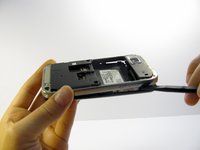
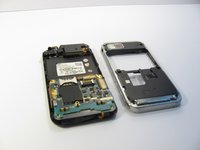
      • Use a nylon spudger to gently pry the silver plastic back plate from the body of the phone.

      crwdns2952109:0crwdne2952109:0

      crwdns2917038:0crwdne2917038:0

    1. Samsung Eternity Digitizer and Screen Replacement, Motherboard: crwdns2935265:05crwdnd2935265:01crwdnd2935265:01crwdne2935265:0
      • It is very easy to rip motherboard cables and damage fragile motherboard clips. Be careful when you are removing every component.

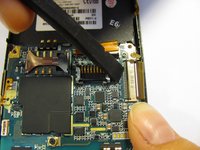
      • Pull the antenna plug out of its socket.

      crwdns2952109:0crwdne2952109:0

      crwdns2917038:0crwdne2917038:0

    2. Samsung Eternity Digitizer and Screen Replacement: crwdns2935265:06crwdnd2935265:01crwdnd2935265:03crwdne2935265:0 Samsung Eternity Digitizer and Screen Replacement: crwdns2935265:06crwdnd2935265:02crwdnd2935265:03crwdne2935265:0 Samsung Eternity Digitizer and Screen Replacement: crwdns2935265:06crwdnd2935265:03crwdnd2935265:03crwdne2935265:0
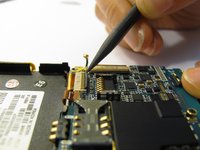
      • Pop the two black hinged-release levers toward their ribbons, then slide the ribbons out.

      crwdns2952109:0crwdne2952109:0

      crwdns2917038:0crwdne2917038:0

    3. Samsung Eternity Digitizer and Screen Replacement: crwdns2935265:07crwdnd2935265:01crwdnd2935265:01crwdne2935265:0
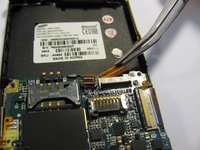
      • Pop the red hinged-release lever away from its ribbon. Then pull it out.

      crwdns2952109:0crwdne2952109:0

      crwdns2917038:0crwdne2917038:0

    4. Samsung Eternity Digitizer and Screen Replacement: crwdns2935265:08crwdnd2935265:01crwdnd2935265:01crwdne2935265:0
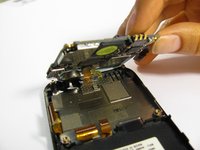
      • Peel the button sensor on the side of the motherboard off of the case.

      crwdns2952109:0crwdne2952109:0

      crwdns2917038:0crwdne2917038:0

    5. Samsung Eternity Digitizer and Screen Replacement: crwdns2935265:09crwdnd2935265:01crwdnd2935265:03crwdne2935265:0 Samsung Eternity Digitizer and Screen Replacement: crwdns2935265:09crwdnd2935265:02crwdnd2935265:03crwdne2935265:0 Samsung Eternity Digitizer and Screen Replacement: crwdns2935265:09crwdnd2935265:03crwdnd2935265:03crwdne2935265:0
      • Slightly pull up one side of the motherboard.

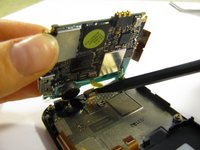
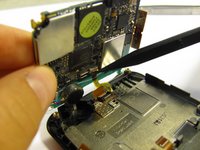
      • Pull the button/microphone plug out of its socket.

      • Pop the red hinged-release lever away from its ribbon, then slide the ribbon out.

      crwdns2952109:0crwdne2952109:0

      crwdns2917038:0crwdne2917038:0

    6. Samsung Eternity Digitizer and Screen Replacement: crwdns2935265:010crwdnd2935265:01crwdnd2935265:01crwdne2935265:0
      • You have successfully removed the motherboard from the phone.

      crwdns2952109:0crwdne2952109:0

      crwdns2917038:0crwdne2917038:0

    1. Samsung Eternity Digitizer and Screen Replacement, Digitizer and Screen: crwdns2935265:011crwdnd2935265:01crwdnd2935265:01crwdne2935265:0
      • Flip the phone over so you are looking at the front screen of the phone.

      crwdns2952109:0crwdne2952109:0

      crwdns2917038:0crwdne2917038:0

    2. Samsung Eternity Digitizer and Screen Replacement: crwdns2935265:012crwdnd2935265:01crwdnd2935265:03crwdne2935265:0 Samsung Eternity Digitizer and Screen Replacement: crwdns2935265:012crwdnd2935265:02crwdnd2935265:03crwdne2935265:0 Samsung Eternity Digitizer and Screen Replacement: crwdns2935265:012crwdnd2935265:03crwdnd2935265:03crwdne2935265:0
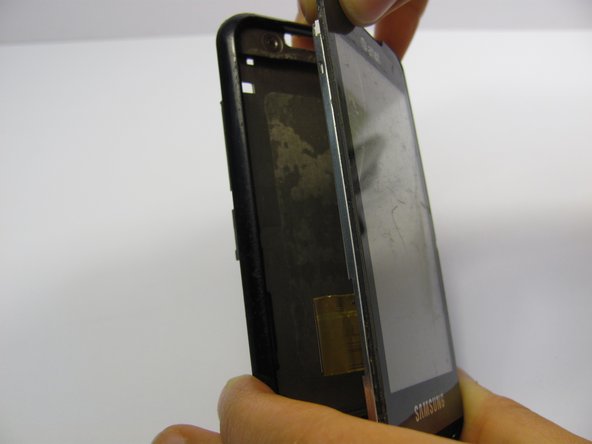
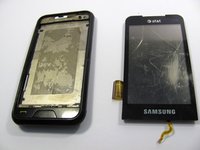
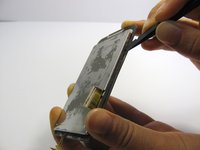
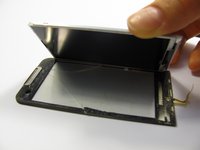
      • Use a small tool to pry the digitizer and screen (together) from the frame of the phone.

      • This may take some time and careful work because it is glued down to the frame.

      • Be careful when you pull the lower part of this piece away from the phone frame because there is a ribbon attached to the digitizer that you don't want to break. There is also a ribbon on the side of the screen to be aware of.

      crwdns2952109:0crwdne2952109:0

      crwdns2917038:0crwdne2917038:0

    3. Samsung Eternity Digitizer and Screen Replacement: crwdns2935265:013crwdnd2935265:01crwdnd2935265:03crwdne2935265:0 Samsung Eternity Digitizer and Screen Replacement: crwdns2935265:013crwdnd2935265:02crwdnd2935265:03crwdne2935265:0 Samsung Eternity Digitizer and Screen Replacement: crwdns2935265:013crwdnd2935265:03crwdnd2935265:03crwdne2935265:0
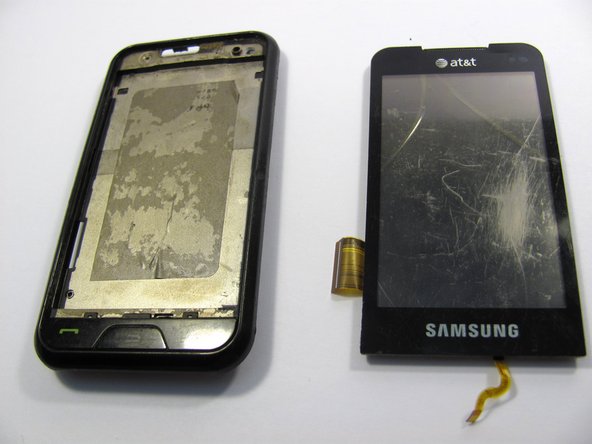
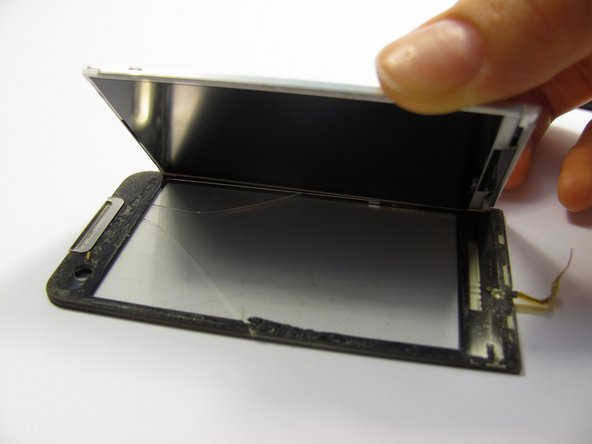
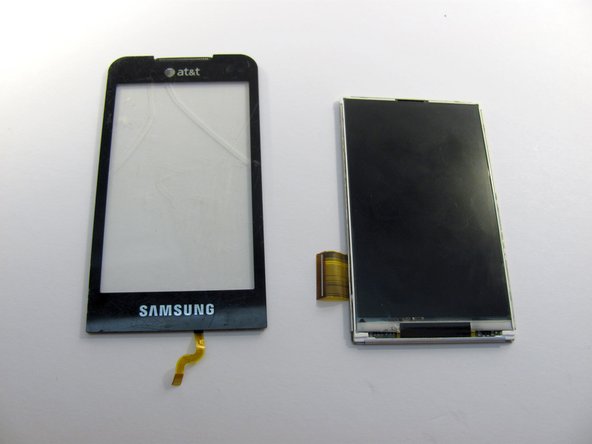
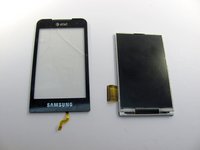
      • Next, carefully pull the digitizer away from the screen.

      • At this point you can replace either the screen or the digitizer.

      • Cleaning the screen with a glass cleaning cloth before reassembling will remove any smudges or fingerprints from disassembling the device.

      crwdns2952109:0crwdne2952109:0

      crwdns2917038:0crwdne2917038:0

crwdns2915888:0crwdne2915888:0

To reassemble your device, follow these instructions in reverse order.

crwdns2935221:0crwdne2935221:0

crwdns2935229:05crwdne2935229:0

Heather Behrend

crwdns2935283:004/20/11crwdne2935283:0

142 crwdns2915208:0crwdne2915208:0

crwdns2935295:0crwdne2935295:0

crwdns2935287:0crwdne2935287:0

Cal Poly, Team 15-11, Regan Spring 2011 crwdns2935289:0Cal Poly, Team 15-11, Regan Spring 2011crwdne2935289:0

CPSU-REGAN-S11S15G11

crwdns2931471:05crwdne2931471:0

crwdns2935297:084crwdne2935297:0

crwdns2947412:03crwdne2947412:0

You did not mention how to glue the digitizer to LCD. That is a very important step.

cashyapan - crwdns2934203:0crwdne2934203:0 crwdns2950251:0crwdne2950251:0

Do these steps also work for the Samsung Eternity 2?

Brian Coukis The 90's Kid! - crwdns2934203:0crwdne2934203:0 crwdns2950251:0crwdne2950251:0

crwdns2917038:0crwdne2917038:0

crwdns2936625:0crwdne2936625:0:

crwdns2936751:024crwdne2936751:0 2

crwdns2936753:07crwdne2936753:0 15

crwdns2936753:030crwdne2936753:0 80

crwdns2959996:0crwdne2959996:0 7,576