crwdns2933423:0crwdne2933423:0
crwdns2947577:0crwdnd2947577:0crwdne2947577:0

Samsung Epix LCD Display Replacement

crwdns2869540:0crwdne2869540:0: 2.5K

crwdns2959988:0crwdne2959988:0

crwdns2959990:0crwdne2959990:0
3
crwdns2959992:0crwdne2959992:0
16
crwdns2959994:0crwdne2959994:0
74
crwdns2959996:0crwdne2959996:0
2,488
crwdns2955950:0crwdne2955950:0: 0

crwdns2959998:0crwdne2959998:0

crwdns2960000:0crwdne2960000:0
crwdns2959984:0crwdne2959984:0: 1

crwdns2959972:01crwdne2959972:0

crwdns2959986:0crwdne2959986:0: 0

crwdns2959958:0crwdne2959958:0

crwdns2955944:0crwdne2955944:0: crwdns2931273:0crwdne2931273:0
crwdns2955970:0crwdne2955970:0: crwdns2937801:0crwdne2937801:0
crwdns2862599:0crwdne2862599:0

crwdns2862600:0crwdne2862600:0

crwdns2862633:0crwdne2862633:0

crwdns2862634:0crwdne2862634:0

crwdns2862635:0crwdne2862635:0

crwdns2862636:0crwdne2862636:0

Samsung Epix LCD Display Replacement

crwdns2915892:0crwdne2915892:0

crwdns2959928:0crwdne2959928:0 ↓

This guide shows you how to access the LCD display inside your phone.

crwdns2959930:0crwdne2959930:0

crwdns2943215:0crwdne2943215:0

    1. Samsung Epix LCD Display Replacement, Battery: crwdns2935265:01crwdnd2935265:01crwdnd2935265:01crwdne2935265:0
      • Just below the phone's camera, press the button and hold it

      • While the button is held down, slide the back panel off to remove it completely.

      crwdns2952109:0crwdne2952109:0

      crwdns2917038:0crwdne2917038:0

    2. Samsung Epix LCD Display Replacement: crwdns2935265:02crwdnd2935265:01crwdnd2935265:01crwdne2935265:0
      • Grasp the bottom corners of the battery with two fingers and gently lift.

      • Gently lift the battery and remove it from the phone.

      crwdns2952109:0crwdne2952109:0

      crwdns2917038:0crwdne2917038:0

    1. Samsung Epix LCD Display Replacement, LCD Display: crwdns2935265:03crwdnd2935265:01crwdnd2935265:01crwdne2935265:0
      • Remove the rubber screw cover in the top left corner by prying upwards with an opening tool.

      crwdns2952109:0crwdne2952109:0

      crwdns2917038:0crwdne2917038:0

    2. Samsung Epix LCD Display Replacement: crwdns2935265:04crwdnd2935265:01crwdnd2935265:01crwdne2935265:0
      • Use a Phillips #00 screwdriver to remove the six screws on the back of the phone.

      • The upper right screw is 4.5 mm and the others are 6.5 mm.

      crwdns2952109:0crwdne2952109:0

      crwdns2917038:0crwdne2917038:0

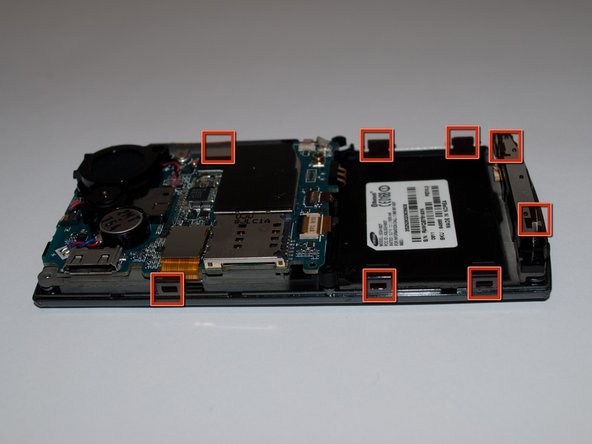
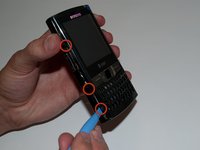
    3. Samsung Epix LCD Display Replacement: crwdns2935265:05crwdnd2935265:01crwdnd2935265:02crwdne2935265:0 Samsung Epix LCD Display Replacement: crwdns2935265:05crwdnd2935265:02crwdnd2935265:02crwdne2935265:0
      • Slide the opening tool along the seam on the side of the phone and turn it slightly to unhook the eight clips.

      • There are three clips on each side and two at the bottom of the phone.

      crwdns2952109:0crwdne2952109:0

      crwdns2917038:0crwdne2917038:0

    4. Samsung Epix LCD Display Replacement: crwdns2935265:06crwdnd2935265:01crwdnd2935265:01crwdne2935265:0
      • Once all eight of the clips have been unhooked, lift the back panel off of the phone.

      • Be careful not to remove the front panel. It will still be connected to the phone chassis by a ribbon cable on the motherboard.

      crwdns2952109:0crwdne2952109:0

      crwdns2917038:0crwdne2917038:0

    5. Samsung Epix LCD Display Replacement: crwdns2935265:07crwdnd2935265:01crwdnd2935265:01crwdne2935265:0
      • Using an opening tool, undo the ZIF connector halfway up the right side.

      • Carefully remove ribbon cable.

      crwdns2952109:0crwdne2952109:0

      crwdns2917038:0crwdne2917038:0

    6. Samsung Epix LCD Display Replacement: crwdns2935265:08crwdnd2935265:01crwdnd2935265:01crwdne2935265:0
      • Remove the front faceplate by lifting it off of the phone chassis.

      crwdns2952109:0crwdne2952109:0

      crwdns2917038:0crwdne2917038:0

    7. Samsung Epix LCD Display Replacement: crwdns2935265:09crwdnd2935265:01crwdnd2935265:01crwdne2935265:0
      • Using the opening tool, unlatch the LCD ribbon cable.

      crwdns2952109:0crwdne2952109:0

      crwdns2917038:0crwdne2917038:0

    8. Samsung Epix LCD Display Replacement: crwdns2935265:010crwdnd2935265:01crwdnd2935265:01crwdne2935265:0
      • Using an opening tool or spudger, pry under the lower left and right corners of the LCD screen.

      • The LCD is held in place to the chassis with adhesive strips.

      • Do not pry excessively hard. You may damage the circuitry on the back of the LCD.

      crwdns2952109:0crwdne2952109:0

      crwdns2917038:0crwdne2917038:0

    9. Samsung Epix LCD Display Replacement: crwdns2935265:011crwdnd2935265:01crwdnd2935265:01crwdne2935265:0
      • Lift the LCD display out from phone chassis.

      crwdns2952109:0crwdne2952109:0

      crwdns2917038:0crwdne2917038:0

crwdns2915888:0crwdne2915888:0

To reassemble your device, follow these instructions in reverse order.

crwdns2935221:0crwdne2935221:0

crwdns2935227:0crwdne2935227:0

Mark Wyse

crwdns2935283:004/19/11crwdne2935283:0

62 crwdns2915208:0crwdne2915208:0

crwdns2935297:02crwdne2935297:0

crwdns2935287:0crwdne2935287:0

Cal Poly, Team 15-15, Regan Spring 2011 crwdns2935289:0Cal Poly, Team 15-15, Regan Spring 2011crwdne2935289:0

CPSU-REGAN-S11S15G15

crwdns2931471:05crwdne2931471:0

crwdns2935297:060crwdne2935297:0

crwdns2947412:00crwdne2947412:0

crwdns2917038:0crwdne2917038:0

crwdns2936625:0crwdne2936625:0:

crwdns2936751:024crwdne2936751:0 3

crwdns2936753:07crwdne2936753:0 16

crwdns2936753:030crwdne2936753:0 74

crwdns2959996:0crwdne2959996:0 2,488