crwdns2933423:0crwdne2933423:0
crwdns2947577:0crwdnd2947577:0crwdne2947577:0

Samsung DVD-HD850 Player Power Button Replacement

crwdns2942213:0crwdne2942213:0

  1. Samsung DVD-HD850 Player Power Button Replacement, Cover: crwdns2935265:01crwdnd2935265:01crwdnd2935265:01crwdne2935265:0
    • with the front of the device facing you, turn the device 180 degrees so the back panel of the device is facing you

    crwdns2952109:0crwdne2952109:0

    crwdns2917038:0crwdne2917038:0

  2. Samsung DVD-HD850 Player Power Button Replacement, Locate and remove screws: crwdns2935265:02crwdnd2935265:01crwdnd2935265:01crwdne2935265:0
    • locate the three (3) screws on the back panel of the device that are implanted in the device

    • to remove the screws, use the tool(s) listed above (right underneath the introduction) and twist the screws counter-clockwise to remove them from the device

    crwdns2952109:0crwdne2952109:0

    crwdns2917038:0crwdne2917038:0

  3. Samsung DVD-HD850 Player Power Button Replacement, Remove Cover: crwdns2935265:03crwdnd2935265:01crwdnd2935265:01crwdne2935265:0
    • to remove the cover of the device, pull the cover towards the back of the device until it is completely removed so you can see the insides of the device

    crwdns2952109:0crwdne2952109:0

    crwdns2917038:0crwdne2917038:0

  4. Samsung DVD-HD850 Player Power Button Replacement, Locate and Remove The Disk Tray: crwdns2935265:04crwdnd2935265:01crwdnd2935265:01crwdne2935265:0
    • *NOTE* remember to never connect to power when working on electrical components

    • Find and locate the disk tray it is located top right hand side of the component when the back of the device ( dvd player ) is facing you.

    crwdns2952109:0crwdne2952109:0

    crwdns2917038:0crwdne2917038:0

  5. Samsung DVD-HD850 Player Power Button Replacement, Removing The Data Strips: crwdns2935265:05crwdnd2935265:01crwdnd2935265:01crwdne2935265:0
    • Locate and gently remove the data strips on the tray. There are three in total, two on the left hand side and one on the right.

    crwdns2952109:0crwdne2952109:0

    crwdns2917038:0crwdne2917038:0

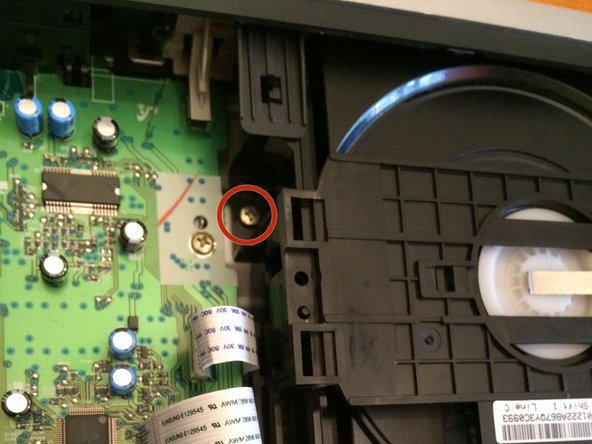
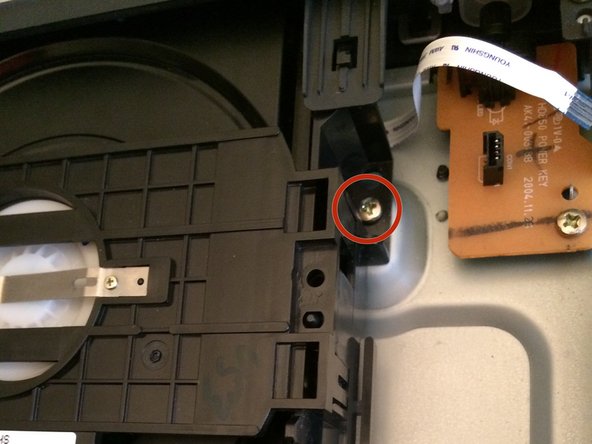
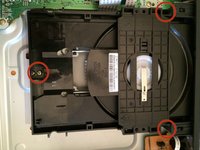
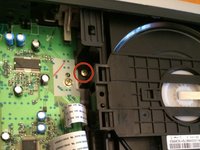
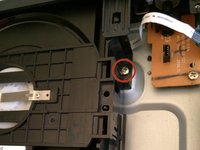
  6. Samsung DVD-HD850 Player Power Button Replacement, Removing The Screws: crwdns2935265:06crwdnd2935265:01crwdnd2935265:03crwdne2935265:0 Samsung DVD-HD850 Player Power Button Replacement, Removing The Screws: crwdns2935265:06crwdnd2935265:02crwdnd2935265:03crwdne2935265:0 Samsung DVD-HD850 Player Power Button Replacement, Removing The Screws: crwdns2935265:06crwdnd2935265:03crwdnd2935265:03crwdne2935265:0
    • As noted by the red circles, locate and remove the screws one at a time

    crwdns2952109:0crwdne2952109:0

    crwdns2917038:0crwdne2917038:0

  7. Samsung DVD-HD850 Player Power Button Replacement, Disk Tray Removal: crwdns2935265:07crwdnd2935265:01crwdnd2935265:01crwdne2935265:0
    • After removing the clips slowly incline the disk drive towards you and unclip it from the two (2) brackets located on the top

    • Be careful not to push too much pressure on the brackets since they tend to break easily

    crwdns2952109:0crwdne2952109:0

    crwdns2917038:0crwdne2917038:0

  8. Samsung DVD-HD850 Player Power Button Replacement, Success!: crwdns2935265:08crwdnd2935265:01crwdnd2935265:01crwdne2935265:0
    • Congrats! You have sucessfully have taken out the disk drive

    crwdns2952109:0crwdne2952109:0

    crwdns2917038:0crwdne2917038:0

  9. Samsung DVD-HD850 Player Power Button Replacement, Unscrew power button circuit board: crwdns2935265:09crwdnd2935265:01crwdnd2935265:01crwdne2935265:0
    • Unscrew the one screw that is connecting the circuit board to the frame.

    crwdns2952109:0crwdne2952109:0

    crwdns2917038:0crwdne2917038:0

  10. Samsung DVD-HD850 Player Power Button Replacement, Remove power button circuit board: crwdns2935265:010crwdnd2935265:01crwdnd2935265:01crwdne2935265:0
    • Jiggle the circuit board until it becomes loose from the two prongs holding it in place.

    • Replace with a new one.

    crwdns2952109:0crwdne2952109:0

    crwdns2917038:0crwdne2917038:0

crwdns2915888:0crwdne2915888:0

To reassemble your device, follow these instructions in reverse order.

crwdns2935221:0crwdne2935221:0

Robert Moss

crwdns2935283:010/22/14crwdne2935283:0

201 crwdns2915208:0crwdne2915208:0

crwdns2935297:02crwdne2935297:0

crwdns2935287:0crwdne2935287:0

UMass Dartmouth, Team 1-6, Duarte Fall 2014 crwdns2935289:0UMass Dartmouth, Team 1-6, Duarte Fall 2014crwdne2935289:0

UMASSD-DUARTE-F14S1G6

crwdns2931471:03crwdne2931471:0

crwdns2935297:07crwdne2935297:0

crwdns2947412:00crwdne2947412:0

crwdns2917038:0crwdne2917038:0

crwdns2936625:0crwdne2936625:0:

crwdns2936751:024crwdne2936751:0 2

crwdns2936753:07crwdne2936753:0 7

crwdns2936753:030crwdne2936753:0 38

crwdns2942667:0crwdne2942667:0 582