
Samsung DV300F Back Button Control Replacement

crwdns2959932:0crwdnd2959932:0Timothy Gordoncrwdnd2959932:0crwdnd2959932:0crwdnd2959932:06crwdnd2959932:0crwdne2959932:0
crwdns2959936:0Sun 9, 2020crwdne2959936:0
crwdns2869540:0crwdne2869540:0: 1,4 B
crwdns2959988:0crwdne2959988:0
- crwdns2959990:0crwdne2959990:0
- 2
- crwdns2959992:0crwdne2959992:0
- 25
- crwdns2959994:0crwdne2959994:0
- 102
- crwdns2959996:0crwdne2959996:0
- 1.424
crwdns2955950:0crwdne2955950:0: 2
crwdns2960004:02crwdne2960004:0.
crwdns2959984:0crwdne2959984:0: 4 5
crwdns2959974:04crwdne2959974:0
crwdns2959970:05crwdne2959970:0
crwdns2959986:0crwdne2959986:0: 1 2
crwdns2959980:01crwdne2959980:0
crwdns2959978:02crwdne2959978:0
crwdns2869444:0crwdne2869444:0
crwdns2869445:0crwdne2869445:0
crwdns2862633:0crwdne2862633:0
crwdns2862634:0crwdne2862634:0
crwdns2915892:0crwdne2915892:0
crwdns2959928:0crwdne2959928:0 ↓This guide will show how to remove the Back Button Control.
crwdns2959930:0crwdne2959930:0
crwdns2943215:0crwdne2943215:0

-
-
-
Remove the two black 4.2 mm screws on the right side of the camera using a Phillips #0 screwdriver.
-
Remove the two black 4.2 mm screws on the left side of the camera using a Phillips #0 screwdriver.
-
Remove the two black 4.2 mm screws on the bottom of the camera using a Phillips #0 screwdriver.
 crwdns2952109:0crwdne2952109:0
-
-
-
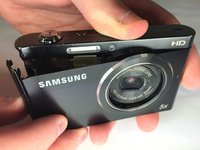
Remove the back case of the camera carefully.
-
-
-
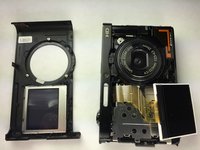
Remove the front case of the camera.
-
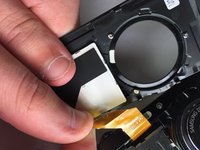
Remove the front LCD screen from the front case next to the lens.
-
-
-
-
-
-
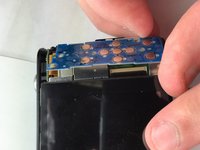
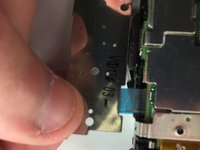
Remove the blue button control from its position next to the LCD screen.
-
Pull the ribbon cable to disconnect the blue button control from the camera.
-
-




To reassemble your device, follow these instructions in reverse order.
crwdns2935221:0crwdne2935221:0
crwdns2935229:04crwdne2935229:0

crwdns2935287:0crwdne2935287:0

Baylor, Team 5-10, Williams Spring 2015 crwdns2935289:0Baylor, Team 5-10, Williams Spring 2015crwdne2935289:0
BU-WILLIAMS-S15S5G10
crwdns2931471:03crwdne2931471:0
crwdns2935297:060crwdne2935297:0
