
Samsung ATIV Book 9 Plus Keys Replacement

crwdns2959932:0crwdnd2959932:0unknowncrwdnd2959932:0crwdnd2959932:0crwdnd2959932:04crwdnd2959932:0crwdne2959932:0
crwdns2959936:0Kul 28, 2020crwdne2959936:0
crwdns2869540:0crwdne2869540:0: 6740
crwdns2959988:0crwdne2959988:0
- crwdns2959990:0crwdne2959990:0
- 2
- crwdns2959992:0crwdne2959992:0
- 20
- crwdns2959994:0crwdne2959994:0
- 84
- crwdns2959996:0crwdne2959996:0
- 6,740
crwdns2955950:0crwdne2955950:0: 0
crwdns2959998:0crwdne2959998:0
crwdns2960000:0crwdne2960000:0crwdns2959984:0crwdne2959984:0: 3 4
crwdns2959974:03crwdne2959974:0
crwdns2959970:04crwdne2959970:0
crwdns2959986:0crwdne2959986:0: 1 2
crwdns2959980:01crwdne2959980:0
crwdns2959978:02crwdne2959978:0
crwdns2915892:0crwdne2915892:0
crwdns2959928:0crwdne2959928:0 ↓Before removing keys from your laptop, make sure that you have a plastic opening tool. After removing the key, having the following tools can come in handy: a cloth, compressed air can, or some rubbing alcohol to clean each key and the area underneath. Be very careful when removing keys and take your time, because the attachments to the keys and the keys themselves can break! If the keys themselves do break, extra keys can be bought online. For further instructions, check out the guide.
crwdns2959930:0crwdne2959930:0
crwdns2943213:0crwdne2943213:0
crwdns2943215:0crwdne2943215:0

-
-
-
Open your laptop so your keyboard is facing you and is easily accessible.
 crwdns2952109:0crwdne2952109:0
-
-
-
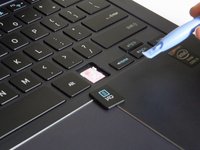
Using a plastic opening tool, carefully push the thin tip under the key.
-
-
-
-
Pivot the tool upwards. This should pry the key away from the keyboard.
-
Continue lifting the tool until the key comes away completely or gently pull the key off. Repeat for other keys as needed.
-
-



To reassemble your device, follow these instructions in reverse order.
crwdns2935221:0crwdne2935221:0
crwdns2935229:03crwdne2935229:0

crwdns2935287:0crwdne2935287:0

Baylor, Team 2-3, Grigsby Spring 2015 crwdns2935289:0Baylor, Team 2-3, Grigsby Spring 2015crwdne2935289:0
BU-GRIGSBY-S15S2G3
crwdns2931471:04crwdne2931471:0
crwdns2935297:048crwdne2935297:0
