
Samsung ATIV Book 4 RAM Replacement

crwdns2959932:0crwdnd2959932:0Danielcrwdnd2959932:0crwdnd2959932:0crwdne2959932:0
crwdns2959936:0Kho 24, 2015crwdne2959936:0
crwdns2869540:0crwdne2869540:0: 2.5K
crwdns2959988:0crwdne2959988:0
- crwdns2959990:0crwdne2959990:0
- 4
- crwdns2959992:0crwdne2959992:0
- 19
- crwdns2959994:0crwdne2959994:0
- 106
- crwdns2959996:0crwdne2959996:0
- 2,490
crwdns2955950:0crwdne2955950:0: 0
crwdns2959998:0crwdne2959998:0
crwdns2960000:0crwdne2960000:0crwdns2959984:0crwdne2959984:0: 1 2
crwdns2959972:01crwdne2959972:0
crwdns2959970:02crwdne2959970:0
crwdns2959986:0crwdne2959986:0: 1 2
crwdns2959980:01crwdne2959980:0
crwdns2959978:02crwdne2959978:0
crwdns2959930:0crwdne2959930:0
crwdns2943215:0crwdne2943215:0

crwdns2915892:0crwdne2915892:0
crwdns2959928:0crwdne2959928:0 ↓If your computer is experiencing memory issues and/or is running slowly, replacing or upgrading the RAM may solve these issues.
-
-
-
Place the computer upside down.
-
Remove one 6.5mm screw on exterior of computer.
 crwdns2952109:0crwdne2952109:0
-
-
-
-
Remove the panel by sliding down and lifting it away from the computer, exposing the RAM and hard drive.
-
-
-
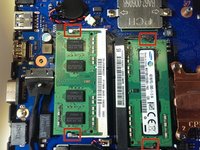
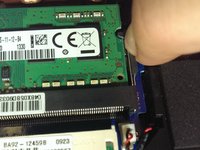
Pull the 4 tabs away from the RAM with your finger.
-
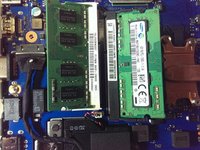
Lift away to remove the RAM and replace.
-
-


To reassemble your device, follow these instructions in reverse order.
crwdns2935221:0crwdne2935221:0
crwdns2935227:0crwdne2935227:0

crwdns2935287:0crwdne2935287:0

Michigan Tech, Team 1-7, Lauer Spring 2015 crwdns2935289:0Michigan Tech, Team 1-7, Lauer Spring 2015crwdne2935289:0
MTU-LAUER-S15S1G7
crwdns2931471:02crwdne2931471:0
crwdns2935297:060crwdne2935297:0
