crwdns2933423:0crwdne2933423:0
crwdns2947577:0crwdnd2947577:0crwdne2947577:0

Rocketfish RF-WHTIB-A Receiver Wireless Audio Module Chip Replacement

crwdns2942213:0crwdne2942213:0

  1. Rocketfish RF-WHTIB-A Receiver Wireless Audio Module Chip Replacement, How to Open the Rocketfish RF-WHTIB-A Receiver: crwdns2935265:01crwdnd2935265:01crwdnd2935265:01crwdne2935265:0
    • Remove the 4 rubber tabs on the bottom side of the receiver.

    crwdns2952109:0crwdne2952109:0

    crwdns2917038:0crwdne2917038:0

  2. Rocketfish RF-WHTIB-A Receiver Wireless Audio Module Chip Replacement: crwdns2935265:02crwdnd2935265:01crwdnd2935265:01crwdne2935265:0
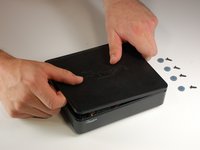
    • Unscrew the four 12 mm screws on the bottom side of the receiver.

    • Use a Phillips #1 screwdriver for this step.

    crwdns2952109:0crwdne2952109:0

    crwdns2917038:0crwdne2917038:0

  3. Rocketfish RF-WHTIB-A Receiver Wireless Audio Module Chip Replacement: crwdns2935265:03crwdnd2935265:01crwdnd2935265:02crwdne2935265:0 Rocketfish RF-WHTIB-A Receiver Wireless Audio Module Chip Replacement: crwdns2935265:03crwdnd2935265:02crwdnd2935265:02crwdne2935265:0
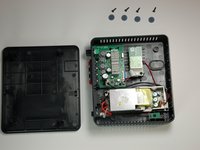
    • Remove top casing from the receiver.

    • The receiver top casing is difficult to remove. Internal clasps may have to be broken in order to remove the top casing (this will not effect the device's function)

    crwdns2952109:0crwdne2952109:0

    crwdns2917038:0crwdne2917038:0

  4. Rocketfish RF-WHTIB-A Receiver Wireless Audio Module Chip Replacement, Receiver Wireless Audio Module Chip: crwdns2935265:04crwdnd2935265:01crwdnd2935265:01crwdne2935265:0
    • Unscrew the 10 mm screw holding the wireless audio module.

    crwdns2952109:0crwdne2952109:0

    crwdns2917038:0crwdne2917038:0

  5. Rocketfish RF-WHTIB-A Receiver Wireless Audio Module Chip Replacement: crwdns2935265:05crwdnd2935265:01crwdnd2935265:02crwdne2935265:0 Rocketfish RF-WHTIB-A Receiver Wireless Audio Module Chip Replacement: crwdns2935265:05crwdnd2935265:02crwdnd2935265:02crwdne2935265:0
    crwdns2935267:0crwdne2935267:0
    Tweezers
    $4.99
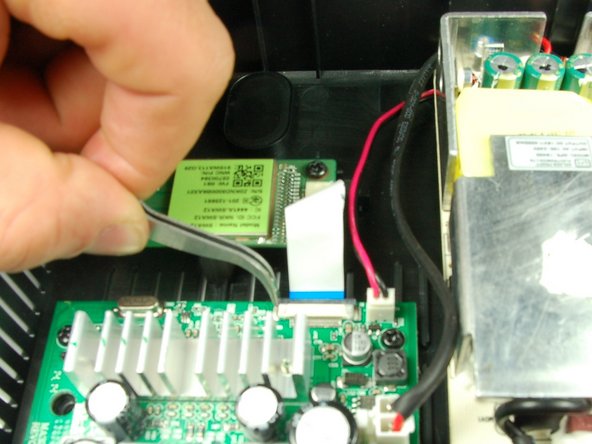
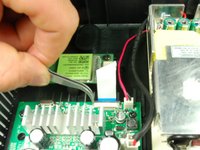
    • Slide the black retaining flap securing the ribbon cable away from the white bar.

    • There should be only a small space between the white bar and black retaining flap.

    • You may want to use tweezers for this step.

    crwdns2952109:0crwdne2952109:0

    crwdns2917038:0crwdne2917038:0

  6. Rocketfish RF-WHTIB-A Receiver Wireless Audio Module Chip Replacement: crwdns2935265:06crwdnd2935265:01crwdnd2935265:01crwdne2935265:0
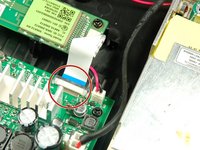
    • Using your fingers, slide the ribbon cable out from the under the black retaining flap to completely disconnect it from the device.

    crwdns2952109:0crwdne2952109:0

    crwdns2917038:0crwdne2917038:0

crwdns2915888:0crwdne2915888:0

To install the new wireless audio module chip, follow these instructions in reverse order.

crwdns2935221:0crwdne2935221:0

crwdns2935227:0crwdne2935227:0

Caitlin Charlton

crwdns2935283:003/22/15crwdne2935283:0

756 crwdns2915208:0crwdne2915208:0

crwdns2935297:06crwdne2935297:0

crwdns2935287:0crwdne2935287:0

Baylor, Team 4-2, Williams Spring 2015 crwdns2935289:0Baylor, Team 4-2, Williams Spring 2015crwdne2935289:0

BU-WILLIAMS-S15S4G2

crwdns2931471:03crwdne2931471:0

crwdns2935297:06crwdne2935297:0

crwdns2947410:01crwdne2947410:0

This is a very long time later, but where do you get the receiver chip??? Rocket fish doesn't support the product anymore

Michael Jay - crwdns2934203:0crwdne2934203:0 crwdns2950251:0crwdne2950251:0

crwdns2917038:0crwdne2917038:0

crwdns2936625:0crwdne2936625:0:

crwdns2936751:024crwdne2936751:0 2

crwdns2936753:07crwdne2936753:0 8

crwdns2936753:030crwdne2936753:0 35

crwdns2942667:0crwdne2942667:0 2,502