crwdns2933423:0crwdne2933423:0
crwdns2947577:0crwdnd2947577:0crwdne2947577:0

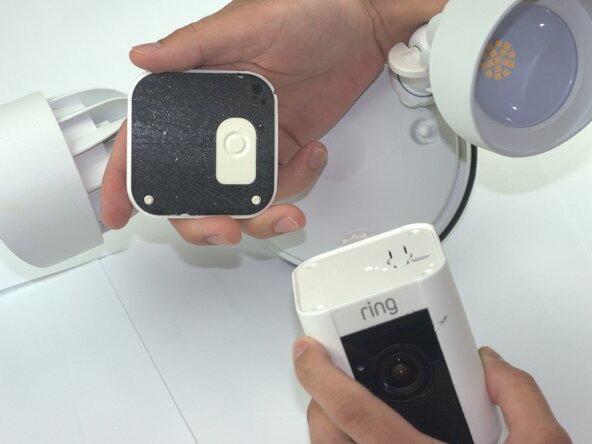
Ring Floodlight Cam Camera Module Replacement

crwdns2942213:0crwdne2942213:0

  1. Ring Floodlight Cam Camera Module Replacement, Motherboard: crwdns2935265:01crwdnd2935265:01crwdnd2935265:02crwdne2935265:0 Ring Floodlight Cam Camera Module Replacement, Motherboard: crwdns2935265:01crwdnd2935265:02crwdnd2935265:02crwdne2935265:0
    • Remove the external cover with a Jimmy tool.

    crwdns2952109:0crwdne2952109:0

    crwdns2917038:0crwdne2917038:0

  2. Ring Floodlight Cam Camera Module Replacement: crwdns2935265:02crwdnd2935265:01crwdnd2935265:02crwdne2935265:0 Ring Floodlight Cam Camera Module Replacement: crwdns2935265:02crwdnd2935265:02crwdnd2935265:02crwdne2935265:0
    • Remove the four outer cover 4.5mm screws with a Philips 1 screwdriver.

    crwdns2952109:0crwdne2952109:0

    crwdns2917038:0crwdne2917038:0

  3. Ring Floodlight Cam Camera Module Replacement: crwdns2935265:03crwdnd2935265:01crwdnd2935265:01crwdne2935265:0
    • Remove the internal cover.

    crwdns2952109:0crwdne2952109:0

    crwdns2917038:0crwdne2917038:0

  4. Ring Floodlight Cam Camera Module Replacement: crwdns2935265:04crwdnd2935265:01crwdnd2935265:01crwdne2935265:0
    • Disconnect the flexible flat cable (FFC) from the motherboard.

    crwdns2952109:0crwdne2952109:0

    crwdns2917038:0crwdne2917038:0

  5. Ring Floodlight Cam Camera Module Replacement: crwdns2935265:05crwdnd2935265:01crwdnd2935265:01crwdne2935265:0
    • Remove the three-prong connector with angled tweezers.

    crwdns2952109:0crwdne2952109:0

    crwdns2917038:0crwdne2917038:0

  6. Ring Floodlight Cam Camera Module Replacement: crwdns2935265:06crwdnd2935265:01crwdnd2935265:01crwdne2935265:0
    • Remove the 2mm screws with a Phillips #00 screwdriver.

    crwdns2952109:0crwdne2952109:0

    crwdns2917038:0crwdne2917038:0

  7. Ring Floodlight Cam Camera Module Replacement: crwdns2935265:07crwdnd2935265:01crwdnd2935265:02crwdne2935265:0 Ring Floodlight Cam Camera Module Replacement: crwdns2935265:07crwdnd2935265:02crwdnd2935265:02crwdne2935265:0
    • Remove the power supply.

    • Disconnect the power supply from the device.

    crwdns2952109:0crwdne2952109:0

    crwdns2917038:0crwdne2917038:0

  8. Ring Floodlight Cam Camera Module Replacement: crwdns2935265:08crwdnd2935265:01crwdnd2935265:01crwdne2935265:0
    • Remove the 2mm screws with a Phillips 00 screwdriver from the base connector.

    • From this step forward use a low profile wrench instead of a screwdriver with the correct bit size to remove screws non-destructively.

    crwdns2952109:0crwdne2952109:0

    crwdns2917038:0crwdne2917038:0

  9. Ring Floodlight Cam Camera Module Replacement: crwdns2935265:09crwdnd2935265:01crwdnd2935265:02crwdne2935265:0 Ring Floodlight Cam Camera Module Replacement: crwdns2935265:09crwdnd2935265:02crwdnd2935265:02crwdne2935265:0
    • Drill holes into the exterior with a 1/16 drill bit.

    • Skip this step unless you lack the specialized tools or other attempts to remove screws non destructively were unsuccessful.

    crwdns2952109:0crwdne2952109:0

    crwdns2917038:0crwdne2917038:0

  10. Ring Floodlight Cam Camera Module Replacement: crwdns2935265:010crwdnd2935265:01crwdnd2935265:01crwdne2935265:0
    • Unscrew the 2mm screws on the metal baseplate with a Phillips 00 screwdriver.

    crwdns2952109:0crwdne2952109:0

    crwdns2917038:0crwdne2917038:0

  11. Ring Floodlight Cam Camera Module Replacement: crwdns2935265:011crwdnd2935265:01crwdnd2935265:01crwdne2935265:0
    • Remove the metal baseplate.

    crwdns2952109:0crwdne2952109:0

    crwdns2917038:0crwdne2917038:0

  12. Ring Floodlight Cam Camera Module Replacement: crwdns2935265:012crwdnd2935265:01crwdnd2935265:01crwdne2935265:0
    • Remove the power connector from the motherboard using angled tweezers.

    crwdns2952109:0crwdne2952109:0

    crwdns2917038:0crwdne2917038:0

  13. Ring Floodlight Cam Camera Module Replacement: crwdns2935265:013crwdnd2935265:01crwdnd2935265:01crwdne2935265:0
    • Remove the front-end flexible flat cable (FFC) with angled tweezers.

    crwdns2952109:0crwdne2952109:0

    crwdns2917038:0crwdne2917038:0

  14. Ring Floodlight Cam Camera Module Replacement: crwdns2935265:014crwdnd2935265:01crwdnd2935265:01crwdne2935265:0
    • Remove the motion sensor flat flexible cable (FFC).

    crwdns2952109:0crwdne2952109:0

    crwdns2917038:0crwdne2917038:0

  15. Ring Floodlight Cam Camera Module Replacement: crwdns2935265:015crwdnd2935265:01crwdnd2935265:02crwdne2935265:0 Ring Floodlight Cam Camera Module Replacement: crwdns2935265:015crwdnd2935265:02crwdnd2935265:02crwdne2935265:0
    • Remove the motherboard module.

    crwdns2952109:0crwdne2952109:0

    crwdns2917038:0crwdne2917038:0

  16. Ring Floodlight Cam Camera Module Replacement, Camera Module: crwdns2935265:016crwdnd2935265:01crwdnd2935265:01crwdne2935265:0
    • Drill holes with a 1/16 drill bit.

    crwdns2952109:0crwdne2952109:0

    crwdns2917038:0crwdne2917038:0

  17. Ring Floodlight Cam Camera Module Replacement: crwdns2935265:017crwdnd2935265:01crwdnd2935265:02crwdne2935265:0 Ring Floodlight Cam Camera Module Replacement: crwdns2935265:017crwdnd2935265:02crwdnd2935265:02crwdne2935265:0
    • Remove the 2mm screws with an iFixit PH00 screwdriver.

    crwdns2952109:0crwdne2952109:0

    crwdns2917038:0crwdne2917038:0

  18. Ring Floodlight Cam Camera Module Replacement: crwdns2935265:018crwdnd2935265:01crwdnd2935265:01crwdne2935265:0
    • Peel the copper strip from camera module.

    • Remove the metal baseplate.

    crwdns2952109:0crwdne2952109:0

    crwdns2917038:0crwdne2917038:0

  19. Ring Floodlight Cam Camera Module Replacement: crwdns2935265:019crwdnd2935265:01crwdnd2935265:02crwdne2935265:0 Ring Floodlight Cam Camera Module Replacement: crwdns2935265:019crwdnd2935265:02crwdnd2935265:02crwdne2935265:0
    • Unplug the WiFi antenna cables with angled tweezers.

    crwdns2952109:0crwdne2952109:0

    crwdns2917038:0crwdne2917038:0

  20. Ring Floodlight Cam Camera Module Replacement: crwdns2935265:020crwdnd2935265:01crwdnd2935265:02crwdne2935265:0 Ring Floodlight Cam Camera Module Replacement: crwdns2935265:020crwdnd2935265:02crwdnd2935265:02crwdne2935265:0
    • Remove 2mm screws with a PH00 screwdriver.

    crwdns2952109:0crwdne2952109:0

    crwdns2917038:0crwdne2917038:0

  21. Ring Floodlight Cam Camera Module Replacement: crwdns2935265:021crwdnd2935265:01crwdnd2935265:01crwdne2935265:0
    • Remove the 3 pin power connector from the camera module.

    crwdns2952109:0crwdne2952109:0

    crwdns2917038:0crwdne2917038:0

  22. Ring Floodlight Cam Camera Module Replacement: crwdns2935265:022crwdnd2935265:01crwdnd2935265:03crwdne2935265:0 Ring Floodlight Cam Camera Module Replacement: crwdns2935265:022crwdnd2935265:02crwdnd2935265:03crwdne2935265:0 Ring Floodlight Cam Camera Module Replacement: crwdns2935265:022crwdnd2935265:03crwdnd2935265:03crwdne2935265:0
    • Remove the camera module.

    crwdns2952109:0crwdne2952109:0

    crwdns2917038:0crwdne2917038:0

crwdns2915888:0crwdne2915888:0

To reassemble your device, follow these instructions in reverse order and before inserting power supply fill the drill holes with plastic putty.

crwdns2935221:0crwdne2935221:0

Samuel Garcia

crwdns2935283:002/04/26crwdne2935283:0

381 crwdns2915208:0crwdne2915208:0

crwdns2935297:02crwdne2935297:0

crwdns2935287:0crwdne2935287:0

Texas Tech, Team 41-3, Johansen Spring 2026 crwdns2935289:0Texas Tech, Team 41-3, Johansen Spring 2026crwdne2935289:0

TTU-JOHANSEN-S26S41G3

crwdns2931471:04crwdne2931471:0

crwdns2935297:05crwdne2935297:0

crwdns2947412:00crwdne2947412:0

crwdns2917038:0crwdne2917038:0

crwdns2936625:0crwdne2936625:0:

crwdns2936751:024crwdne2936751:0 5

crwdns2936753:07crwdne2936753:0 23

crwdns2936753:030crwdne2936753:0 23

crwdns2942667:0crwdne2942667:0 96