
Replacing Tungsten E screen. PAL5037

crwdns2959932:0crwdnd2959932:0Kevin Homcrwdnd2959932:0crwdnd2959932:0crwdnd2959932:06crwdnd2959932:0crwdne2959932:0
crwdns2959936:0Yan 19, 2016crwdne2959936:0
crwdns2869540:0crwdne2869540:0: 6.2K
crwdns2959988:0crwdne2959988:0
- crwdns2959990:0crwdne2959990:0
- 1
- crwdns2959992:0crwdne2959992:0
- 16
- crwdns2959994:0crwdne2959994:0
- 85
- crwdns2959996:0crwdne2959996:0
- 6,174
crwdns2955950:0crwdne2955950:0: 1
crwdns2960002:01crwdne2960002:0.
crwdns2959984:0crwdne2959984:0: 4 5
crwdns2959974:04crwdne2959974:0
crwdns2959970:05crwdne2959970:0
crwdns2959986:0crwdne2959986:0: 1 2
crwdns2959980:01crwdne2959980:0
crwdns2959978:02crwdne2959978:0
crwdns2869444:0crwdne2869444:0
crwdns2869445:0crwdne2869445:0
crwdns2862601:0crwdne2862601:0
crwdns2862602:0crwdne2862602:0
crwdns2862629:0crwdne2862629:0
crwdns2862630:0crwdne2862630:0
crwdns2915892:0crwdne2915892:0
crwdns2959928:0crwdne2959928:0 ↓This is a guide on how to replace the touch screen on a Palm Tungsten E.
crwdns2959930:0crwdne2959930:0
crwdns2943215:0crwdne2943215:0
-
Spudger4.9


-
-
-
Remove the stylus and SD card.
-
Using a T5 torx screwdriver, remove all 4 back panel screws.
 crwdns2952109:0crwdne2952109:0
-
-
-
Insert a plastic opening tool under the USB and power input slots.
-
Slide the plastic opener along the seam and gently pry the cover from the PDA body to remove the cover completely.
-
-
-
Remove the screen protector by lifting the hinge out of the plastic housing.
-
Remove the top cover by gently pulling it away from the device with a plastic opening tool or your fingers.
-
-
-
-
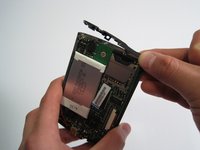
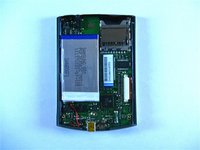
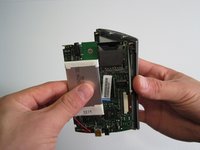
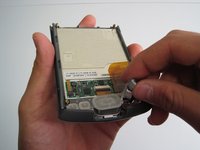
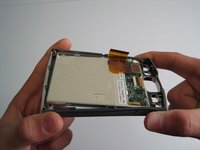
Carefully remove motherboard from the standoffs without damaging the LCD flex connector.
-
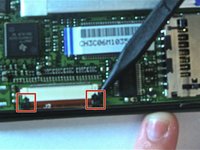
Using a spudger, unlock both sides of the flex connector block by pushing down.
-
Remove motherboard completely.
-
-
-
Remove buttons using fingers.
-
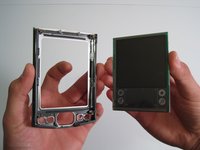
Gently flex frame to release screen from plastic frame.
-
Lift out screen.
-
-
-
Congratulations! You have successfully taken apart a Palm Tungsten E.
-
-
-
-
-
Reassemble the device in the reverse order of the tear down using the new screen in place of the old screen.
-
To reconnect the flex connector press up on the blocks with the spudger to ensure they click into place.
-
-








To reassemble your device, follow these instructions in reverse order.
crwdns2935221:0crwdne2935221:0
crwdns2935229:04crwdne2935229:0

crwdns2935287:0crwdne2935287:0

Cal Poly, Team 13-22, Maness Winter 2010 crwdns2935289:0Cal Poly, Team 13-22, Maness Winter 2010crwdne2935289:0
CPSU-MANESS-W10S13G22
crwdns2931471:04crwdne2931471:0
crwdns2935297:048crwdne2935297:0
