crwdns2933423:0crwdne2933423:0

Replace the Light Socket in a Desk Lamp

crwdns2942213:0crwdne2942213:0

  1. Replace the Light Socket in a Desk Lamp, Light socket: crwdns2935265:01crwdnd2935265:01crwdnd2935265:03crwdne2935265:0 Replace the Light Socket in a Desk Lamp, Light socket: crwdns2935265:01crwdnd2935265:02crwdnd2935265:03crwdne2935265:0 Replace the Light Socket in a Desk Lamp, Light socket: crwdns2935265:01crwdnd2935265:03crwdnd2935265:03crwdne2935265:0
    • Unplug the lamp before starting to avoid electrical shock.

    • Carefully unscrew the bulb by turning it counterclockwise.

    • If it’s tight, use a cloth for better grip and protection.

    • Set the bulb aside in a safe spot.

  2. Replace the Light Socket in a Desk Lamp: crwdns2935265:02crwdnd2935265:01crwdnd2935265:03crwdne2935265:0 Replace the Light Socket in a Desk Lamp: crwdns2935265:02crwdnd2935265:02crwdnd2935265:03crwdne2935265:0 Replace the Light Socket in a Desk Lamp: crwdns2935265:02crwdnd2935265:03crwdnd2935265:03crwdne2935265:0
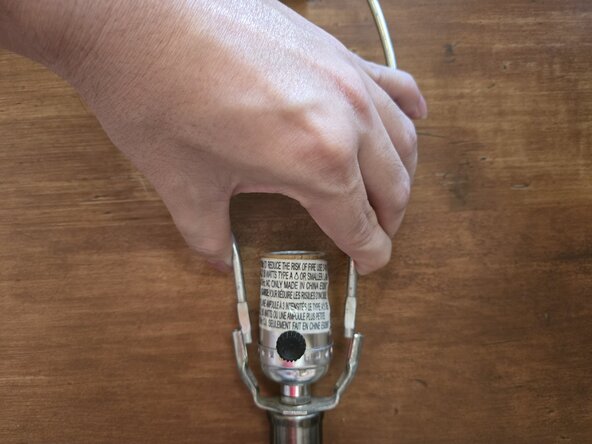
    • Grip the harp saddle firmly and lift it straight up to release it from the socket base.

    • Some lamps have clips or tension that hold the saddle in place—if yours does, gently squeeze the sides to loosen it.

    • Set the saddle aside for reassembly later.

  3. Replace the Light Socket in a Desk Lamp: crwdns2935265:03crwdnd2935265:01crwdnd2935265:02crwdne2935265:0 Replace the Light Socket in a Desk Lamp: crwdns2935265:03crwdnd2935265:02crwdnd2935265:02crwdne2935265:0
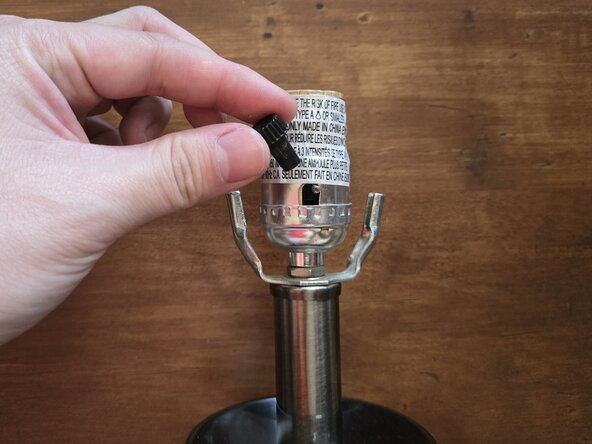
    • Turn the light switch handle counterclockwise to remove it.

    • Some handles may be snug, so take your time and avoid forcing it.

  4. Replace the Light Socket in a Desk Lamp: crwdns2935265:04crwdnd2935265:01crwdnd2935265:03crwdne2935265:0 Replace the Light Socket in a Desk Lamp: crwdns2935265:04crwdnd2935265:02crwdnd2935265:03crwdne2935265:0 Replace the Light Socket in a Desk Lamp: crwdns2935265:04crwdnd2935265:03crwdnd2935265:03crwdne2935265:0
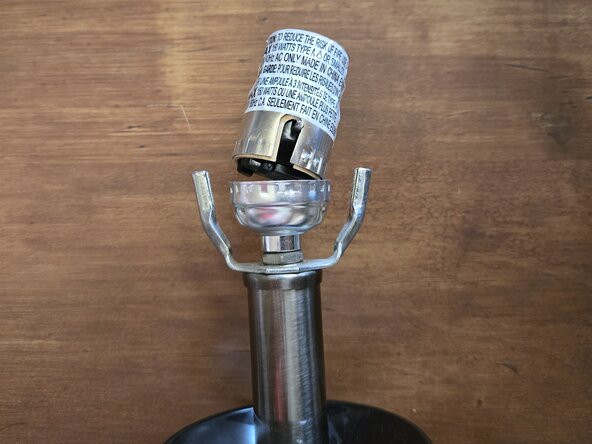
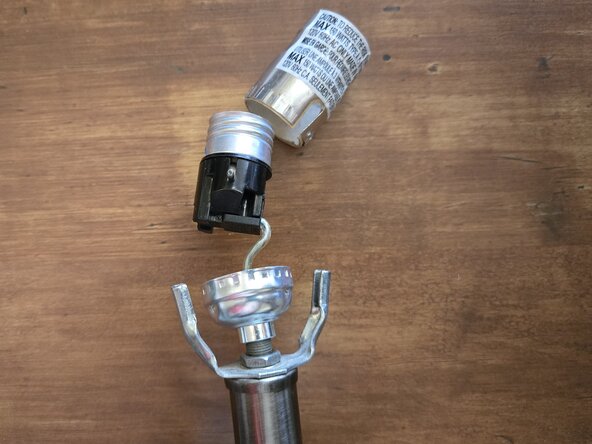
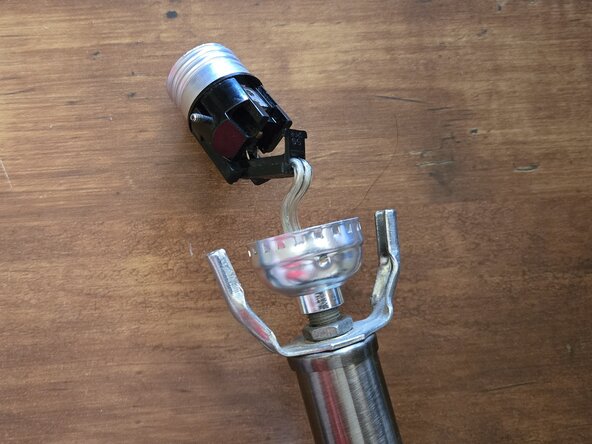
    • Gently pull the socket shell up from the lamp base.

    • Some sockets may be snug or clipped in. If so, gently wiggle the socket while pulling to loosen it.

    • Be careful not to pull too hard on the wires—they are still connected underneath.

  5. Replace the Light Socket in a Desk Lamp: crwdns2935265:05crwdnd2935265:01crwdnd2935265:03crwdne2935265:0 Replace the Light Socket in a Desk Lamp: crwdns2935265:05crwdnd2935265:02crwdnd2935265:03crwdne2935265:0 Replace the Light Socket in a Desk Lamp: crwdns2935265:05crwdnd2935265:03crwdnd2935265:03crwdne2935265:0
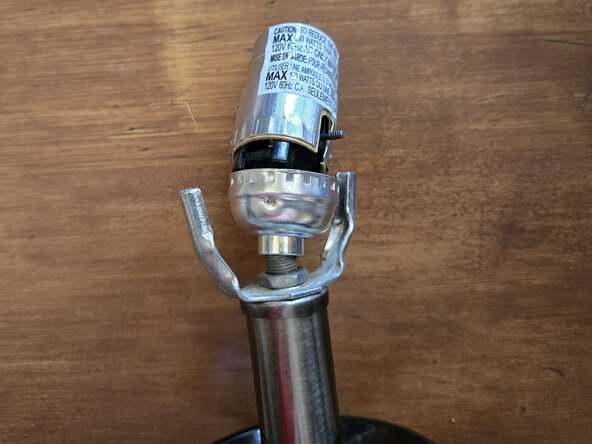
    • Carefully open the inner socket housing to access the wire connections.

    • Depending on your lamp model, you may need to unscrew the socket, release a locking tab, or separate a snap-fit joint.

    • Use a screwdriver to loosen the terminal screws or clips and gently disconnect the wires.

  6. Replace the Light Socket in a Desk Lamp: crwdns2935265:06crwdnd2935265:01crwdnd2935265:02crwdne2935265:0 Replace the Light Socket in a Desk Lamp: crwdns2935265:06crwdnd2935265:02crwdnd2935265:02crwdne2935265:0
    • Release the wire by loosening screws, releasing clips, or pulling them from push-in connectors, depending on the socket.

    • Take note of how the wires were connected for reassembly later.

  7. Replace the Light Socket in a Desk Lamp: crwdns2935265:07crwdnd2935265:01crwdnd2935265:03crwdne2935265:0 Replace the Light Socket in a Desk Lamp: crwdns2935265:07crwdnd2935265:02crwdnd2935265:03crwdne2935265:0 Replace the Light Socket in a Desk Lamp: crwdns2935265:07crwdnd2935265:03crwdnd2935265:03crwdne2935265:0
    • Align the new socket with the metal brackets or prongs on the lamp base, then secure it.

    • Depending on the lamp, snap it into place, twist to lock, or fasten it with screws.

    • Make sure the socket sits firmly and evenly to prevent wobbling.

  8. Replace the Light Socket in a Desk Lamp: crwdns2935265:08crwdnd2935265:01crwdnd2935265:03crwdne2935265:0 Replace the Light Socket in a Desk Lamp: crwdns2935265:08crwdnd2935265:02crwdnd2935265:03crwdne2935265:0 Replace the Light Socket in a Desk Lamp: crwdns2935265:08crwdnd2935265:03crwdnd2935265:03crwdne2935265:0
    • Press the socket cap down onto the base until it clicks or locks into place.

    • If it has screws, replace and tighten them to secure the socket.

    • Reattach the harp.

    • Finally, screw in a working bulb and test the lamp to confirm the repair was successful.

crwdns2915888:0crwdne2915888:0

To reassemble your device, follow these instructions in reverse order.

Phieu Pham

crwdns2935283:008/27/25crwdne2935283:0

157 crwdns2915208:0crwdne2915208:0

crwdns2935295:0crwdne2935295:0

crwdns2935287:0crwdne2935287:0

Austin Community College, Team 73-11, Kapoor Fall 2025 crwdns2935289:0Austin Community College, Team 73-11, Kapoor Fall 2025crwdne2935289:0

AUSTINCC-KAPOOR-F25S73G11

crwdns2934841:01crwdne2934841:0

crwdns2935303:01crwdne2935303:0

crwdns2947412:00crwdne2947412:0

crwdns2917038:0crwdne2917038:0

crwdns2936625:0crwdne2936625:0:

crwdns2936751:024crwdne2936751:0 3

crwdns2936753:07crwdne2936753:0 3

crwdns2936753:030crwdne2936753:0 3

crwdns2942667:0crwdne2942667:0 18