
Replace Front Panel

crwdns2959932:0crwdnd2959932:0You Zhoucrwdnd2959932:0crwdnd2959932:0crwdnd2959932:05crwdnd2959932:0crwdne2959932:0
crwdns2959936:0Kul 5, 2023crwdne2959936:0
crwdns2869540:0crwdne2869540:0: 1.2K
crwdns2959988:0crwdne2959988:0
- crwdns2959990:0crwdne2959990:0
- 2
- crwdns2959992:0crwdne2959992:0
- 28
- crwdns2959994:0crwdne2959994:0
- 93
- crwdns2959996:0crwdne2959996:0
- 1,171
crwdns2955950:0crwdne2955950:0: 0
crwdns2959998:0crwdne2959998:0
crwdns2960000:0crwdne2960000:0crwdns2959984:0crwdne2959984:0: 0 1
crwdns2959956:0crwdne2959956:0
crwdns2959968:01crwdne2959968:0
crwdns2959986:0crwdne2959986:0: 0 1
crwdns2959958:0crwdne2959958:0
crwdns2959976:01crwdne2959976:0
crwdns2959930:0crwdne2959930:0
crwdns2943215:0crwdne2943215:0


-
-
-
Slide the back cover down towards the bottom of the phone to remove.
 crwdns2952109:0crwdne2952109:0
-
-
-
Pull the top of the battery towards you to remove it from the phone.
-
-
-
-
-
-
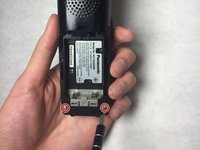
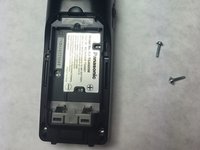
Unscrew the two screws located at the bottom of the phone.
-
-
-
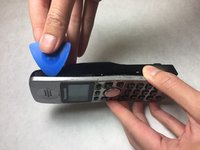
Separate the back cover from the front cover by using a wedge.
-
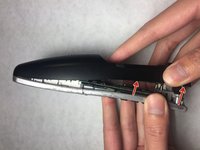
Remove the back cover from the front cover by pulling them apart.
-
-
-
Remove three screws on the motherboard.
-
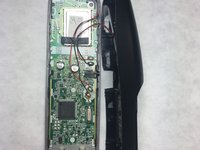
Pull the phone face off of the motherboard.
-
-





To reassemble your device, follow these instructions in reverse order.

crwdns2935287:0crwdne2935287:0

IUPUI, Team 3-1, Baechle Fall 2016 crwdns2935289:0IUPUI, Team 3-1, Baechle Fall 2016crwdne2935289:0
IUPUI-BAECHLE-F16S3G1
crwdns2931471:04crwdne2931471:0
crwdns2935297:060crwdne2935297:0
