
Repairing Nintendo DS Lite Volume Switch

crwdns2959932:0crwdnd2959932:0Philipcrwdnd2959932:0crwdnd2959932:0crwdnd2959932:07crwdnd2959932:0crwdne2959932:0
crwdns2959936:0Mud 7, 2024crwdne2959936:0
crwdns2869540:0crwdne2869540:0: 14K
crwdns2959988:0crwdne2959988:0
- crwdns2959990:0crwdne2959990:0
- 5
- crwdns2959992:0crwdne2959992:0
- 41
- crwdns2959994:0crwdne2959994:0
- 187
- crwdns2959996:0crwdne2959996:0
- 13,831
crwdns2955950:0crwdne2955950:0: 19
crwdns2960004:019crwdne2960004:0.
crwdns2959984:0crwdne2959984:0: 5 6
crwdns2959974:05crwdne2959974:0
crwdns2959970:06crwdne2959970:0
crwdns2959986:0crwdne2959986:0: 9 10
crwdns2959982:09crwdne2959982:0
crwdns2959978:010crwdne2959978:0
crwdns2915892:0crwdne2915892:0
crwdns2959928:0crwdne2959928:0 ↓Replace the volume switch on the DS Lite.
crwdns2959930:0crwdne2959930:0
crwdns2943215:0crwdne2943215:0
-
Spudger4.9
-


-
-
-
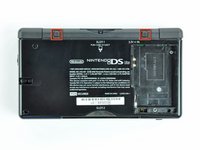
Unscrew the Phillips screw securing the battery cover to the lower case.
-
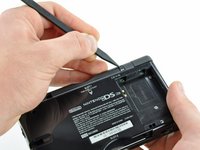
Pry the battery cover upward with a spudger or fingernail, and lift out of the lower case.
 crwdns2952109:0crwdne2952109:0
-
-
-
Wedge the edge of a spudger in between the side of the battery and the lower case housing and pry upward to dislodge the battery.
-
Remove the battery from the DS Lite.
-
-
-
-
-
Use the tip of a spudger to pry both rubber feet off the DS Lite.
-
-
-
-
Remove the following screws securing the lower case to the body of the DS Lite:
-
Two 4.3 mm gold Phillips screws
-
One 3.9 mm black Tri-point screw
-
One 3.3 mm silver Phillips screw
-
Three 5.5 mm silver Tri-point screws
-
-
-
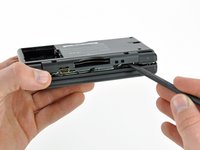
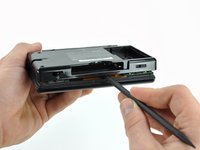
Insert the edge of a spudger in between the lower and upper case near the top right corner of the DS Lite.
-
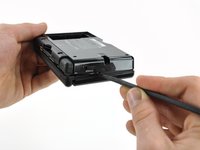
Carefully run the spudger along the right edge of the DS Lite, creating an opening in the process.
-
Continue running the spudger along the backside of the DS Lite until the majority of the lower case has been separated from the upper case.
-
-
-
Lift the lower case away from the rest of the DS Lite.
-
-
-
-
crwdns2935267:0crwdne2935267:0Tweezers$4.99
-
Carefully use a pair of tweezers to remove the volume switch.
-
-






crwdns2935221:0crwdne2935221:0
crwdns2935229:05crwdne2935229:0

crwdns2935287:0crwdne2935287:0

Cal Poly, Team 16-30, Maness Winter 2010 crwdns2935289:0Cal Poly, Team 16-30, Maness Winter 2010crwdne2935289:0
CPSU-MANESS-W10S16G30
crwdns2931471:04crwdne2931471:0
crwdns2935297:096crwdne2935297:0
