crwdns2933423:0crwdne2933423:0
crwdns2947577:0crwdnd2947577:0crwdne2947577:0

Removing DJI Phantom 2 Vision+ Case Top Shell

crwdns2942213:0crwdne2942213:0

  1. Removing DJI Phantom 2 Vision+ Case Top Shell, Remove the battery: crwdns2935265:01crwdnd2935265:01crwdnd2935265:03crwdne2935265:0 Removing DJI Phantom 2 Vision+ Case Top Shell, Remove the battery: crwdns2935265:01crwdnd2935265:02crwdnd2935265:03crwdne2935265:0 Removing DJI Phantom 2 Vision+ Case Top Shell, Remove the battery: crwdns2935265:01crwdnd2935265:03crwdnd2935265:03crwdne2935265:0
    • Pinch the top and bottom tabs of the battery case, pull the battery straight out to remove it.

    • The metal connectors form a stiff mechanical connection with the battery, you will need quite a bit of force to remove the battery. Hold the Phantom Vision+ with one hand and remove the battery with the other.

    crwdns2952109:0crwdne2952109:0

    crwdns2917038:0crwdne2917038:0

  2. Removing DJI Phantom 2 Vision+ Case Top Shell, Propellers: crwdns2935265:02crwdnd2935265:01crwdnd2935265:01crwdne2935265:0
    • Determine if the propellor is clockwise or counter-clockwise rotating.

    • Each arm is labeled with a rotation icon that shows the direction of propellor rotation.

    • If this icon is missing or you can't read it, you can determine the direction of rotation by examining the propellor.

    • A clockwise rotating propellor pushes air down while rotating clockwise, and the opposite is true for a counter-clockwise rotating propellor, and the propellor blade slopes up in the direction of rotation.

    crwdns2952109:0crwdne2952109:0

    crwdns2917038:0crwdne2917038:0

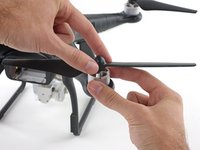
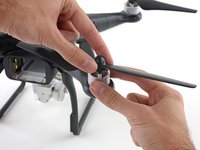
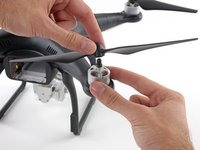
  3. Removing DJI Phantom 2 Vision+ Case Top Shell, Removing clockwise rotating propellers: crwdns2935265:03crwdnd2935265:01crwdnd2935265:03crwdne2935265:0 Removing DJI Phantom 2 Vision+ Case Top Shell, Removing clockwise rotating propellers: crwdns2935265:03crwdnd2935265:02crwdnd2935265:03crwdne2935265:0 Removing DJI Phantom 2 Vision+ Case Top Shell, Removing clockwise rotating propellers: crwdns2935265:03crwdnd2935265:03crwdnd2935265:03crwdne2935265:0
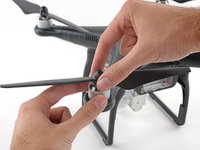
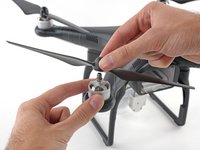
    • Loosen a clockwise rotating propeller by holding the motor with one hand and spinning the propellor clockwise.

    • Remove the propellor.

    crwdns2952109:0crwdne2952109:0

    crwdns2917038:0crwdne2917038:0

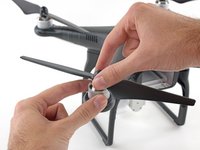
  4. Removing DJI Phantom 2 Vision+ Case Top Shell, Removing counter-clockwise rotating propellers: crwdns2935265:04crwdnd2935265:01crwdnd2935265:03crwdne2935265:0 Removing DJI Phantom 2 Vision+ Case Top Shell, Removing counter-clockwise rotating propellers: crwdns2935265:04crwdnd2935265:02crwdnd2935265:03crwdne2935265:0 Removing DJI Phantom 2 Vision+ Case Top Shell, Removing counter-clockwise rotating propellers: crwdns2935265:04crwdnd2935265:03crwdnd2935265:03crwdne2935265:0
    • Loosen a counter-clockwise rotating propeller by holding the motor with one hand and spinning the propellor counter-clockwise.

    • Remove the propellor.

    crwdns2952109:0crwdne2952109:0

    crwdns2917038:0crwdne2917038:0

  5. Removing DJI Phantom 2 Vision+ Case Top Shell, Case Top Shell: crwdns2935265:05crwdnd2935265:01crwdnd2935265:02crwdne2935265:0 Removing DJI Phantom 2 Vision+ Case Top Shell, Case Top Shell: crwdns2935265:05crwdnd2935265:02crwdnd2935265:02crwdne2935265:0
    • Remove the following screws from the underside of the Phantom:

    • Twelve 2.0 mm hex bolts

    • Four Phillips #00 screws

    crwdns2952109:0crwdne2952109:0

    crwdns2917038:0crwdne2917038:0

  6. Removing DJI Phantom 2 Vision+ Case Top Shell: crwdns2935265:06crwdnd2935265:01crwdnd2935265:02crwdne2935265:0 Removing DJI Phantom 2 Vision+ Case Top Shell: crwdns2935265:06crwdnd2935265:02crwdnd2935265:02crwdne2935265:0
    • Gently lift up the top shell case.

    • Do not attempt to fully remove the top shell. The GPS cable is still attached to the mainboard, avoid lifting the case too high or you may damage this connection.

    crwdns2952109:0crwdne2952109:0

    crwdns2917038:0crwdne2917038:0

  7. Removing DJI Phantom 2 Vision+ Case Top Shell, Unplug GPS connector and remove case: crwdns2935265:07crwdnd2935265:01crwdnd2935265:03crwdne2935265:0 Removing DJI Phantom 2 Vision+ Case Top Shell, Unplug GPS connector and remove case: crwdns2935265:07crwdnd2935265:02crwdnd2935265:03crwdne2935265:0 Removing DJI Phantom 2 Vision+ Case Top Shell, Unplug GPS connector and remove case: crwdns2935265:07crwdnd2935265:03crwdnd2935265:03crwdne2935265:0
    • The GPS cable molex connector is located on the backside of the mainboard, near the battery opening.

    • Pull the GPS connector straight up out of its socket.

    • Lift the top shell case up and remove it from the body of the Phantom.

    crwdns2952109:0crwdne2952109:0

    crwdns2917038:0crwdne2917038:0

crwdns2915888:0crwdne2915888:0

To reassemble your device, follow these instructions in reverse order.

crwdns2935221:0crwdne2935221:0

crwdns2935229:011crwdne2935229:0

David Hoyt

crwdns2935283:004/09/10crwdne2935283:0

4 053 crwdns2915208:0crwdne2915208:0

crwdns2935297:039crwdne2935297:0

crwdns2935287:0crwdne2935287:0

Cal Poly, Team 25-89, Amido Spring 2010 crwdns2935289:0Cal Poly, Team 25-89, Amido Spring 2010crwdne2935289:0

CPSU-AMIDO-S10S25G89

crwdns2931471:04crwdne2931471:0

crwdns2935297:059crwdne2935297:0

crwdns2947412:02crwdne2947412:0

This guild will also largely work for the Phantom 3 (Adv./Pro) with the difference being that the phillips-head screws are T7s in the P3, and the 2mm Allen/Hex bolts are T8s.

anonymous 4102 - crwdns2934203:0crwdne2934203:0 crwdns2950251:0crwdne2950251:0

Does anyone know what the size and thread pitch for the “2.0 mm hex bolts” are? I lost the screws and need a replacement.

Matt Hirsch - crwdns2934203:0crwdne2934203:0 crwdns2950251:0crwdne2950251:0

crwdns2917038:0crwdne2917038:0

crwdns2936625:0crwdne2936625:0:

crwdns2936751:024crwdne2936751:0 2

crwdns2936753:07crwdne2936753:0 9

crwdns2936753:030crwdne2936753:0 35

crwdns2942667:0crwdne2942667:0 11,625