
Removing Back Cover

crwdns2959932:0crwdnd2959932:0Hasitcrwdnd2959932:0crwdnd2959932:0crwdnd2959932:011crwdnd2959932:0crwdne2959932:0
crwdns2959936:0Ndz 24, 2017crwdne2959936:0
crwdns2869540:0crwdne2869540:0: 5324
crwdns2959988:0crwdne2959988:0
- crwdns2959990:0crwdne2959990:0
- 5
- crwdns2959992:0crwdne2959992:0
- 28
- crwdns2959994:0crwdne2959994:0
- 110
- crwdns2959996:0crwdne2959996:0
- 5.324
crwdns2955950:0crwdne2955950:0: 1
crwdns2960002:01crwdne2960002:0.
crwdns2959984:0crwdne2959984:0: 4 5
crwdns2959974:04crwdne2959974:0
crwdns2959970:05crwdne2959970:0
crwdns2959986:0crwdne2959986:0: 0 1
crwdns2959958:0crwdne2959958:0
crwdns2959976:01crwdne2959976:0
crwdns2862601:0crwdne2862601:0
crwdns2862602:0crwdne2862602:0
crwdns2915892:0crwdne2915892:0
crwdns2959928:0crwdne2959928:0 ↓This guide will show how to remove the back cover.
crwdns2959930:0crwdne2959930:0
crwdns2943215:0crwdne2943215:0


-
-
-
Remove the six external screws from the camera using a Phillips #0 screwdriver.
-
After the screws has been removed, the bottom of the back half of the external case should be loosened from the camera.
 crwdns2952109:0crwdne2952109:0
-
-
-
Open the battery cover that's located on the bottom right side of the camera and carefully remove the battery.
-
-
-
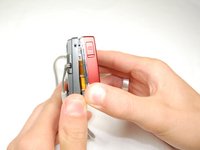
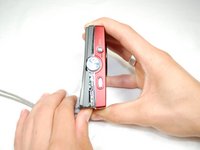
Slide your fingernail or a plastic spudger in the groove from the bottom to the top right side of the camera.
-
-
-
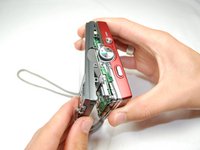
Carefully squeeze the top right corner of the camera and pry off the external cover.
-
Continue to pull the external cover and it will come off cleanly.
-
-
-




crwdns2935221:0crwdne2935221:0
crwdns2935229:04crwdne2935229:0

crwdns2935287:0crwdne2935287:0

Cal Poly, Team 6-17, Maness Spring 2010 crwdns2935289:0Cal Poly, Team 6-17, Maness Spring 2010crwdne2935289:0
CPSU-MANESS-S10S6G17
crwdns2931471:04crwdne2931471:0
crwdns2935297:060crwdne2935297:0
