crwdns2933423:0crwdne2933423:0
crwdns2947577:0crwdnd2947577:0crwdne2947577:0

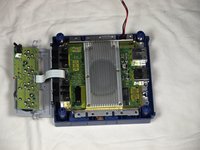
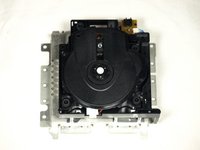
Remove Nintendo GameCube Optical Drive Assembly

crwdns2862623:0crwdne2862623:0
crwdns2948751:0crwdne2948751:0

crwdns2942213:0crwdne2942213:0

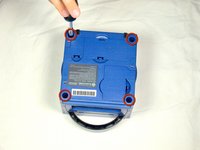
    1. Remove Nintendo GameCube Optical Drive Assembly, Top Case: crwdns2935265:01crwdnd2935265:01crwdnd2935265:03crwdne2935265:0 Remove Nintendo GameCube Optical Drive Assembly, Top Case: crwdns2935265:01crwdnd2935265:02crwdnd2935265:03crwdne2935265:0 Remove Nintendo GameCube Optical Drive Assembly, Top Case: crwdns2935265:01crwdnd2935265:03crwdnd2935265:03crwdne2935265:0
      • Turn over the Gamecube so that the bottom side is facing up.

      • Use the 4.5 mm Gamebit screwdriver to remove all four screws.

      crwdns2952109:0crwdne2952109:0

      crwdns2917038:0crwdne2917038:0

    2. Remove Nintendo GameCube Optical Drive Assembly: crwdns2935265:02crwdnd2935265:01crwdnd2935265:03crwdne2935265:0 Remove Nintendo GameCube Optical Drive Assembly: crwdns2935265:02crwdnd2935265:02crwdnd2935265:03crwdne2935265:0 Remove Nintendo GameCube Optical Drive Assembly: crwdns2935265:02crwdnd2935265:03crwdnd2935265:03crwdne2935265:0
      • With the bottom side of the GameCube facing upward and the screws removed, carefully pull the outer shell of the unit away from the top half.

      • Move the GameCube so that the inside is facing upwards.

      crwdns2952109:0crwdne2952109:0

      crwdns2917038:0crwdne2917038:0

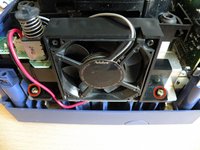
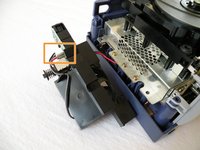
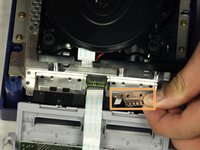
    1. Remove Nintendo GameCube Optical Drive Assembly, Remove Nintendo GameCube Optical Drive Assembly: crwdns2935265:03crwdnd2935265:01crwdnd2935265:02crwdne2935265:0 Remove Nintendo GameCube Optical Drive Assembly, Remove Nintendo GameCube Optical Drive Assembly: crwdns2935265:03crwdnd2935265:02crwdnd2935265:02crwdne2935265:0
      • The left side of the unit contains the cooling fan and its housing.

      • Carefully remove the two screws attaching the cooling fan housing to the unit.

      • Do not detach the red and black cooling fan wire from the main unit. Boxed in orange.

      crwdns2952109:0crwdne2952109:0

      crwdns2917038:0crwdne2917038:0

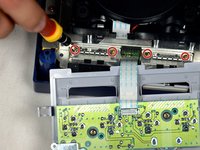
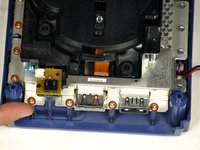
    2. Remove Nintendo GameCube Optical Drive Assembly: crwdns2935265:04crwdnd2935265:01crwdnd2935265:02crwdne2935265:0 Remove Nintendo GameCube Optical Drive Assembly: crwdns2935265:04crwdnd2935265:02crwdnd2935265:02crwdne2935265:0
      • Remove the four Phillips #1 screws retaining the ground springs.

      • Carefully remove the ground springs from the main unit.

      crwdns2952109:0crwdne2952109:0

      crwdns2917038:0crwdne2917038:0

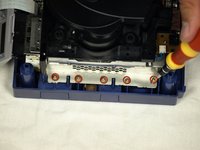
    3. Remove Nintendo GameCube Optical Drive Assembly: crwdns2935265:05crwdnd2935265:01crwdnd2935265:02crwdne2935265:0 Remove Nintendo GameCube Optical Drive Assembly: crwdns2935265:05crwdnd2935265:02crwdnd2935265:02crwdne2935265:0
      • The optical drive is secured to a metal plate.

      • Using a Phillips #2 screwdriver, unscrew the twelve screws that are around the outer edge of the optical drive.

      crwdns2952109:0crwdne2952109:0

      crwdns2917038:0crwdne2917038:0

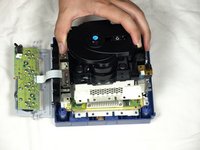
    4. Remove Nintendo GameCube Optical Drive Assembly, Remove the assembly: crwdns2935265:06crwdnd2935265:01crwdnd2935265:03crwdne2935265:0 Remove Nintendo GameCube Optical Drive Assembly, Remove the assembly: crwdns2935265:06crwdnd2935265:02crwdnd2935265:03crwdne2935265:0 Remove Nintendo GameCube Optical Drive Assembly, Remove the assembly: crwdns2935265:06crwdnd2935265:03crwdnd2935265:03crwdne2935265:0
      • Carefully separate the optical drive assembly from the rest of the GameCube unit.

      • The optical drive assembly is secured to the motherboard underneath by a slot; some force may be required to carefully free the assembly.

      • The metal plate and the actual optical drive will remain attached.

      crwdns2952109:0crwdne2952109:0

      crwdns2917038:0crwdne2917038:0

crwdns2915888:0crwdne2915888:0

To reassemble your device, follow these instructions in reverse order.

crwdns2935221:0crwdne2935221:0

dcarlin

crwdns2935283:011/05/09crwdne2935283:0

399 crwdns2915208:0crwdne2915208:0

crwdns2935297:04crwdne2935297:0

crwdns2935287:0crwdne2935287:0

Cal Poly, Team 6-2, Maness Fall 2009 crwdns2935289:0Cal Poly, Team 6-2, Maness Fall 2009crwdne2935289:0

CPSU-MANESS-F09S6G2

crwdns2931471:04crwdne2931471:0

crwdns2935297:088crwdne2935297:0

crwdns2947412:00crwdne2947412:0

crwdns2917038:0crwdne2917038:0

crwdns2936625:0crwdne2936625:0:

crwdns2936751:024crwdne2936751:0 0

crwdns2936753:07crwdne2936753:0 8

crwdns2936753:030crwdne2936753:0 37

crwdns2942667:0crwdne2942667:0 4,854