crwdns2933423:0crwdne2933423:0
crwdns2947577:0crwdnd2947577:0crwdne2947577:0

Razer DeathAdder Chroma USB Cable Replacement

crwdns2942213:0crwdne2942213:0

    1. Razer DeathAdder Chroma USB Cable Replacement, Outer Casing: crwdns2935265:01crwdnd2935265:01crwdnd2935265:01crwdne2935265:0
      • Opening the mouse casing will void any warranty that exists for the mouse.

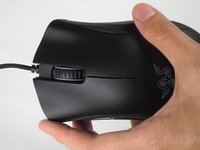
      • Turn the mouse over so the bottom is facing up.

      crwdns2952109:0crwdne2952109:0

      crwdns2917038:0crwdne2917038:0

    2. Razer DeathAdder Chroma USB Cable Replacement: crwdns2935265:02crwdnd2935265:01crwdnd2935265:02crwdne2935265:0 Razer DeathAdder Chroma USB Cable Replacement: crwdns2935265:02crwdnd2935265:02crwdnd2935265:02crwdne2935265:0
      • Use the blunt end of the spudger to pry the adhesive rubber pads from the top left and right edges.

      crwdns2952109:0crwdne2952109:0

      crwdns2917038:0crwdne2917038:0

    3. Razer DeathAdder Chroma USB Cable Replacement: crwdns2935265:03crwdnd2935265:01crwdnd2935265:02crwdne2935265:0 Razer DeathAdder Chroma USB Cable Replacement: crwdns2935265:03crwdnd2935265:02crwdnd2935265:02crwdne2935265:0
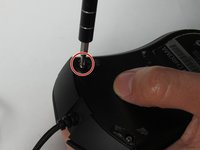
      • Use a Phillips #0 screwdriver to remove two 6.7 mm screws.

      crwdns2952109:0crwdne2952109:0

      crwdns2917038:0crwdne2917038:0

    4. Razer DeathAdder Chroma USB Cable Replacement: crwdns2935265:04crwdnd2935265:01crwdnd2935265:01crwdne2935265:0
      • Use your fingers to identify the location of the screw under the bottom label.

      crwdns2952109:0crwdne2952109:0

      crwdns2917038:0crwdne2917038:0

    5. Razer DeathAdder Chroma USB Cable Replacement: crwdns2935265:05crwdnd2935265:01crwdnd2935265:01crwdne2935265:0
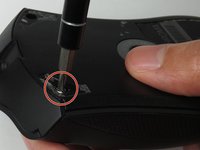
      • Use a Phillips #0 screwdriver to remove one 6.7 mm screw.

      • Clear the label away from around the screw for easier removal.

      crwdns2952109:0crwdne2952109:0

      crwdns2917038:0crwdne2917038:0

    6. Razer DeathAdder Chroma USB Cable Replacement: crwdns2935265:06crwdnd2935265:01crwdnd2935265:03crwdne2935265:0 Razer DeathAdder Chroma USB Cable Replacement: crwdns2935265:06crwdnd2935265:02crwdnd2935265:03crwdne2935265:0 Razer DeathAdder Chroma USB Cable Replacement: crwdns2935265:06crwdnd2935265:03crwdnd2935265:03crwdne2935265:0
      • Turn the mouse over so the bottom is facing down.

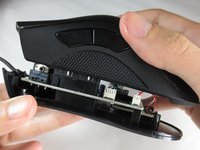
      • Separate the top casing from the bottom base by pulling the top casing upwards.

      • Separating the casing too quickly could damage the ribbon connector between the motherboard and the LED lights.

      crwdns2952109:0crwdne2952109:0

      crwdns2917038:0crwdne2917038:0

    7. Razer DeathAdder Chroma USB Cable Replacement: crwdns2935265:07crwdnd2935265:01crwdnd2935265:02crwdne2935265:0 Razer DeathAdder Chroma USB Cable Replacement: crwdns2935265:07crwdnd2935265:02crwdnd2935265:02crwdne2935265:0
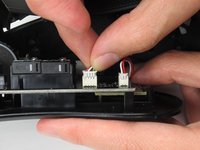
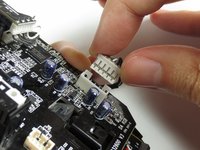
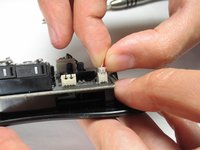
      • Disconnect the ribbon connector between the motherboard and the LED lights by pulling upward.

      • Pulling too hard could damage the wire connections.

      crwdns2952109:0crwdne2952109:0

      crwdns2917038:0crwdne2917038:0

    1. Razer DeathAdder Chroma USB Cable Replacement, Motherboard: crwdns2935265:08crwdnd2935265:01crwdnd2935265:02crwdne2935265:0 Razer DeathAdder Chroma USB Cable Replacement, Motherboard: crwdns2935265:08crwdnd2935265:02crwdnd2935265:02crwdne2935265:0
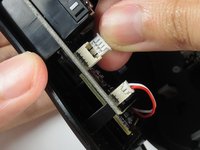
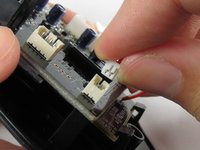
      • Disconnect the ribbon connector between the motherboard and the USB cable by pulling upward.

      crwdns2952109:0crwdne2952109:0

      crwdns2917038:0crwdne2917038:0

    2. Razer DeathAdder Chroma USB Cable Replacement: crwdns2935265:09crwdnd2935265:01crwdnd2935265:01crwdne2935265:0
      • Use a Phillips #0 screwdriver to remove three 5.5 mm screws.

      crwdns2952109:0crwdne2952109:0

      crwdns2917038:0crwdne2917038:0

    3. Razer DeathAdder Chroma USB Cable Replacement: crwdns2935265:010crwdnd2935265:01crwdnd2935265:02crwdne2935265:0 Razer DeathAdder Chroma USB Cable Replacement: crwdns2935265:010crwdnd2935265:02crwdnd2935265:02crwdne2935265:0
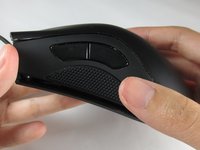
      • Use a Phillips #0 screwdriver to remove two 11.5 mm screws on the side buttons.

      crwdns2952109:0crwdne2952109:0

      crwdns2917038:0crwdne2917038:0

    4. Razer DeathAdder Chroma USB Cable Replacement: crwdns2935265:011crwdnd2935265:01crwdnd2935265:01crwdne2935265:0
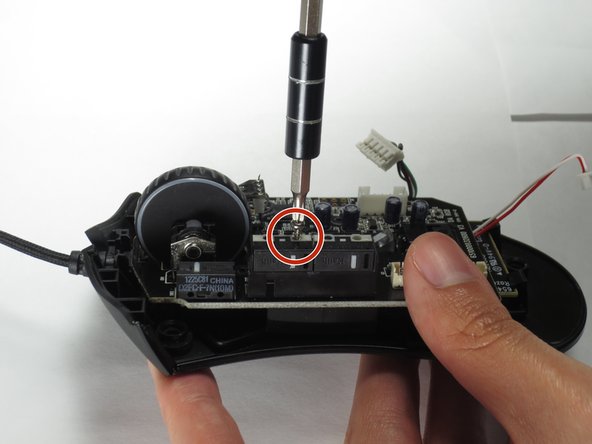
      • Use a Phillips #000 screwdriver to remove one 5.0 mm screw.

      crwdns2952109:0crwdne2952109:0

      crwdns2917038:0crwdne2917038:0

    5. Razer DeathAdder Chroma USB Cable Replacement: crwdns2935265:012crwdnd2935265:01crwdnd2935265:02crwdne2935265:0 Razer DeathAdder Chroma USB Cable Replacement: crwdns2935265:012crwdnd2935265:02crwdnd2935265:02crwdne2935265:0
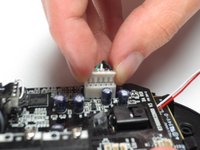
      • Disconnect the ribbon connector between the motherboard and the optical sensor.

      crwdns2952109:0crwdne2952109:0

      crwdns2917038:0crwdne2917038:0

    6. Razer DeathAdder Chroma USB Cable Replacement: crwdns2935265:013crwdnd2935265:01crwdnd2935265:02crwdne2935265:0 Razer DeathAdder Chroma USB Cable Replacement: crwdns2935265:013crwdnd2935265:02crwdnd2935265:02crwdne2935265:0
      • Remove the motherboard by grasping the sides and gently pulling upward.

      crwdns2952109:0crwdne2952109:0

      crwdns2917038:0crwdne2917038:0

    1. Razer DeathAdder Chroma USB Cable Replacement, USB Cable: crwdns2935265:014crwdnd2935265:01crwdnd2935265:01crwdne2935265:0
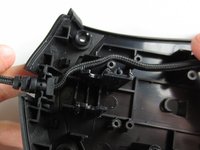
      • Locate the USB cable.

      crwdns2952109:0crwdne2952109:0

      crwdns2917038:0crwdne2917038:0

    2. Razer DeathAdder Chroma USB Cable Replacement: crwdns2935265:015crwdnd2935265:01crwdnd2935265:02crwdne2935265:0 Razer DeathAdder Chroma USB Cable Replacement: crwdns2935265:015crwdnd2935265:02crwdnd2935265:02crwdne2935265:0
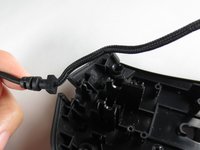
      • Remove the USB cable by pulling it up and out.

      crwdns2952109:0crwdne2952109:0

      crwdns2917038:0crwdne2917038:0

crwdns2915888:0crwdne2915888:0

To reassemble your device, follow these instructions in reverse order.

crwdns2935221:0crwdne2935221:0

crwdns2935229:08crwdne2935229:0

Henry Shi

crwdns2935283:003/26/17crwdne2935283:0

236 crwdns2915208:0crwdne2915208:0

crwdns2935295:0crwdne2935295:0

crwdns2935287:0crwdne2935287:0

Baylor, Team S5-G2, Williams Spring 2017 crwdns2935289:0Baylor, Team S5-G2, Williams Spring 2017crwdne2935289:0

BU-WILLIAMS-S17S5G2

crwdns2931471:03crwdne2931471:0

crwdns2935297:060crwdne2935297:0

crwdns2947412:05crwdne2947412:0

Thank you! It realy worked. Btw: The cable for the Deathadder 2013 is working for the Chroma and Elite as well. I Just tried it :)

Pokefreeks - crwdns2934203:0crwdne2934203:0 crwdns2950251:0crwdne2950251:0
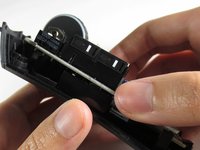
Great and easy guide thanx alot, saved me a new mouse :)

jesperkb - crwdns2934203:0crwdne2934203:0 crwdns2950251:0crwdne2950251:0
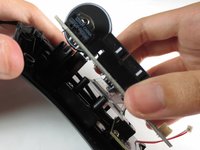
Is there a reliable website where I can get a replacement cable with low delivery time?

Bubbles EXE - crwdns2934203:0crwdne2934203:0 crwdns2950251:0crwdne2950251:0

crwdns2917038:0crwdne2917038:0

crwdns2936625:0crwdne2936625:0:

crwdns2936751:024crwdne2936751:0 0

crwdns2936753:07crwdne2936753:0 8

crwdns2936753:030crwdne2936753:0 55

crwdns2942667:0crwdne2942667:0 15,543