crwdns2933423:0crwdne2933423:0
crwdns2947577:0crwdnd2947577:0crwdne2947577:0

PowerA Spectra Infinity Enhanced D-pad Replacement

crwdns2869540:0crwdne2869540:0: 940

crwdns2959988:0crwdne2959988:0

crwdns2959990:0crwdne2959990:0
2
crwdns2959992:0crwdne2959992:0
12
crwdns2959994:0crwdne2959994:0
64
crwdns2959996:0crwdne2959996:0
940
crwdns2955950:0crwdne2955950:0: 0

crwdns2959998:0crwdne2959998:0

crwdns2960000:0crwdne2960000:0
crwdns2959984:0crwdne2959984:0: 1

crwdns2959972:01crwdne2959972:0

crwdns2959986:0crwdne2959986:0: 0

crwdns2959958:0crwdne2959958:0

crwdns2955944:0crwdne2955944:0: 10 - 15 crwdns2931279:0crwdne2931279:0
crwdns2955970:0crwdne2955970:0: crwdns2937801:0crwdne2937801:0
crwdns2862591:0crwdne2862591:0

crwdns2862592:0crwdne2862592:0

PowerA Spectra Infinity Enhanced D-pad Replacement

crwdns2915892:0crwdne2915892:0

crwdns2959928:0crwdne2959928:0 ↓

If your PowerA Spectra Infinity Enhanced (model number 1522360-01) D-pad is unresponsive, use this guide to replace the D-pad.

You may also want to replace your D-pad with a different customized D-pad in which case you can also use this guide to do! Please ensure that the controller is not plugged in while disassembling it.

crwdns2959930:0crwdne2959930:0

crwdns2943215:0crwdne2943215:0

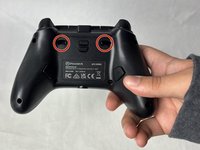
    1. PowerA Spectra Infinity Enhanced D-pad Replacement, Motherboard: crwdns2935265:01crwdnd2935265:01crwdnd2935265:02crwdne2935265:0 PowerA Spectra Infinity Enhanced D-pad Replacement, Motherboard: crwdns2935265:01crwdnd2935265:02crwdnd2935265:02crwdne2935265:0
      • Flip the controller so the back is facing up.

      crwdns2952109:0crwdne2952109:0

      crwdns2917038:0crwdne2917038:0

    2. PowerA Spectra Infinity Enhanced D-pad Replacement: crwdns2935265:02crwdnd2935265:01crwdnd2935265:01crwdne2935265:0
      • Remove the eight 10 mm screws from the back of the controller using a Phillips #0 screwdriver.

      crwdns2952109:0crwdne2952109:0

      crwdns2917038:0crwdne2917038:0

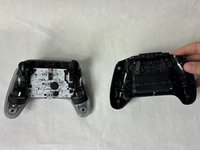
    3. PowerA Spectra Infinity Enhanced D-pad Replacement: crwdns2935265:03crwdnd2935265:01crwdnd2935265:02crwdne2935265:0 PowerA Spectra Infinity Enhanced D-pad Replacement: crwdns2935265:03crwdnd2935265:02crwdnd2935265:02crwdne2935265:0
      • Unlock the trigger locks before removing the backplate.

      • This will make taking the plate off easier.

      • Use your fingers and carefully remove the backplate.

      crwdns2952109:0crwdne2952109:0

      crwdns2917038:0crwdne2917038:0

    4. PowerA Spectra Infinity Enhanced D-pad Replacement: crwdns2935265:04crwdnd2935265:01crwdnd2935265:01crwdne2935265:0
      • Remove the two 10 mm screws connecting the motherboard to the faceplate using a Phillips #0 screwdriver.

      crwdns2952109:0crwdne2952109:0

      crwdns2917038:0crwdne2917038:0

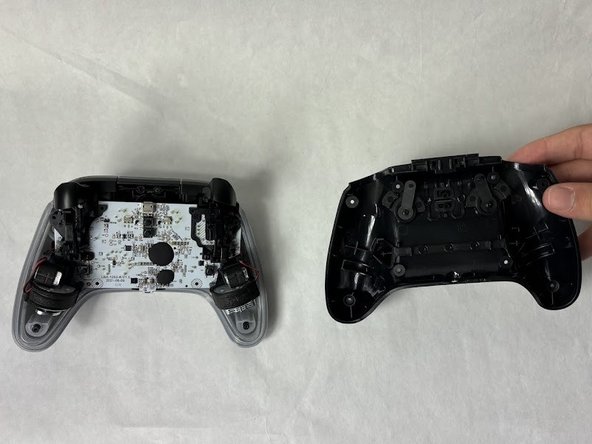
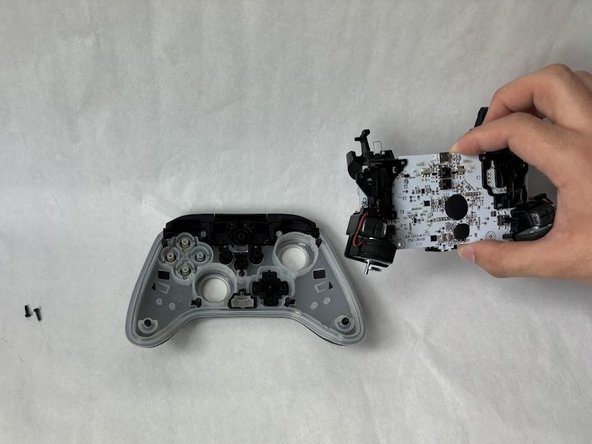
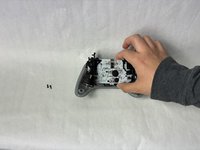
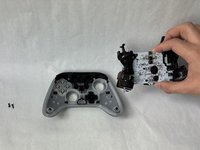
    5. PowerA Spectra Infinity Enhanced D-pad Replacement: crwdns2935265:05crwdnd2935265:01crwdnd2935265:02crwdne2935265:0 PowerA Spectra Infinity Enhanced D-pad Replacement: crwdns2935265:05crwdnd2935265:02crwdnd2935265:02crwdne2935265:0
      • Use your hand to separate the motherboard from the face plate.

      crwdns2952109:0crwdne2952109:0

      crwdns2917038:0crwdne2917038:0

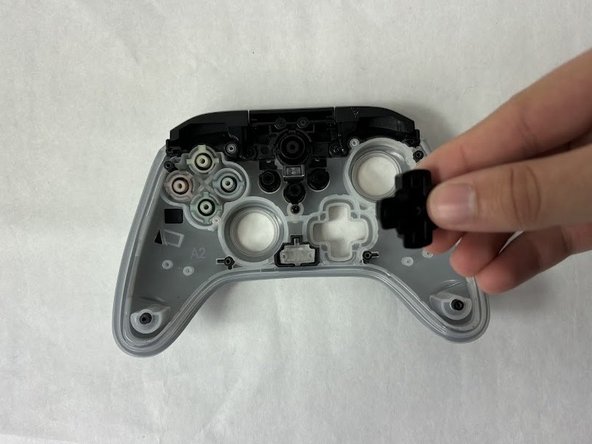
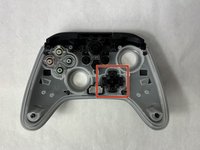
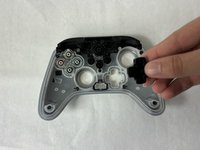
    1. PowerA Spectra Infinity Enhanced D-pad Replacement, D-pad: crwdns2935265:06crwdnd2935265:01crwdnd2935265:02crwdne2935265:0 PowerA Spectra Infinity Enhanced D-pad Replacement, D-pad: crwdns2935265:06crwdnd2935265:02crwdnd2935265:02crwdne2935265:0
      • Remove the D-pad.

      • The buttons will fall out easily if you flip the faceplate over. You can raise the faceplate off the surface and push the D-Pad out from underneath.

      crwdns2952109:0crwdne2952109:0

      crwdns2917038:0crwdne2917038:0

crwdns2915888:0crwdne2915888:0

To reassemble your device, follow these instructions in reverse order.

crwdns2935221:0crwdne2935221:0

crwdns2935227:0crwdne2935227:0

Kevyn Jorge

crwdns2935283:003/22/24crwdne2935283:0

1 020 crwdns2915208:0crwdne2915208:0

crwdns2935297:06crwdne2935297:0

crwdns2935287:0crwdne2935287:0

UMass Dartmouth, Team 6-5, Botvin Spring 2024 crwdns2935289:0UMass Dartmouth, Team 6-5, Botvin Spring 2024crwdne2935289:0

UMASSD-BOTVIN-S24S6G5

crwdns2931471:03crwdne2931471:0

crwdns2935297:072crwdne2935297:0

crwdns2947412:00crwdne2947412:0

crwdns2917038:0crwdne2917038:0

crwdns2936625:0crwdne2936625:0:

crwdns2936751:024crwdne2936751:0 2

crwdns2936753:07crwdne2936753:0 12

crwdns2936753:030crwdne2936753:0 64

crwdns2959996:0crwdne2959996:0 940