crwdns2933423:0crwdne2933423:0
crwdns2947577:0crwdnd2947577:0crwdne2947577:0

PlayStation VR Processor Unit Cooling Fan Replacement

crwdns2869540:0crwdne2869540:0: 11K

crwdns2959988:0crwdne2959988:0

crwdns2959990:0crwdne2959990:0
6
crwdns2959992:0crwdne2959992:0
36
crwdns2959994:0crwdne2959994:0
160
crwdns2959996:0crwdne2959996:0
11,135
crwdns2955950:0crwdne2955950:0: 4

crwdns2960008:04crwdne2960008:0

crwdns2960000:0crwdne2960000:0
crwdns2959984:0crwdne2959984:0: 8

crwdns2959974:08crwdne2959974:0

crwdns2959986:0crwdne2959986:0: 1

crwdns2959980:01crwdne2959980:0

crwdns2955944:0crwdne2955944:0: 5 - 8 crwdns2931279:0crwdne2931279:0
crwdns2955970:0crwdne2955970:0: crwdns2937799:0crwdne2937799:0
PlayStation VR Processor Unit Cooling Fan Replacement

crwdns2915892:0crwdne2915892:0

crwdns2959928:0crwdne2959928:0 ↓

A damaged or broken cooling fan can make your system overheat so it is important to replace it if that happens in order to prevent any further damage to the system.

crwdns2959930:0crwdne2959930:0

crwdns2943215:0crwdne2943215:0

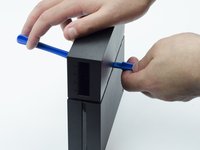
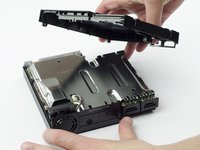
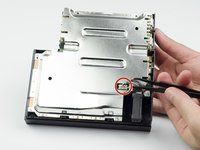
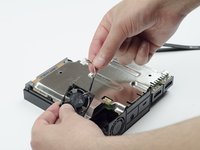
    1. PlayStation VR Processor Unit Cooling Fan Replacement, Processor Unit Cooling Fan: crwdns2935265:01crwdnd2935265:01crwdnd2935265:03crwdne2935265:0 PlayStation VR Processor Unit Cooling Fan Replacement, Processor Unit Cooling Fan: crwdns2935265:01crwdnd2935265:02crwdnd2935265:03crwdne2935265:0 PlayStation VR Processor Unit Cooling Fan Replacement, Processor Unit Cooling Fan: crwdns2935265:01crwdnd2935265:03crwdnd2935265:03crwdne2935265:0
      • On one side of the console (the side adjacent to the fan vent), there will be two 6 mm screws. Unscrew them with a PH #000 screwdriver.

      crwdns2952109:0crwdne2952109:0

      crwdns2917038:0crwdne2917038:0

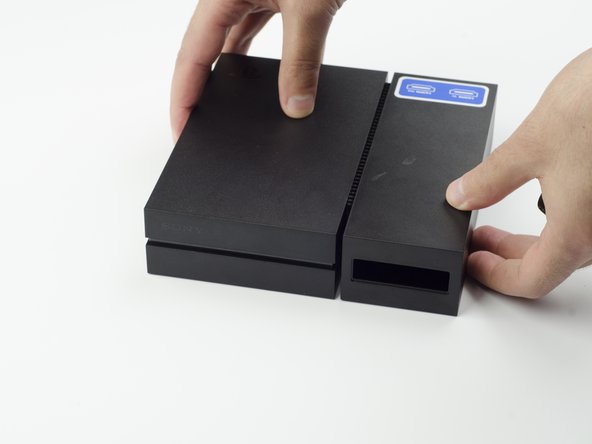
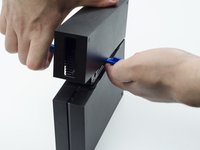
    2. PlayStation VR Processor Unit Cooling Fan Replacement: crwdns2935265:02crwdnd2935265:01crwdnd2935265:03crwdne2935265:0 PlayStation VR Processor Unit Cooling Fan Replacement: crwdns2935265:02crwdnd2935265:02crwdnd2935265:03crwdne2935265:0 PlayStation VR Processor Unit Cooling Fan Replacement: crwdns2935265:02crwdnd2935265:03crwdnd2935265:03crwdne2935265:0
      • Press and slide the side panel (it will have the two ports) back to reveal an additional 6 mm screw.

      • Unscrew the 6mm screw with a PH #000 screwdriver.

      crwdns2952109:0crwdne2952109:0

      crwdns2917038:0crwdne2917038:0

    3. PlayStation VR Processor Unit Cooling Fan Replacement: crwdns2935265:03crwdnd2935265:01crwdnd2935265:02crwdne2935265:0 PlayStation VR Processor Unit Cooling Fan Replacement: crwdns2935265:03crwdnd2935265:02crwdnd2935265:02crwdne2935265:0
      • Slide the panel back into place.

      crwdns2952109:0crwdne2952109:0

      crwdns2917038:0crwdne2917038:0

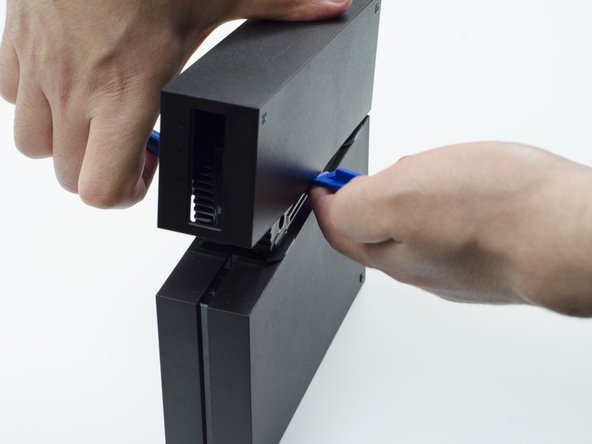
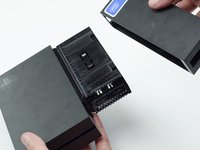
    4. PlayStation VR Processor Unit Cooling Fan Replacement: crwdns2935265:04crwdnd2935265:01crwdnd2935265:03crwdne2935265:0 PlayStation VR Processor Unit Cooling Fan Replacement: crwdns2935265:04crwdnd2935265:02crwdnd2935265:03crwdne2935265:0 PlayStation VR Processor Unit Cooling Fan Replacement: crwdns2935265:04crwdnd2935265:03crwdnd2935265:03crwdne2935265:0
      • Using a plastic opening tool, carefully pry the panel from the main console to reveal the HDMI ports.

      • You will probably need to lift it on both sides in order for the panel to come loose.

      crwdns2952109:0crwdne2952109:0

      crwdns2917038:0crwdne2917038:0

    5. PlayStation VR Processor Unit Cooling Fan Replacement: crwdns2935265:05crwdnd2935265:01crwdnd2935265:01crwdne2935265:0
      • Turn the console over.

      • Unscrew the two 9 mm screws with a PH #000 screwdriver.

      crwdns2952109:0crwdne2952109:0

      crwdns2917038:0crwdne2917038:0

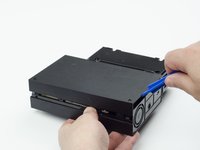
    6. PlayStation VR Processor Unit Cooling Fan Replacement: crwdns2935265:06crwdnd2935265:01crwdnd2935265:02crwdne2935265:0 PlayStation VR Processor Unit Cooling Fan Replacement: crwdns2935265:06crwdnd2935265:02crwdnd2935265:02crwdne2935265:0
      • With the plastic opening tool, carefully pry the console shell panel free and lift it away.

      crwdns2952109:0crwdne2952109:0

      crwdns2917038:0crwdne2917038:0

    7. PlayStation VR Processor Unit Cooling Fan Replacement: crwdns2935265:07crwdnd2935265:01crwdnd2935265:02crwdne2935265:0 PlayStation VR Processor Unit Cooling Fan Replacement: crwdns2935265:07crwdnd2935265:02crwdnd2935265:02crwdne2935265:0
      crwdns2935267:0crwdne2935267:0
      Tweezers
      $4.99
      • Using tweezers, carefully pull the multi colored bundled cable from its port connecting the fan to the console.

      • Carefully lift the fan and its wiring from the device.

      • Be mindful of damaging the wires.

      • Take care to keep your fingers away from the fan blades.

      crwdns2952109:0crwdne2952109:0

      crwdns2917038:0crwdne2917038:0

crwdns2915888:0crwdne2915888:0

To reassemble your device, follow these instructions in reverse order.

crwdns2935221:0crwdne2935221:0

crwdns2935229:08crwdne2935229:0

Sarah Shand

crwdns2935283:002/20/17crwdne2935283:0

1,996 crwdns2915208:0crwdne2915208:0

crwdns2935297:07crwdne2935297:0

crwdns2935287:0crwdne2935287:0

USF Tampa, Team S3-G1, Sullivan Spring 2017 crwdns2935289:0USF Tampa, Team S3-G1, Sullivan Spring 2017crwdne2935289:0

USFT-SULLIVAN-S17S3G1

crwdns2931471:03crwdne2931471:0

crwdns2935297:084crwdne2935297:0

crwdns2947412:04crwdne2947412:0

Where do I get a replacement fan tho?

Ponos King - crwdns2934203:0crwdne2934203:0 crwdns2950251:0crwdne2950251:0

I think is a 3x3 cm fan, alliexpres has some, but what voltage?

crus - crwdns2934203:0crwdne2934203:0 crwdns2950251:0crwdne2950251:0

Reference for fan when I have replaced mine : DELTA ELECTRONICS MODEL : ASB0305MA-01 DC 5V 0.19A

herossuperman - crwdns2934203:0crwdne2934203:0 crwdns2950251:0crwdne2950251:0

crwdns2917038:0crwdne2917038:0

crwdns2936625:0crwdne2936625:0:

crwdns2936751:024crwdne2936751:0 6

crwdns2936753:07crwdne2936753:0 36

crwdns2936753:030crwdne2936753:0 160

crwdns2959996:0crwdne2959996:0 11,135