crwdns2933423:0crwdne2933423:0
crwdns2947577:0crwdnd2947577:0crwdne2947577:0

PlayStation 3 Slim - Manually Removing Stuck Disk

crwdns2942213:0crwdne2942213:0

crwdns2936621:0crwdne2936621:0

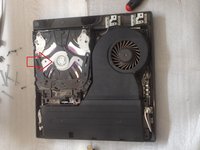
    1. PlayStation 3 Slim - Manually Removing Stuck Disk, PlayStation 3 Slim - Manually Removing Stuck Disk: crwdns2935265:01crwdnd2935265:01crwdnd2935265:03crwdne2935265:0 PlayStation 3 Slim - Manually Removing Stuck Disk, PlayStation 3 Slim - Manually Removing Stuck Disk: crwdns2935265:01crwdnd2935265:02crwdnd2935265:03crwdne2935265:0 PlayStation 3 Slim - Manually Removing Stuck Disk, PlayStation 3 Slim - Manually Removing Stuck Disk: crwdns2935265:01crwdnd2935265:03crwdnd2935265:03crwdne2935265:0
      • Disconnect all cables. You have 4x Torx T8 screws and 7x Phillips screws. Now you can remove outer case.

      crwdns2952109:0crwdne2952109:0

      crwdns2917038:0crwdne2917038:0

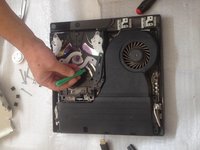
    2. PlayStation 3 Slim - Manually Removing Stuck Disk: crwdns2935265:02crwdnd2935265:01crwdnd2935265:03crwdne2935265:0 PlayStation 3 Slim - Manually Removing Stuck Disk: crwdns2935265:02crwdnd2935265:02crwdnd2935265:03crwdne2935265:0 PlayStation 3 Slim - Manually Removing Stuck Disk: crwdns2935265:02crwdnd2935265:03crwdnd2935265:03crwdne2935265:0
      • Unscrew the three screws. To remove Blu Ray unit shell you must open two plates that are on the left and right side.

      crwdns2952109:0crwdne2952109:0

      crwdns2917038:0crwdne2917038:0

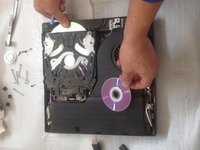
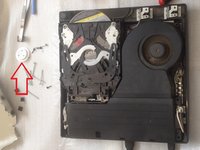
    3. PlayStation 3 Slim - Manually Removing Stuck Disk: crwdns2935265:03crwdnd2935265:01crwdnd2935265:03crwdne2935265:0 PlayStation 3 Slim - Manually Removing Stuck Disk: crwdns2935265:03crwdnd2935265:02crwdnd2935265:03crwdne2935265:0 PlayStation 3 Slim - Manually Removing Stuck Disk: crwdns2935265:03crwdnd2935265:03crwdnd2935265:03crwdne2935265:0
      • First remove the spindle disc magnet. Now use plastic tool and slowly extrude the disk from inside.

      crwdns2952109:0crwdne2952109:0

      crwdns2917038:0crwdne2917038:0

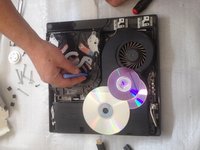
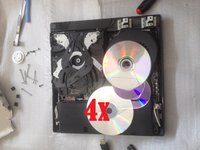
    4. PlayStation 3 Slim - Manually Removing Stuck Disk: crwdns2935265:04crwdnd2935265:01crwdnd2935265:02crwdne2935265:0 PlayStation 3 Slim - Manually Removing Stuck Disk: crwdns2935265:04crwdnd2935265:02crwdnd2935265:02crwdne2935265:0
      • In this case we have ... 4x disks. :)

      • .

      • Did you do it successfully?

      crwdns2952109:0crwdne2952109:0

      crwdns2917038:0crwdne2917038:0

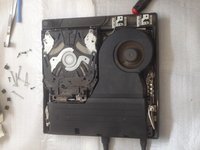
    5. PlayStation 3 Slim - Manually Removing Stuck Disk: crwdns2935265:05crwdnd2935265:01crwdnd2935265:02crwdne2935265:0 PlayStation 3 Slim - Manually Removing Stuck Disk: crwdns2935265:05crwdnd2935265:02crwdnd2935265:02crwdne2935265:0
      • Test the console before assembling. And don't forget to put the spindle disc magnet.

      crwdns2952109:0crwdne2952109:0

      crwdns2917038:0crwdne2917038:0

crwdns2915888:0crwdne2915888:0

To reassemble your device, follow these instructions in reverse order.

crwdns2935221:0crwdne2935221:0

crwdns2935229:019crwdne2935229:0

ZFix

crwdns2935283:012/09/13crwdne2935283:0

197.675 crwdns2915208:0crwdne2915208:0

crwdns2935297:0330crwdne2935297:0

crwdns2935287:0crwdne2935287:0

Master Techs crwdns2935289:0Master Techscrwdne2935289:0

Community

crwdns2931471:0335crwdne2931471:0

crwdns2935297:08.260crwdne2935297:0

crwdns2947410:01crwdne2947410:0

crwdns2917038:0crwdne2917038:0

crwdns2936625:0crwdne2936625:0:

crwdns2936751:024crwdne2936751:0 6

crwdns2936753:07crwdne2936753:0 67

crwdns2936753:030crwdne2936753:0 315

crwdns2942667:0crwdne2942667:0 32,771