crwdns2933423:0crwdne2933423:0
crwdns2947577:0crwdnd2947577:0crwdne2947577:0

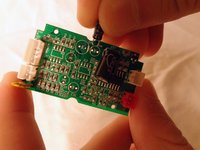
Philips SBA1060 Capacitor Replacement

crwdns2942213:0crwdne2942213:0

    1. Philips SBA1060 Capacitor Replacement, Battery Casing: crwdns2935265:01crwdnd2935265:01crwdnd2935265:01crwdne2935265:0
      • Remove the back cover by sliding it off.

      • Remove the 3 AAA batteries.

      crwdns2952109:0crwdne2952109:0

      crwdns2917038:0crwdne2917038:0

    2. Philips SBA1060 Capacitor Replacement: crwdns2935265:02crwdnd2935265:01crwdnd2935265:03crwdne2935265:0 Philips SBA1060 Capacitor Replacement: crwdns2935265:02crwdnd2935265:02crwdnd2935265:03crwdne2935265:0 Philips SBA1060 Capacitor Replacement: crwdns2935265:02crwdnd2935265:03crwdnd2935265:03crwdne2935265:0
      • Unscrew the nine exterior screws on the back panel using a PH0-size Philips-head screwdriver.

      • A larger screwdriver head and more force may be required for damaged screws.

      • Remove the triangular end piece by pulling it straight off.

      crwdns2952109:0crwdne2952109:0

      crwdns2917038:0crwdne2917038:0

    3. Philips SBA1060 Capacitor Replacement: crwdns2935265:03crwdnd2935265:01crwdnd2935265:02crwdne2935265:0 Philips SBA1060 Capacitor Replacement: crwdns2935265:03crwdnd2935265:02crwdnd2935265:02crwdne2935265:0
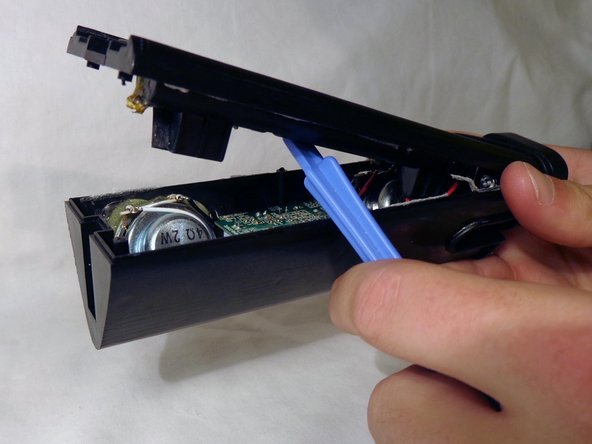
      • Remove the colored grill by sliding it off in the direction of the removed end piece.

      • Pry off the back battery panel with the plastic opening tool.

      • Be careful to avoid tearing any wires.

      crwdns2952109:0crwdne2952109:0

      crwdns2917038:0crwdne2917038:0

    1. Philips SBA1060 Capacitor Replacement, Capacitor: crwdns2935265:04crwdnd2935265:01crwdnd2935265:01crwdne2935265:0
      • Remove the two screws on opposite ends of the circuit board with the PH0 size philips head screw driver.

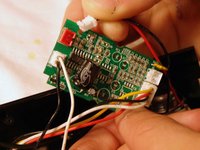
      • Slowly pull the circuit board out of the device

      • NOTE: Be careful not to damage any of the wires protruding from the back of the circuit board.

      crwdns2952109:0crwdne2952109:0

      crwdns2917038:0crwdne2917038:0

    2. Philips SBA1060 Capacitor Replacement: crwdns2935265:05crwdnd2935265:01crwdnd2935265:02crwdne2935265:0 Philips SBA1060 Capacitor Replacement: crwdns2935265:05crwdnd2935265:02crwdnd2935265:02crwdne2935265:0
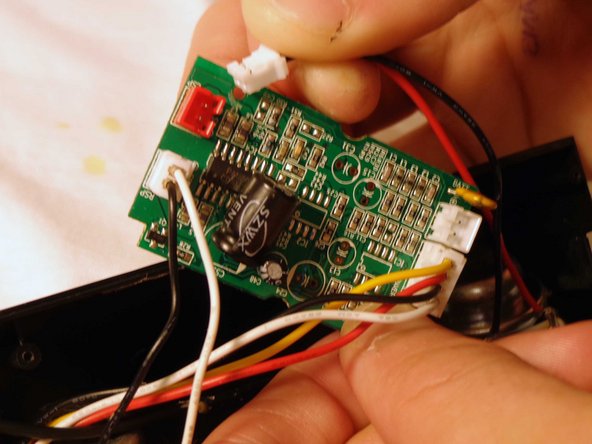
      • Flip the device and remove the battery plug from the circuit board by pulling out the plugs to fully remove back panel.

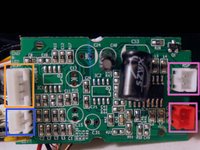
      • Remove the speaker plugs from the circuit board by pulling out the plugs. They are located on opposite sides of the circuit board.

      • NOTE: When reassembling, note that the speaker with the red wire goes to the red plug, and the speaker with the white wire goes to the adjacent white plug.

      • Remove the light plug from the circuit board.

      • NOTE: This plug is twice as wide as the speaker and battery plugs.

      crwdns2952109:0crwdne2952109:0

      crwdns2917038:0crwdne2917038:0

    3. Philips SBA1060 Capacitor Replacement: crwdns2935265:06crwdnd2935265:01crwdnd2935265:02crwdne2935265:0 Philips SBA1060 Capacitor Replacement: crwdns2935265:06crwdnd2935265:02crwdnd2935265:02crwdne2935265:0
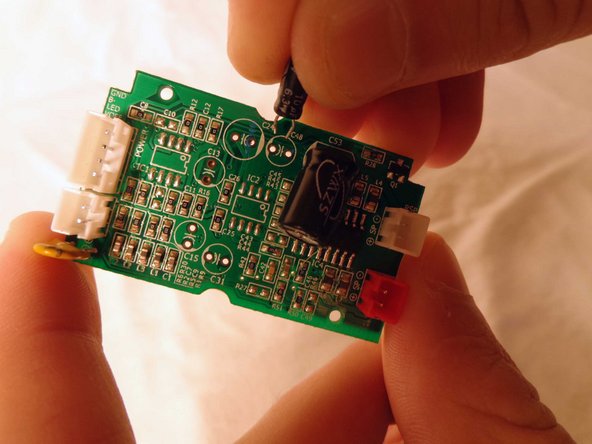
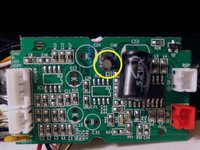
      • Locate the capacitor and carefully slide it out of the circuit board.

      • NOTE: The capacitor will be a cylindrical object protruding vertically near the center of the circuit board.

      • Slide the prongs of the replacement capacitor into the two holes of the circuit board where the original capacitor was removed from.

      • Reassemble the speaker.

      crwdns2952109:0crwdne2952109:0

      crwdns2917038:0crwdne2917038:0

crwdns2915888:0crwdne2915888:0

To reassemble your device, follow these instructions in reverse order.

crwdns2935221:0crwdne2935221:0

April Driscoll

crwdns2935283:010/21/13crwdne2935283:0

321 crwdns2915208:0crwdne2915208:0

crwdns2935297:03crwdne2935297:0

crwdns2935287:0crwdne2935287:0

Clemson, Team 14-4, Benson Fall 2013 crwdns2935289:0Clemson, Team 14-4, Benson Fall 2013crwdne2935289:0

CLEM-BENSON-F13S14G4

crwdns2931471:03crwdne2931471:0

crwdns2935297:048crwdne2935297:0

crwdns2947412:00crwdne2947412:0

crwdns2917038:0crwdne2917038:0

crwdns2936625:0crwdne2936625:0:

crwdns2936751:024crwdne2936751:0 2

crwdns2936753:07crwdne2936753:0 19

crwdns2936753:030crwdne2936753:0 63

crwdns2942667:0crwdne2942667:0 1,132