crwdns2933423:0crwdne2933423:0
crwdns2947577:0crwdnd2947577:0crwdne2947577:0

Pentax Optio WG-2 Back Case Replacement

crwdns2862623:0crwdne2862623:0
crwdns2948751:0crwdne2948751:0

crwdns2942213:0crwdne2942213:0

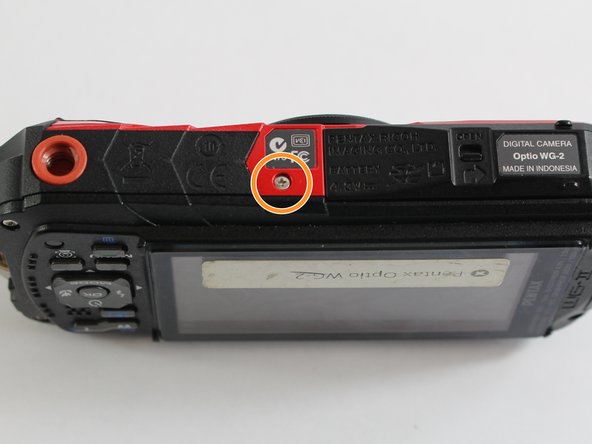
    1. Pentax Optio WG-2 Back Case Replacement, Back Case: crwdns2935265:01crwdnd2935265:01crwdnd2935265:02crwdne2935265:0 Pentax Optio WG-2 Back Case Replacement, Back Case: crwdns2935265:01crwdnd2935265:02crwdnd2935265:02crwdne2935265:0
      • Remove all four 1 mm JIS #00 screws from the back of the camera.

      crwdns2952109:0crwdne2952109:0

      crwdns2917038:0crwdne2917038:0

    2. Pentax Optio WG-2 Back Case Replacement: crwdns2935265:02crwdnd2935265:01crwdnd2935265:01crwdne2935265:0
      • Use your finger to peel the grip off the top of the camera.

      • For best results, start from the right side of the camera, opposite the buttons.

      • Once the grip is removed, you will most likely lose the water-tight seal.

      crwdns2952109:0crwdne2952109:0

      crwdns2917038:0crwdne2917038:0

    3. Pentax Optio WG-2 Back Case Replacement: crwdns2935265:03crwdnd2935265:01crwdnd2935265:01crwdne2935265:0
      crwdns2935267:0crwdne2935267:0
      Tweezers
      $4.99
      • Use the tweezers to remove the two buttons from the top of the camera.

      • The buttons may fall out while removing the grip.

      crwdns2952109:0crwdne2952109:0

      crwdns2917038:0crwdne2917038:0

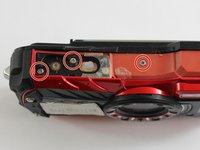
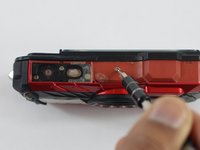
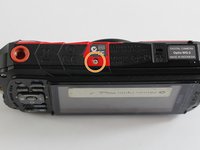
    4. Pentax Optio WG-2 Back Case Replacement: crwdns2935265:04crwdnd2935265:01crwdnd2935265:03crwdne2935265:0 Pentax Optio WG-2 Back Case Replacement: crwdns2935265:04crwdnd2935265:02crwdnd2935265:03crwdne2935265:0 Pentax Optio WG-2 Back Case Replacement: crwdns2935265:04crwdnd2935265:03crwdnd2935265:03crwdne2935265:0
      • Remove the three 1 mm JIS #000 screws from the top.

      • Remove the 1 mm JIS #000 screw from the bottom.

      crwdns2952109:0crwdne2952109:0

      crwdns2917038:0crwdne2917038:0

    5. Pentax Optio WG-2 Back Case Replacement: crwdns2935265:05crwdnd2935265:01crwdnd2935265:01crwdne2935265:0
      • Carefully separate the back and the front of the camera.

      • There are three ribbon cables connecting the two boards. Be careful not to tear them.

      crwdns2952109:0crwdne2952109:0

      crwdns2917038:0crwdne2917038:0

    6. Pentax Optio WG-2 Back Case Replacement: crwdns2935265:06crwdnd2935265:01crwdnd2935265:01crwdne2935265:0
      • Use the tip of a spudger to flip up the small retaining flaps on the ribbon cable ZIF connectors.

      • Carefully pull the ribbon cables out of their sockets.

      crwdns2952109:0crwdne2952109:0

      crwdns2917038:0crwdne2917038:0

crwdns2915888:0crwdne2915888:0

To reassemble your device, follow these instructions in reverse order.

crwdns2935221:0crwdne2935221:0

Matthew Bessette

crwdns2935283:003/04/16crwdne2935283:0

658 crwdns2915208:0crwdne2915208:0

crwdns2935297:06crwdne2935297:0

crwdns2935287:0crwdne2935287:0

UMass Dartmouth, Team 6-7, Bhusal Spring 2016 crwdns2935289:0UMass Dartmouth, Team 6-7, Bhusal Spring 2016crwdne2935289:0

UMASSD-BHUSAL-S16S6G7

crwdns2931471:03crwdne2931471:0

crwdns2935297:06crwdne2935297:0

crwdns2947412:00crwdne2947412:0

crwdns2917038:0crwdne2917038:0

crwdns2936625:0crwdne2936625:0:

crwdns2936751:024crwdne2936751:0 2

crwdns2936753:07crwdne2936753:0 4

crwdns2936753:030crwdne2936753:0 12

crwdns2942667:0crwdne2942667:0 290