crwdns2933423:0crwdne2933423:0
crwdns2947577:0crwdnd2947577:0crwdne2947577:0

Pantech Matrix Camera Button Replacement

crwdns2869540:0crwdne2869540:0: 627

crwdns2959988:0crwdne2959988:0

crwdns2959990:0crwdne2959990:0
2
crwdns2959992:0crwdne2959992:0
20
crwdns2959994:0crwdne2959994:0
73
crwdns2959996:0crwdne2959996:0
627
crwdns2955950:0crwdne2955950:0: 0

crwdns2959998:0crwdne2959998:0

crwdns2960000:0crwdne2960000:0
crwdns2959984:0crwdne2959984:0: 1

crwdns2959972:01crwdne2959972:0

crwdns2959986:0crwdne2959986:0: 0

crwdns2959958:0crwdne2959958:0

crwdns2955944:0crwdne2955944:0: 10 - 15 crwdns2931279:0crwdne2931279:0
crwdns2955970:0crwdne2955970:0: crwdns2937801:0crwdne2937801:0
Pantech Matrix Camera Button Replacement

crwdns2915892:0crwdne2915892:0

crwdns2959928:0crwdne2959928:0 ↓

The camera button of Pantech Matrix C740 functions as the mechanism by which the camera is activated; however, faulty functioning of the camera button may cause the device to not allow picture-taking. Therefore, this guide serves as an aid in the replacement of the camera button for the Pantech Matrix C740.

crwdns2959930:0crwdne2959930:0

crwdns2943215:0crwdne2943215:0

    1. Pantech Matrix Camera Button Replacement, Phone Orientation: crwdns2935265:01crwdnd2935265:01crwdnd2935265:01crwdne2935265:0
      • Place phone with screen side facing toward you.

      crwdns2952109:0crwdne2952109:0

      crwdns2917038:0crwdne2917038:0

    2. Pantech Matrix Camera Button Replacement, Phone Orientation: crwdns2935265:02crwdnd2935265:01crwdnd2935265:01crwdne2935265:0
      • Flip phone over so screen side is now facing down.

      crwdns2952109:0crwdne2952109:0

      crwdns2917038:0crwdne2917038:0

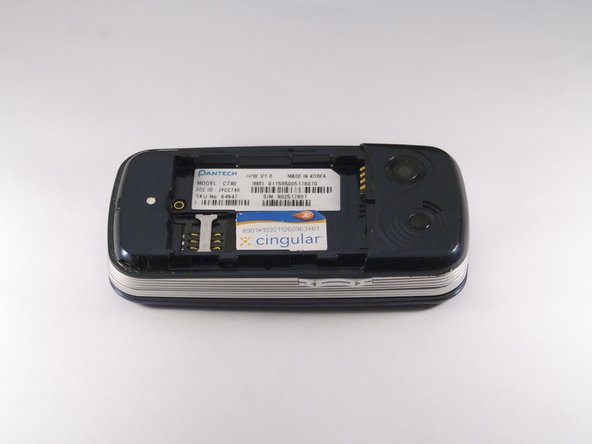
    3. Pantech Matrix Camera Button Replacement, Remove Back Cover: crwdns2935265:03crwdnd2935265:01crwdnd2935265:02crwdne2935265:0 Pantech Matrix Camera Button Replacement, Remove Back Cover: crwdns2935265:03crwdnd2935265:02crwdnd2935265:02crwdne2935265:0
      • Gently slide the backside phone cover off exposing the battery underneath.

      crwdns2952109:0crwdne2952109:0

      crwdns2917038:0crwdne2917038:0

    4. Pantech Matrix Camera Button Replacement, Lift Battery: crwdns2935265:04crwdnd2935265:01crwdnd2935265:01crwdne2935265:0
      • Carefully lift the battery up from where the spudger is pointed.

      crwdns2952109:0crwdne2952109:0

      crwdns2917038:0crwdne2917038:0

    5. Pantech Matrix Camera Button Replacement, Remove Battery: crwdns2935265:05crwdnd2935265:01crwdnd2935265:01crwdne2935265:0
      • Remove the battery from its dock.

      crwdns2952109:0crwdne2952109:0

      crwdns2917038:0crwdne2917038:0

    1. Pantech Matrix Camera Button Replacement, Slide SIM Card Out: crwdns2935265:06crwdnd2935265:01crwdnd2935265:03crwdne2935265:0 Pantech Matrix Camera Button Replacement, Slide SIM Card Out: crwdns2935265:06crwdnd2935265:02crwdnd2935265:03crwdne2935265:0 Pantech Matrix Camera Button Replacement, Slide SIM Card Out: crwdns2935265:06crwdnd2935265:03crwdnd2935265:03crwdne2935265:0
      • Slide the SIM Card out of its dock.

      crwdns2952109:0crwdne2952109:0

      crwdns2917038:0crwdne2917038:0

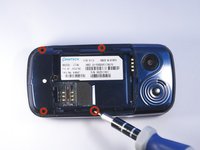
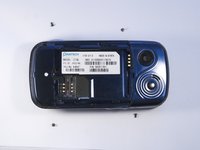
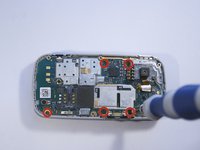
    1. Pantech Matrix Camera Button Replacement, Remove Phone Screws: crwdns2935265:07crwdnd2935265:01crwdnd2935265:02crwdne2935265:0 Pantech Matrix Camera Button Replacement, Remove Phone Screws: crwdns2935265:07crwdnd2935265:02crwdnd2935265:02crwdne2935265:0
      • Use a Phillips screwdriver to remove the four 2mm Phillips #000 screws from each corner of the device.

      crwdns2952109:0crwdne2952109:0

      crwdns2917038:0crwdne2917038:0

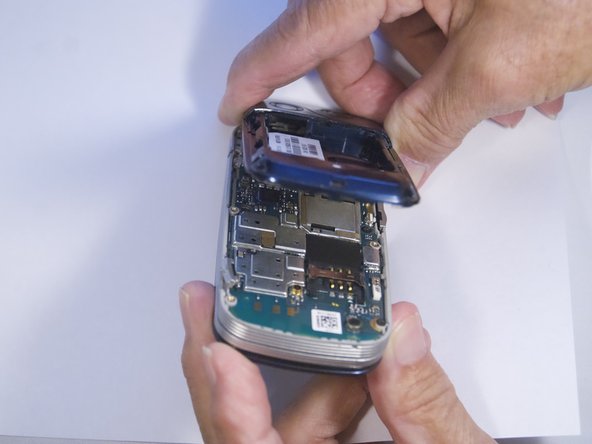
    2. Pantech Matrix Camera Button Replacement, Identify and Remove Phone Casing: crwdns2935265:08crwdnd2935265:01crwdnd2935265:02crwdne2935265:0 Pantech Matrix Camera Button Replacement, Identify and Remove Phone Casing: crwdns2935265:08crwdnd2935265:02crwdnd2935265:02crwdne2935265:0
      • Rotate the phone so the base is facing you.

      • Use spudger to separate phone casing and inside as shown.

      • Remove the casing carefully and set aside.

      crwdns2952109:0crwdne2952109:0

      crwdns2917038:0crwdne2917038:0

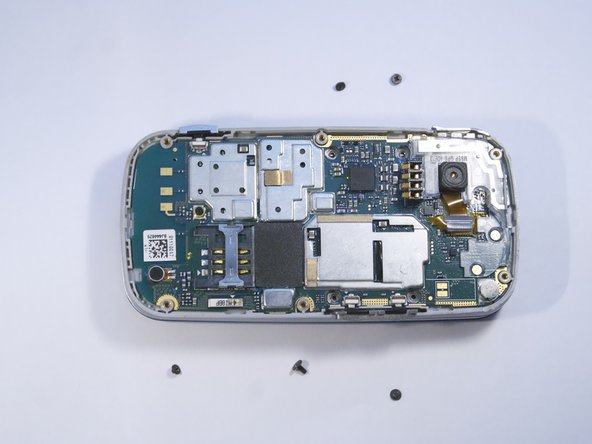
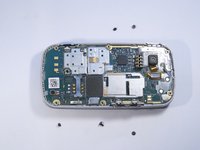
    3. Pantech Matrix Camera Button Replacement, Remove Camera Screws: crwdns2935265:09crwdnd2935265:01crwdnd2935265:02crwdne2935265:0 Pantech Matrix Camera Button Replacement, Remove Camera Screws: crwdns2935265:09crwdnd2935265:02crwdnd2935265:02crwdne2935265:0
      • Place phone with exposed motherboard facing you.

      • Use a Phillips screwdriver to remove the five 2mm Phillips #000 screws holding the camera in place.

      crwdns2952109:0crwdne2952109:0

      crwdns2917038:0crwdne2917038:0

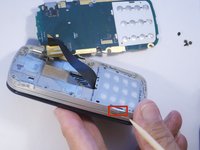
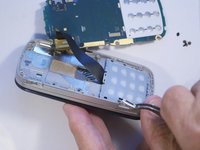
    4. Pantech Matrix Camera Button Replacement, Identify and Remove Camera Button: crwdns2935265:010crwdnd2935265:01crwdnd2935265:02crwdne2935265:0 Pantech Matrix Camera Button Replacement, Identify and Remove Camera Button: crwdns2935265:010crwdnd2935265:02crwdnd2935265:02crwdne2935265:0
      • Carefully remove the motherboard to expose the camera button.

      • Grasp the camera button with a polypus and pull gently to remove the camera button.

      crwdns2952109:0crwdne2952109:0

      crwdns2917038:0crwdne2917038:0

crwdns2915888:0crwdne2915888:0

To reassemble your device, follow these instructions in reverse order.

crwdns2935221:0crwdne2935221:0

crwdns2935227:0crwdne2935227:0

Zeel Patel

crwdns2935283:010/13/14crwdne2935283:0

1,096 crwdns2915208:0crwdne2915208:0

crwdns2935297:09crwdne2935297:0

crwdns2947412:00crwdne2947412:0

crwdns2917038:0crwdne2917038:0

crwdns2936625:0crwdne2936625:0:

crwdns2936751:024crwdne2936751:0 2

crwdns2936753:07crwdne2936753:0 20

crwdns2936753:030crwdne2936753:0 73

crwdns2959996:0crwdne2959996:0 627