
Pantech Breakout Micro SD/SIM Card Replacement

crwdns2959934:0crwdnd2959934:0Ryan Murphycrwdnd2959934:0crwdnd2959934:0crwdnd2959934:0crwdne2959934:0
crwdns2959936:0Sun 8, 2015crwdne2959936:0
crwdns2869540:0crwdne2869540:0: 3.2K
crwdns2959988:0crwdne2959988:0
- crwdns2959990:0crwdne2959990:0
- 1
- crwdns2959992:0crwdne2959992:0
- 23
- crwdns2959994:0crwdne2959994:0
- 89
- crwdns2959996:0crwdne2959996:0
- 3,227
crwdns2955950:0crwdne2955950:0: 0
crwdns2959998:0crwdne2959998:0
crwdns2960000:0crwdne2960000:0crwdns2959984:0crwdne2959984:0: 3 4
crwdns2959974:03crwdne2959974:0
crwdns2959970:04crwdne2959970:0
crwdns2959986:0crwdne2959986:0: 0 1
crwdns2959958:0crwdne2959958:0
crwdns2959976:01crwdne2959976:0
crwdns2862633:0crwdne2862633:0
crwdns2862634:0crwdne2862634:0
-
-
-
Turn phone over so that the back side is facing up.
-
Using a finger, apply moderate pressure to the top of the back cover while sliding the cover down and off.
-
Lift and remove the back cover from the phone.
 crwdns2952109:0crwdne2952109:0
-
-
-
-
Locate the battery: It is a silver, rectangular object.
-
Insert a fingernail into the indent just below the battery about 0.5 inches from the bottom of the phone.
-
Then, apply pressure to the battery, pushing up and away from the phone. It will come out easily.
-
-
-
-
-
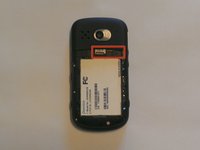
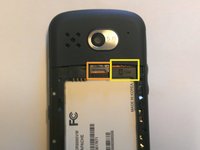
The slots for the Micro SD and SIM cards are directly above the battery tray.
-
To insert a card, slide it face up into the slot. To remove a card, slide the card out from the slot.
-
Micro SD Card Slot - On the Left
-
SIM Card Slot - On the Right
-
-


To reassemble your device, follow these instructions in reverse order.
crwdns2935221:0crwdne2935221:0
crwdns2935229:03crwdne2935229:0

crwdns2935287:0crwdne2935287:0

USF Tampa, Team 5-5, Mcgee Fall 2014 crwdns2935289:0USF Tampa, Team 5-5, Mcgee Fall 2014crwdne2935289:0
USFT-MCGEE-F14S5G5
crwdns2931471:04crwdne2931471:0
crwdns2935297:084crwdne2935297:0
