crwdns2915892:0crwdne2915892:0
If your Panasonic Lumix DMC-ZS3 no longer powers on, fails to hold a charge, or displays a low-battery warning even after charging, you may need to replace its rechargeable battery.
This guide will walk you through safely removing and replacing the camera’s lithium-ion battery. The process requires no tools and takes only a few minutes.
Before you begin, make sure the camera is turned off to avoid potential short circuits or data loss.
Replacing the battery can help restore normal operation and extend the lifespan of your Lumix DMC-ZS3.
crwdns2942213:0crwdne2942213:0
-
-
Turn the camera upside down and locate the battery compartment on the bottom panel.
-
-
-
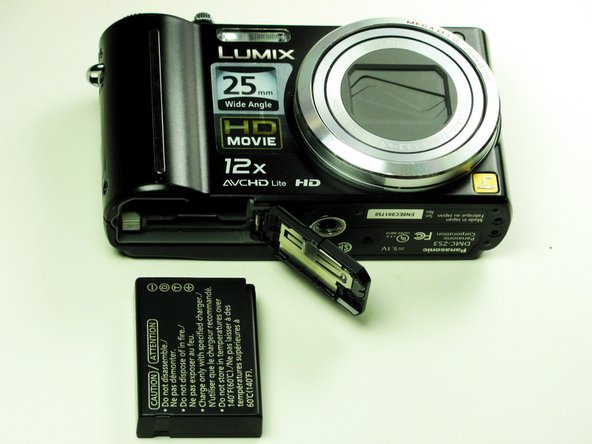
Slide the battery compartment latch to the right, then lift the door open to access the battery.
-
-
-
Gently press down on the small gray release tab using your fingernail or a spudger to unlock the battery.
-
-
-
Carefully remove the battery by pulling it straight out of the compartment.
-
Insert the new battery, aligning the metal contacts. Push it in until it clicks into place, then close and lock the compartment door. Turn on the camera to confirm it powers up, and charge the new battery fully (about 18 hours) before first use.
-


You've successfully replaced the battery in your Panasonic Lumix DMC-ZS3! Power on the camera to verify it works, then fully charge the new battery before regular use. This quick fix can revive your device and keep it capturing memories for years to come.



crwdns2935287:0crwdne2935287:0

Cal Poly, Team 13-60, Johann Spring 2013 crwdns2935289:0Cal Poly, Team 13-60, Johann Spring 2013crwdne2935289:0
CPSU-JOHANN-S13S13G60
crwdns2931471:03crwdne2931471:0
crwdns2935297:010crwdne2935297:0
