crwdns2933423:0crwdne2933423:0
crwdns2947577:0crwdnd2947577:0crwdne2947577:0

Palm Pre Speaker Replacement

crwdns2942213:0crwdne2942213:0

    1. Palm Pre Speaker Replacement, Battery: crwdns2935265:01crwdnd2935265:01crwdnd2935265:01crwdne2935265:0
      • Make sure your Palm Pre is turned off before disassembling the phone.

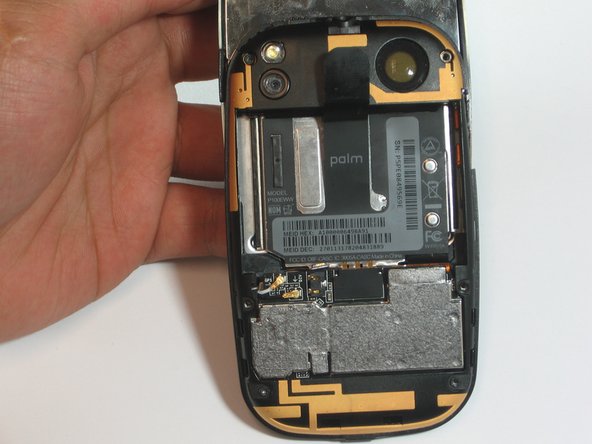
      • Snap off the back panel to reveal the battery.

      crwdns2952109:0crwdne2952109:0

      crwdns2917038:0crwdne2917038:0

    2. Palm Pre Speaker Replacement: crwdns2935265:02crwdnd2935265:01crwdnd2935265:01crwdne2935265:0
      • Carefully pull up on the tab to remove the current battery.

      crwdns2952109:0crwdne2952109:0

      crwdns2917038:0crwdne2917038:0

    1. Palm Pre Speaker Replacement, Speaker: crwdns2935265:03crwdnd2935265:01crwdnd2935265:02crwdne2935265:0 Palm Pre Speaker Replacement, Speaker: crwdns2935265:03crwdnd2935265:02crwdnd2935265:02crwdne2935265:0
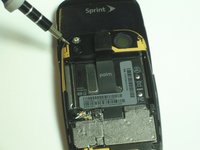
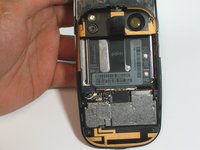
      • Use the t4 screwdriver to remove all 6 of the 3.6mm long screws.

      crwdns2952109:0crwdne2952109:0

      crwdns2917038:0crwdne2917038:0

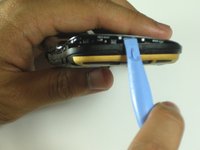
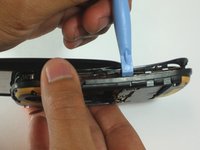
    2. Palm Pre Speaker Replacement: crwdns2935265:04crwdnd2935265:01crwdnd2935265:02crwdne2935265:0 Palm Pre Speaker Replacement: crwdns2935265:04crwdnd2935265:02crwdnd2935265:02crwdne2935265:0
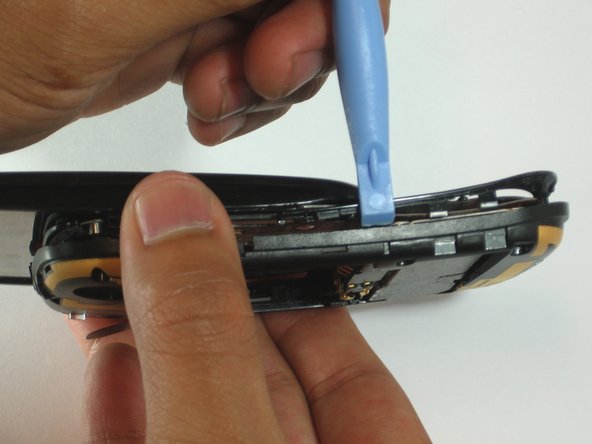
      • Use the spudger to locate the crease at the bottom of the keyboard.

      • Carefully work your way around the phone separating the back frame from the keyboard.

      crwdns2952109:0crwdne2952109:0

      crwdns2917038:0crwdne2917038:0

    3. Palm Pre Speaker Replacement: crwdns2935265:05crwdnd2935265:01crwdnd2935265:01crwdne2935265:0
      crwdns2935267:0crwdne2935267:0
      Tweezers
      $4.99
      • Use tweezers to remove the DIV and GPS antennas from the back of the keyboard.

      crwdns2952109:0crwdne2952109:0

      crwdns2917038:0crwdne2917038:0

    4. Palm Pre Speaker Replacement: crwdns2935265:06crwdnd2935265:01crwdnd2935265:01crwdne2935265:0
      • Use the spuger to pry out the speaker. It is magnetically connected so do not be afraid to use the necessary force.

      • Make sure to take note of the orientation of the speaker for re-installation.

      • Make sure not the puncture the screen on the outside of the back frame.

      crwdns2952109:0crwdne2952109:0

      crwdns2917038:0crwdne2917038:0

crwdns2915888:0crwdne2915888:0

To reassemble your device, follow these instructions in reverse order.

crwdns2935221:0crwdne2935221:0

noha

crwdns2935283:004/12/12crwdne2935283:0

139 crwdns2915208:0crwdne2915208:0

crwdns2935297:06crwdne2935297:0

crwdns2935287:0crwdne2935287:0

Cal Poly, Team 7-31, Maness Spring 2012 crwdns2935289:0Cal Poly, Team 7-31, Maness Spring 2012crwdne2935289:0

CPSU-MANESS-S12S7G31

crwdns2931471:03crwdne2931471:0

crwdns2935297:096crwdne2935297:0

crwdns2947412:00crwdne2947412:0

crwdns2917038:0crwdne2917038:0

crwdns2936625:0crwdne2936625:0:

crwdns2936751:024crwdne2936751:0 0

crwdns2936753:07crwdne2936753:0 5

crwdns2936753:030crwdne2936753:0 27

crwdns2942667:0crwdne2942667:0 1,531