crwdns2933423:0crwdne2933423:0
crwdns2947577:0crwdnd2947577:0crwdne2947577:0

Packard Bell 4X4 Desktop Optical Drive Replacement

crwdns2942213:0crwdne2942213:0

    1. Packard Bell 4X4 Desktop Optical Drive Replacement, Top Cover: crwdns2935265:01crwdnd2935265:01crwdnd2935265:01crwdne2935265:0
      • Using a Phillips screwdriver, remove the three Phillips head screws (circled in red) from the back of the computer.

      crwdns2952109:0crwdne2952109:0

      crwdns2917038:0crwdne2917038:0

    2. Packard Bell 4X4 Desktop Optical Drive Replacement: crwdns2935265:02crwdnd2935265:01crwdnd2935265:01crwdne2935265:0
      • With both hands on each side of the case, slide the top cover toward you. Lift it off the computer.

      crwdns2952109:0crwdne2952109:0

      crwdns2917038:0crwdne2917038:0

    3. Packard Bell 4X4 Desktop Optical Drive Replacement: crwdns2935265:03crwdnd2935265:01crwdnd2935265:01crwdne2935265:0
      • The top cover is removed.

      crwdns2952109:0crwdne2952109:0

      crwdns2917038:0crwdne2917038:0

    1. Packard Bell 4X4 Desktop Optical Drive Replacement, Drive Cage: crwdns2935265:04crwdnd2935265:01crwdnd2935265:01crwdne2935265:0
      • Remove the two Philips head screws with your Philips screwdriver. You may have to lubricate these screws as they can be very difficult to remove.

      crwdns2952109:0crwdne2952109:0

      crwdns2917038:0crwdne2917038:0

    2. Packard Bell 4X4 Desktop Optical Drive Replacement: crwdns2935265:05crwdnd2935265:01crwdnd2935265:01crwdne2935265:0
      • Remove the 1 Philips head screw from the left hand side of the case if there is one. Again, you may need to lubricate this screw.

      crwdns2952109:0crwdne2952109:0

      crwdns2917038:0crwdne2917038:0

    3. Packard Bell 4X4 Desktop Optical Drive Replacement: crwdns2935265:06crwdnd2935265:01crwdnd2935265:01crwdne2935265:0
      • Once the screws are removed, disconnect all cables from the optical drive, hard drive and floppy drive.

      crwdns2952109:0crwdne2952109:0

      crwdns2917038:0crwdne2917038:0

    4. Packard Bell 4X4 Desktop Optical Drive Replacement: crwdns2935265:07crwdnd2935265:01crwdnd2935265:01crwdne2935265:0
      • Slide the drive cage back. An easy way to do this is the push on the optical drive from the front.

      crwdns2952109:0crwdne2952109:0

      crwdns2917038:0crwdne2917038:0

    5. Packard Bell 4X4 Desktop Optical Drive Replacement: crwdns2935265:08crwdnd2935265:01crwdnd2935265:01crwdne2935265:0
      • Lift the drive cage up and out of the computer.

      crwdns2952109:0crwdne2952109:0

      crwdns2917038:0crwdne2917038:0

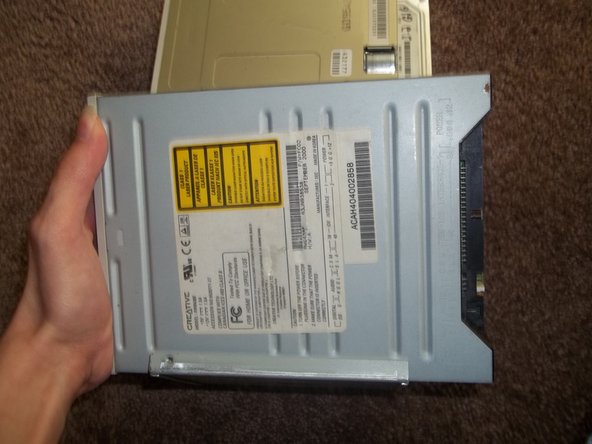
    1. Packard Bell 4X4 Desktop Optical Drive Replacement, Optical Drive: crwdns2935265:09crwdnd2935265:01crwdnd2935265:01crwdne2935265:0
      • Remove the 1 Philips head screw with your Phillips screwdriver. There should not be a screw in the right hole.

      crwdns2952109:0crwdne2952109:0

      crwdns2917038:0crwdne2917038:0

    2. Packard Bell 4X4 Desktop Optical Drive Replacement: crwdns2935265:010crwdnd2935265:01crwdnd2935265:02crwdne2935265:0 Packard Bell 4X4 Desktop Optical Drive Replacement: crwdns2935265:010crwdnd2935265:02crwdnd2935265:02crwdne2935265:0
      • Slide the optical drive forward and lift it up from the right side, the side closest to the floppy drive.

      crwdns2952109:0crwdne2952109:0

      crwdns2917038:0crwdne2917038:0

    3. Packard Bell 4X4 Desktop Optical Drive Replacement: crwdns2935265:011crwdnd2935265:01crwdnd2935265:01crwdne2935265:0
      • Remove the 2 Philips head screws with your Philips screwdriver. Put these screws onto your new optical drive.

      crwdns2952109:0crwdne2952109:0

      crwdns2917038:0crwdne2917038:0

crwdns2915888:0crwdne2915888:0

To reassemble your device, follow these instructions in reverse order.

crwdns2935221:0crwdne2935221:0

crwdns2935227:0crwdne2935227:0

Brandon S

crwdns2935283:009/04/10crwdne2935283:0

490 crwdns2915208:0crwdne2915208:0

crwdns2935297:03crwdne2935297:0

crwdns2935287:0crwdne2935287:0

Packard Bell Planet crwdns2935289:0Packard Bell Planetcrwdne2935289:0

Community

crwdns2934841:01crwdne2934841:0

crwdns2935297:036crwdne2935297:0

crwdns2947412:00crwdne2947412:0

crwdns2917038:0crwdne2917038:0

crwdns2936625:0crwdne2936625:0:

crwdns2936751:024crwdne2936751:0 3

crwdns2936753:07crwdne2936753:0 34

crwdns2936753:030crwdne2936753:0 95

crwdns2942667:0crwdne2942667:0 1,623