crwdns2915892:0crwdne2915892:0
If your 3000-series PSP is having issues not turning on, this guide will explain how to replace the circuit board for the power switch.
When the power circuit board functions properly, the light next to the power switch should be illuminated after the PSP is turned on, even if there is no audio or video. A faulty circuit board can prevent the device from drawing power and beginning the startup sequence
PSP batteries have had reported issues with swelling, so remember to visually inspect the battery cover for bulging before removing the battery. For more information on swollen batteries, click here.
Before getting started with this guide, ensure that the problem is actually the circuit board itself. Follow this guide up to Step 10 to disassemble the PSP, and inspect the switch to make sure the power button on the case activates the switch on the circuit. With the screen removed, also ensure that the silver ribbon cable has a firm connection both on the power board and on the motherboard. If the cables are loose, then they can be secured with electrical tape underneath the cable and away from the connectors.
crwdns2942213:0crwdne2942213:0
-
-
-
Place the PSP face down and locate the battery cover on the left side of the device.
-
Lift and remove the battery cover to reveal the battery.
-
Remove the battery.
 crwdns2952109:0crwdne2952109:0
-
-
-
-
-
Peel back the warranty sticker that is behind the battery with a spudger or your fingernail.
-
-
-
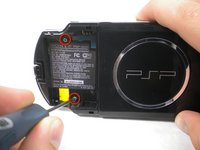
Unscrew all four screws from the back of the PSP with the Phillips #00 Screwdriver.
-
Two are located behind the battery's warranty sticker.
-
Two are located on the right side of the PSP.
-
-
-
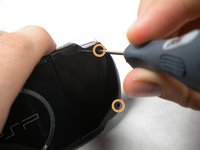
Next, unscrew the two screws located at the top of the PSP.
-
-
-
Then, remove the single screw from the bottom edge of the PSP (which is positioned next to the barcode).
-
-
-
-
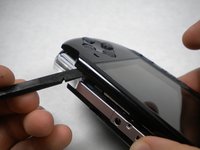
Slide the spudger in between the outer casing of the PSP, beginning at the "R" shoulder button, and gently pry off the casing.
-
Remove the front casing completely.
-
-
-
-
-
Push the homebar to the right to release the tab located on the right side of the LCD screen.
-
-
-
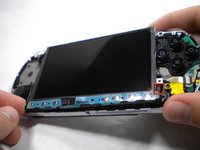
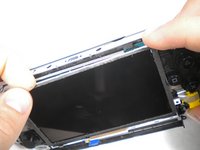
Slowly lift the LCD screen off the PSP starting at the top edge corner.
-
-
-
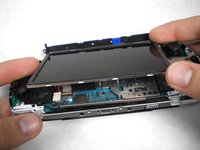
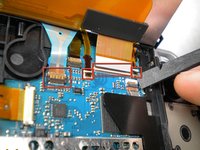
Flip the small brown locks on the four ribbon cable connectors up using a spudger or fingernail.
-
Pull all four ribbon cables out.
-
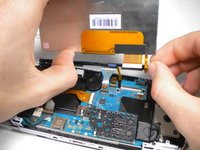
Now remove the LCD screen and homebar from the PSP.
-
-
-
Remove the metal tab that lies above the LCD screen.
-
-
-
-
-
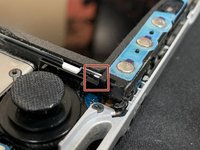
Using a spudger, lift up the lock and remove the ribbon cable from the motherboard
-
-
-
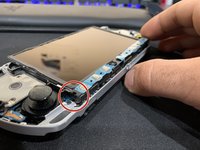
Use a Phillips #00 screwdriver to remove the screw located on the power switch board.
-
-
-
Lift up and remove the power-switch board.
-
-












crwdns2935221:0crwdne2935221:0
crwdns2935229:07crwdne2935229:0

crwdns2947410:01crwdne2947410:0
for power board you can skip 7-10 steps ,1 to 6 is remove front case , real work start at step 11 ,between those was taking apart sreen, but not need for power board replacement.
javi - crwdns2934203:0crwdne2934203:0 crwdns2950251:0crwdne2950251:0
