crwdns2933423:0crwdne2933423:0
crwdns2947577:0crwdnd2947577:0crwdne2947577:0

crwdns2956850:0crwdne2956850:0 crwdns2956756:0crwdnd2956756:0crwdne2956756:0

P775DM3 RAM Replacement

crwdns2942213:0crwdne2942213:0

    1. P775DM3 RAM Replacement, Battery: crwdns2935265:01crwdnd2935265:01crwdnd2935265:02crwdne2935265:0 P775DM3 RAM Replacement, Battery: crwdns2935265:01crwdnd2935265:02crwdnd2935265:02crwdne2935265:0
      • Unlock the lock circled in red.

      crwdns2952109:0crwdne2952109:0

      crwdns2917038:0crwdne2917038:0

    2. P775DM3 RAM Replacement: crwdns2935265:02crwdnd2935265:01crwdnd2935265:03crwdne2935265:0 P775DM3 RAM Replacement: crwdns2935265:02crwdnd2935265:02crwdnd2935265:03crwdne2935265:0 P775DM3 RAM Replacement: crwdns2935265:02crwdnd2935265:03crwdnd2935265:03crwdne2935265:0
      • Lift the battery while unlocking the lock circled in red.

      crwdns2952109:0crwdne2952109:0

      crwdns2917038:0crwdne2917038:0

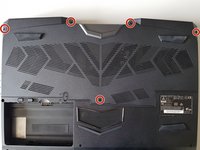
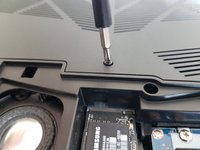
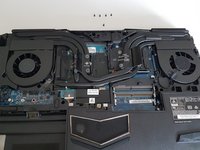
    1. P775DM3 RAM Replacement, Access to major components: crwdns2935265:03crwdnd2935265:01crwdnd2935265:02crwdne2935265:0 P775DM3 RAM Replacement, Access to major components: crwdns2935265:03crwdnd2935265:02crwdnd2935265:02crwdne2935265:0
      • Unscrew the five screws circled in red.

      crwdns2952109:0crwdne2952109:0

      crwdns2917038:0crwdne2917038:0

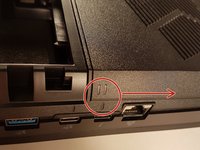
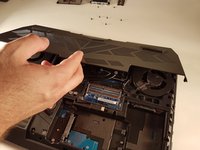
    2. P775DM3 RAM Replacement: crwdns2935265:04crwdnd2935265:01crwdnd2935265:02crwdne2935265:0 P775DM3 RAM Replacement: crwdns2935265:04crwdnd2935265:02crwdnd2935265:02crwdne2935265:0
      • Slide the plate in the direction of the red arrow.

      crwdns2952109:0crwdne2952109:0

      crwdns2917038:0crwdne2917038:0

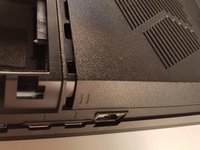
    3. P775DM3 RAM Replacement: crwdns2935265:05crwdnd2935265:01crwdnd2935265:02crwdne2935265:0 P775DM3 RAM Replacement: crwdns2935265:05crwdnd2935265:02crwdnd2935265:02crwdne2935265:0
      • Lift the plate.

      crwdns2952109:0crwdne2952109:0

      crwdns2917038:0crwdne2917038:0

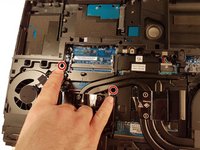
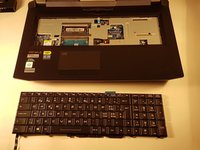
    1. P775DM3 RAM Replacement, Keyboard: crwdns2935265:06crwdnd2935265:01crwdnd2935265:02crwdne2935265:0 P775DM3 RAM Replacement, Keyboard: crwdns2935265:06crwdnd2935265:02crwdnd2935265:02crwdne2935265:0
      • Unscrew the two screws circled in red

      crwdns2952109:0crwdne2952109:0

      crwdns2917038:0crwdne2917038:0

    2. P775DM3 RAM Replacement: crwdns2935265:07crwdnd2935265:01crwdnd2935265:03crwdne2935265:0 P775DM3 RAM Replacement: crwdns2935265:07crwdnd2935265:02crwdnd2935265:03crwdne2935265:0 P775DM3 RAM Replacement: crwdns2935265:07crwdnd2935265:03crwdnd2935265:03crwdne2935265:0
      • Press a paper clip in the three places marked in red

      • Lift the keyboard and feel free to put some strength

      crwdns2952109:0crwdne2952109:0

      crwdns2917038:0crwdne2917038:0

    3. P775DM3 RAM Replacement: crwdns2935265:08crwdnd2935265:01crwdnd2935265:02crwdne2935265:0 P775DM3 RAM Replacement: crwdns2935265:08crwdnd2935265:02crwdnd2935265:02crwdne2935265:0
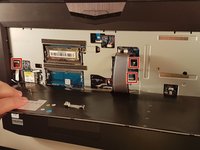
      • Disconnect the three framed connectors in red

      crwdns2952109:0crwdne2952109:0

      crwdns2917038:0crwdne2917038:0

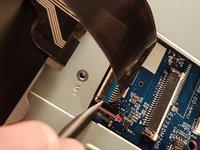
    4. P775DM3 RAM Replacement: crwdns2935265:09crwdnd2935265:01crwdnd2935265:02crwdne2935265:0 P775DM3 RAM Replacement: crwdns2935265:09crwdnd2935265:02crwdnd2935265:02crwdne2935265:0
      • Pull the white drawer in the direction of the arrow to unlock the connector

      • Disconnect the red circled connector

      crwdns2952109:0crwdne2952109:0

      crwdns2917038:0crwdne2917038:0

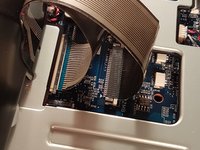
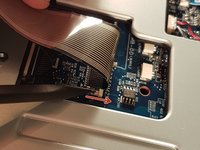
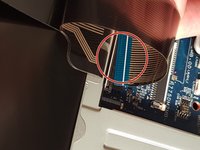
    5. P775DM3 RAM Replacement: crwdns2935265:010crwdnd2935265:01crwdnd2935265:02crwdne2935265:0 P775DM3 RAM Replacement: crwdns2935265:010crwdnd2935265:02crwdnd2935265:02crwdne2935265:0
      • Pull the black drawer in the direction of the arrow to unlock the connector

      • Disconnect the red circled connector

      crwdns2952109:0crwdne2952109:0

      crwdns2917038:0crwdne2917038:0

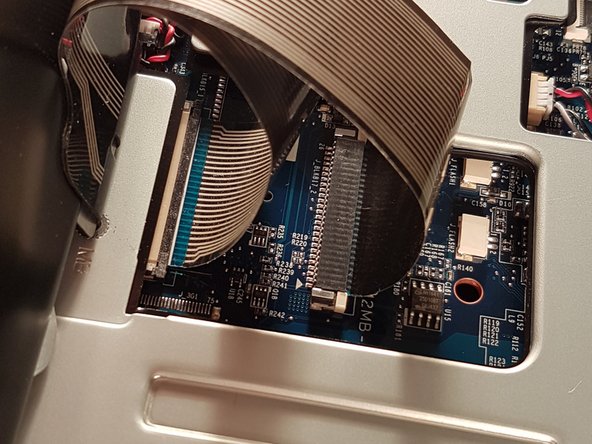
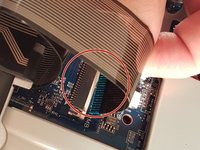
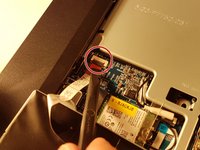
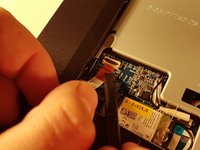
    6. P775DM3 RAM Replacement: crwdns2935265:011crwdnd2935265:01crwdnd2935265:03crwdne2935265:0 P775DM3 RAM Replacement: crwdns2935265:011crwdnd2935265:02crwdnd2935265:03crwdne2935265:0 P775DM3 RAM Replacement: crwdns2935265:011crwdnd2935265:03crwdnd2935265:03crwdne2935265:0
      • Lift the flap that holds the connector circled in red

      • Disconnect the red circled connector

      • Remove the keyboard

      crwdns2952109:0crwdne2952109:0

      crwdns2917038:0crwdne2917038:0

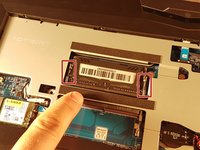
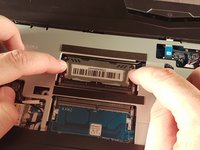
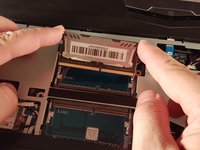
    1. P775DM3 RAM Replacement, RAM: crwdns2935265:012crwdnd2935265:01crwdnd2935265:03crwdne2935265:0 P775DM3 RAM Replacement, RAM: crwdns2935265:012crwdnd2935265:02crwdnd2935265:03crwdne2935265:0 P775DM3 RAM Replacement, RAM: crwdns2935265:012crwdnd2935265:03crwdnd2935265:03crwdne2935265:0
      • Spread the two clips in red.

      • Remove the RAM card.

      crwdns2952109:0crwdne2952109:0

      crwdns2917038:0crwdne2917038:0

crwdns2915888:0crwdne2915888:0

To reassemble your device, follow these instructions in reverse order.

crwdns2935221:0crwdne2935221:0

crwdns2934873:0crwdne2934873:0

fr en

100%

crwdns2934885:0crwdne2934885:0 crwdns2934875:0crwdne2934875:0
crwdns2934877:0crwdne2934877:0 ›

Felice Suglia

crwdns2935283:006/15/13crwdne2935283:0

33.634 crwdns2915208:0crwdne2915208:0

crwdns2935297:0283crwdne2935297:0

crwdns2947412:00crwdne2947412:0

crwdns2917038:0crwdne2917038:0

crwdns2936625:0crwdne2936625:0:

crwdns2936751:024crwdne2936751:0 1

crwdns2936753:07crwdne2936753:0 10

crwdns2936753:030crwdne2936753:0 26

crwdns2942667:0crwdne2942667:0 684