
Optoma HD20 Light Bulb Replacement

crwdns2959932:0crwdnd2959932:0Trevercrwdnd2959932:0crwdnd2959932:0crwdnd2959932:010crwdnd2959932:0crwdne2959932:0
crwdns2959936:0Mud 7, 2024crwdne2959936:0
crwdns2869540:0crwdne2869540:0: 13K
crwdns2959988:0crwdne2959988:0
- crwdns2959990:0crwdne2959990:0
- 5
- crwdns2959992:0crwdne2959992:0
- 25
- crwdns2959994:0crwdne2959994:0
- 134
- crwdns2959996:0crwdne2959996:0
- 13,069
crwdns2955950:0crwdne2955950:0: 5
crwdns2960008:05crwdne2960008:0
crwdns2960000:0crwdne2960000:0crwdns2959984:0crwdne2959984:0: 7 8
crwdns2959974:07crwdne2959974:0
crwdns2959970:08crwdne2959970:0
crwdns2959986:0crwdne2959986:0: 1 2
crwdns2959980:01crwdne2959980:0
crwdns2959978:02crwdne2959978:0
crwdns2915892:0crwdne2915892:0
crwdns2959928:0crwdne2959928:0 ↓Use this guide to remove the light bulb from your Optoma HD20.
crwdns2959930:0crwdne2959930:0
crwdns2943215:0crwdne2943215:0
-
Tweezers4.9


-
-
-
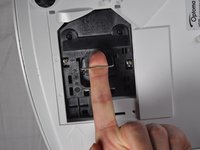
Use a Phillips #1 screwdriver to loosen the screws that secure the panel on the bottom of the Optoma HD20.
 crwdns2952109:0crwdne2952109:0
-
-
-
Lift the panel off of the device.
-
-
-
Use a Phillips #1 screwdriver to loosen the two screws securing the black casing.
-
-
-
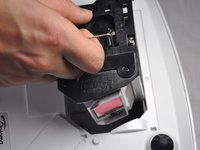
Remove the light bulb casing from the device.
-
-
-
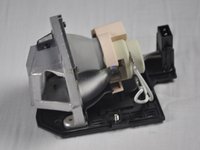
Remove the three 4.5 mm screws on the light bulb case.
-
-
-
Carefully remove the light bulb insulator from the light bulb casing.
-
-
-
crwdns2935267:0crwdne2935267:0Tweezers$4.99
-
Gently pull the wires off of the pins using tweezers.
-
-
-
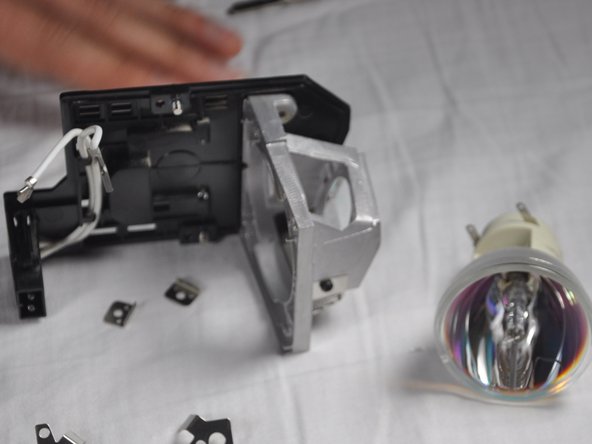
Remove the 4 screws on the back of the light bulb casing using a Phillips #1 screwdriver.
-
-
-
Remove the casing, then gently pull out the old light bulb and replace it with the new one.
-
-




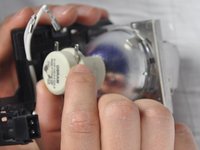
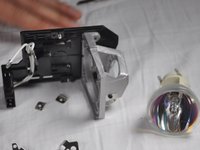
To reassemble your device, follow these instructions in reverse order.
crwdns2935221:0crwdne2935221:0
crwdns2935229:07crwdne2935229:0

crwdns2935287:0crwdne2935287:0

Cal Poly, Team 21-23, Maness Winter 2015 crwdns2935289:0Cal Poly, Team 21-23, Maness Winter 2015crwdne2935289:0
CPSU-MANESS-W15S21G23
crwdns2931471:04crwdne2931471:0
crwdns2935297:072crwdne2935297:0
crwdns2947412:05crwdne2947412:0
I recently replaced my bulb for the third time and the insulator had grown brittle I am guessing from the heat and it broke. I can't seem to find this part for sale anywhere. Does anyone know if is possible to purchase it?
Thomas - crwdns2934203:0crwdne2934203:0 crwdns2950251:0crwdne2950251:0
The screws in step 8 are extremely hard to get off. I went and bought proper screwdrivers before even attempting since theyre small, but in a day I've only managed to get one off and I'm having to resort to other tactics, even using a drill to just grind the heads off.
dv01_ - crwdns2934203:0crwdne2934203:0 crwdns2950251:0crwdne2950251:0
king@okinlamps.com
Need LAD60 20PCS
kingshen92 - crwdns2934203:0crwdne2934203:0 crwdns2950251:0crwdne2950251:0
The manual says the new light won’t come back on until a lamp reset I’d done via menu , but how can you see the text if the light isn’t on?????
Taringajohn - crwdns2934203:0crwdne2934203:0 crwdns2950251:0crwdne2950251:0
my hd 20 projects dull images i recently replaced my bulb for the first time successfully and i followed as per menu trying to bulb reset but it is not working and still image is dull how to solve the problem
kumar - crwdns2934203:0crwdne2934203:0 crwdns2950251:0crwdne2950251:0
