
OnePlus 6 Motherboard Replacement

crwdns2959932:0crwdnd2959932:0John Steven Trammellcrwdnd2959932:0crwdnd2959932:0crwdne2959932:0
crwdns2959936:0N'w 28, 2021crwdne2959936:0
crwdns2869540:0crwdne2869540:0: 6.3K
crwdns2959988:0crwdne2959988:0
- crwdns2959990:0crwdne2959990:0
- 9
- crwdns2959992:0crwdne2959992:0
- 46
- crwdns2959994:0crwdne2959994:0
- 190
- crwdns2959996:0crwdne2959996:0
- 6,253
crwdns2955950:0crwdne2955950:0: 10
crwdns2960004:09crwdne2960004:0, crwdns2960006:01crwdne2960006:0
crwdns2960000:0crwdne2960000:0crwdns2959984:0crwdne2959984:0: 7 8
crwdns2959974:07crwdne2959974:0
crwdns2959970:08crwdne2959970:0
crwdns2959986:0crwdne2959986:0: 0 1
crwdns2959958:0crwdne2959958:0
crwdns2959976:01crwdne2959976:0
crwdns2869444:0crwdne2869444:0
crwdns2869445:0crwdne2869445:0
crwdns2915892:0crwdne2915892:0
crwdns2959928:0crwdne2959928:0 ↓If your OnePlus 6 is powering on but is not displaying anything on the screen, will not turn on at all after fully charging, or is otherwise malfunctioning, use this guide to replace the motherboard.
The motherboard is the main communication center for all the hardware to the processor in the phone. Without a properly functioning motherboard, the phone’s components will be out of sequence with each other causing performance malfunctions such as glitches and loss of power.
Before attempting to replace the motherboard of the OnePlus 6, check out the troubleshooting page for the device to see if other solutions are available. Sometimes a connector being loose to the motherboard or faulty battery can cause glitching and power loss. If none of these solutions solve the problem, this guide will show you how to replace the motherboard.
The first step of this guide requires you to remove the back panel of the phone, which is made of glass, so be careful during removal not to shatter it.
Be sure to back up your phone to prevent memory loss if you are able to. Also, before completing this replacement guide, make sure to shut down the phone and to disconnect any outside sources.
crwdns2959930:0crwdne2959930:0
crwdns2943215:0crwdne2943215:0


-
-
-
Turn on the heat gun to a low heat and and gently heat the curved edges on the back of the phone.
-
Wedge the opening picks between the front and back panel and slide them around the perimeter to break the adhesive securing the back cover.
-
Repeat until the back panel is fully released.
 crwdns2952109:0crwdne2952109:0
-
-
-
Gently lift up the back panel, with care not to damage the fingerprint sensor ribbon cable.
-
-
crwdns2935267:0crwdne2935267:0Tweezers$4.99
-
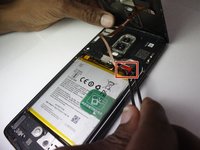
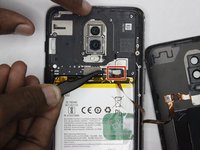
Use a pair of tweezers to gently pull up on the red tab and disconnect the cable from the device.
-
Completely remove the back panel from the device.
-
-
-
-
-
-
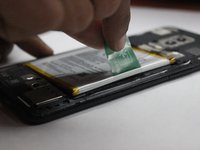
Grip the green tab connected to the battery and pull the battery directly up and out.
-
-
-
-
-
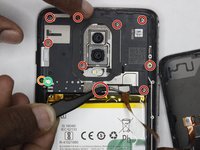
Using the Phillips #00 screwdriver, remove the ten 3 mm screws from the midframe.
-
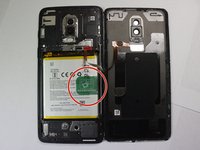
ATTENTION - Be aware that the 10th screw is actually underneath the round white sticker marked with the green circle at the bottom left. Do not remove the screw next to it marked with the orange circle or you will damage your midframe board.
-
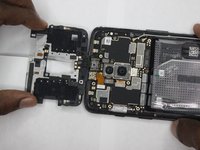
Lift the bottom of the mid frame directly up and remove it from the device.
-
-
-
-
-
Remove the ten screws holding the motherboard using a Phillips #00 screwdriver.
-
-
-
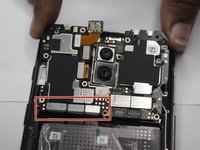
Disconnect the small metal tabs near the battery compartment that are holding the motherboard down.
-
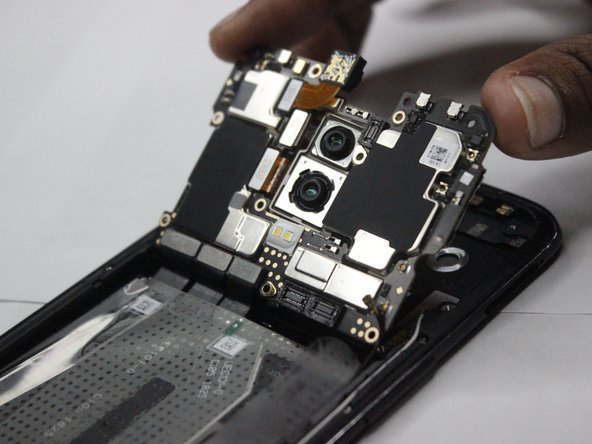
Using a fingernail, carefully work under the edge and pry the motherboard up from the phone.
-
-








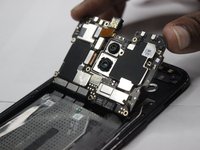
To reassemble your device, follow these instructions in reverse order.
crwdns2935221:0crwdne2935221:0
crwdns2935229:07crwdne2935229:0

crwdns2935287:0crwdne2935287:0

Clemson, Team 4-3, Hunter Fall 2021 crwdns2935289:0Clemson, Team 4-3, Hunter Fall 2021crwdne2935289:0
CLEM-HUNTER-F21S4G3
crwdns2931471:05crwdne2931471:0
crwdns2935297:096crwdne2935297:0
crwdns2947410:01crwdne2947410:0
Can you repair my One plus 6. It's one IC of motherboard is damaged.
AMIT PANWAR - crwdns2934203:0crwdne2934203:0 crwdns2950251:0crwdne2950251:0
