crwdns2933423:0crwdne2933423:0
crwdns2947577:0crwdnd2947577:0crwdne2947577:0

OnePlus 12 Back Glass Replacement

crwdns2942213:0crwdne2942213:0

    1. OnePlus 12 Back Glass Replacement, Back Glass: crwdns2935265:01crwdnd2935265:01crwdnd2935265:01crwdne2935265:0
      • Ensure the phone is powered off and placed with the back glass facing towards you on a stable surface.

      crwdns2952109:0crwdne2952109:0

      crwdns2917038:0crwdne2917038:0

    2. OnePlus 12 Back Glass Replacement: crwdns2935265:02crwdnd2935265:01crwdnd2935265:02crwdne2935265:0 OnePlus 12 Back Glass Replacement: crwdns2935265:02crwdnd2935265:02crwdnd2935265:02crwdne2935265:0
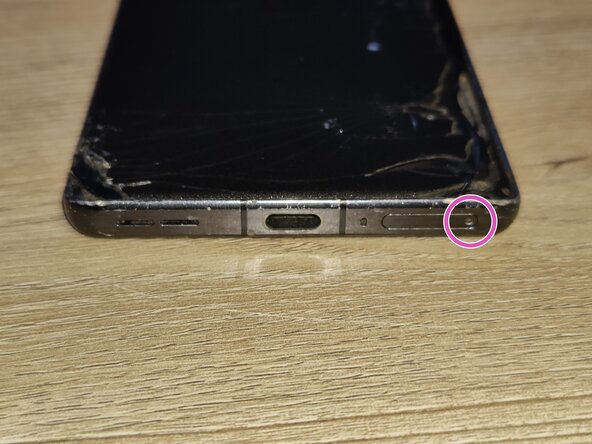
      • Pop open the SIM card tray by inserting a SIM card removal tool into the SIM card tray on the bottom of the phone.

      • Remove the SIM card tray from the phone and set it aside for when we are done.

      crwdns2952109:0crwdne2952109:0

      crwdns2917038:0crwdne2917038:0

      • Loosen the glue holding the back glass in place by using a hairdryer or an iOpener.

      • If you use a hairdryer, hold it at least a few inches from the phone and apply heat for two minutes in a circular motion around the edges of the phone - not the center.

      crwdns2952109:0crwdne2952109:0

      crwdns2917038:0crwdne2917038:0

    3. OnePlus 12 Back Glass Replacement: crwdns2935265:04crwdnd2935265:01crwdnd2935265:02crwdne2935265:0 OnePlus 12 Back Glass Replacement: crwdns2935265:04crwdnd2935265:02crwdnd2935265:02crwdne2935265:0
      crwdns2935267:0crwdne2935267:0
      Jimmy
      $7.95
      • Insert a Jimmy into the seam of the back glass to lift it slightly. Try to reduce pressure on any single spot of the glass to avoid cracking it.

      • Insert a plastic card underneath the small gap created on the back glass and gently glide the card under the lifted glass.

      • Remove the back glass from the phone by working your way around the glass slowly. You may need to re-heat after a while to keep the glue soft. Otherwise, you may shatter the glass.

      • Use isopropyl alcohol and a lint-free cloth to remove any leftover adhesive and adhesive residue from the frame of the phone (and the back glass if you are re-using it). Do not skip this or else the back glass may not stick on properly.

      crwdns2952109:0crwdne2952109:0

      crwdns2917038:0crwdne2917038:0

crwdns2915888:0crwdne2915888:0

To reassemble your device, follow these instructions in reverse order.

crwdns2935221:0crwdne2935221:0

ThatStella7922

crwdns2935283:003/16/20crwdne2935283:0

556 crwdns2915208:0crwdne2915208:0

crwdns2935297:03crwdne2935297:0

crwdns2947412:00crwdne2947412:0

crwdns2917038:0crwdne2917038:0

crwdns2936625:0crwdne2936625:0:

crwdns2936751:024crwdne2936751:0 6

crwdns2936753:07crwdne2936753:0 61

crwdns2936753:030crwdne2936753:0 235

crwdns2942667:0crwdne2942667:0 250