crwdns2933423:0crwdne2933423:0
crwdns2947577:0crwdnd2947577:0crwdne2947577:0

One Education Infinity Upper Hinge Assembly Replacement

crwdns2862623:0crwdne2862623:0
crwdns2948751:0crwdne2948751:0

crwdns2942213:0crwdne2942213:0

    1. One Education Infinity Upper Hinge Assembly Replacement, Back Case: crwdns2935265:01crwdnd2935265:01crwdnd2935265:03crwdne2935265:0 One Education Infinity Upper Hinge Assembly Replacement, Back Case: crwdns2935265:01crwdnd2935265:02crwdnd2935265:03crwdne2935265:0 One Education Infinity Upper Hinge Assembly Replacement, Back Case: crwdns2935265:01crwdnd2935265:03crwdnd2935265:03crwdne2935265:0
      • Always power off your device before beginning disassembly.

      • Remove the screw covers and rubber feet from the bottom of the laptop with a metal spudger.

      crwdns2952109:0crwdne2952109:0

      crwdns2917038:0crwdne2917038:0

    2. One Education Infinity Upper Hinge Assembly Replacement: crwdns2935265:02crwdnd2935265:01crwdnd2935265:02crwdne2935265:0 One Education Infinity Upper Hinge Assembly Replacement: crwdns2935265:02crwdnd2935265:02crwdnd2935265:02crwdne2935265:0
      • Using a Phillips #00 screwdriver, remove the sixteen 5.0 mm black screws from the back panel.

      crwdns2952109:0crwdne2952109:0

      crwdns2917038:0crwdne2917038:0

    3. One Education Infinity Upper Hinge Assembly Replacement: crwdns2935265:03crwdnd2935265:01crwdnd2935265:03crwdne2935265:0 One Education Infinity Upper Hinge Assembly Replacement: crwdns2935265:03crwdnd2935265:02crwdnd2935265:03crwdne2935265:0 One Education Infinity Upper Hinge Assembly Replacement: crwdns2935265:03crwdnd2935265:03crwdnd2935265:03crwdne2935265:0
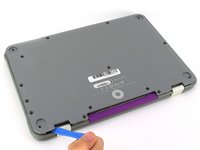
      • Using the iFixit plastic opening tool or spudger, start near the white hinge of the device and lift along the outer edges of the device until all clips are released.

      • Lift the back case off of the device.

      • Removing the back may create a loud snapping noise.

      crwdns2952109:0crwdne2952109:0

      crwdns2917038:0crwdne2917038:0

    1. One Education Infinity Upper Hinge Assembly Replacement, Battery: crwdns2935265:04crwdnd2935265:01crwdnd2935265:03crwdne2935265:0 One Education Infinity Upper Hinge Assembly Replacement, Battery: crwdns2935265:04crwdnd2935265:02crwdnd2935265:03crwdne2935265:0 One Education Infinity Upper Hinge Assembly Replacement, Battery: crwdns2935265:04crwdnd2935265:03crwdnd2935265:03crwdne2935265:0
      • There may be black tape inside your device covering components or holding down wires. This tape is unimportant for the function of the device, and can be removed.

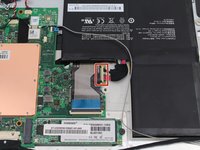
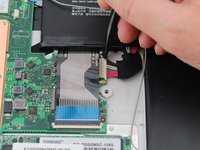
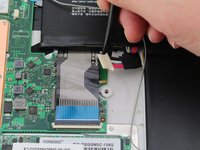
      • Carefully wiggle the battery cable to the right and out of the port with a plastic spudger.

      crwdns2952109:0crwdne2952109:0

      crwdns2917038:0crwdne2917038:0

    2. One Education Infinity Upper Hinge Assembly Replacement: crwdns2935265:05crwdnd2935265:01crwdnd2935265:03crwdne2935265:0 One Education Infinity Upper Hinge Assembly Replacement: crwdns2935265:05crwdnd2935265:02crwdnd2935265:03crwdne2935265:0 One Education Infinity Upper Hinge Assembly Replacement: crwdns2935265:05crwdnd2935265:03crwdnd2935265:03crwdne2935265:0
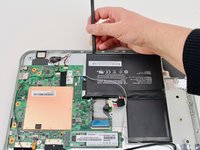
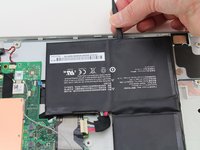
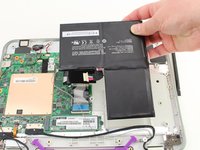
      • Wedge a plastic spudger underneath the battery from the upper edge and slide it carefully along the length of the battery to separate it from the case.

      • There is a mild adhesive holding down the battery. Take care not to puncture or excessively bend the battery while freeing it from the adhesive.

      • Lift the battery out from the internal case.

      crwdns2952109:0crwdne2952109:0

      crwdns2917038:0crwdne2917038:0

    1. One Education Infinity Upper Hinge Assembly Replacement, Upper Case: crwdns2935265:06crwdnd2935265:01crwdnd2935265:03crwdne2935265:0 One Education Infinity Upper Hinge Assembly Replacement, Upper Case: crwdns2935265:06crwdnd2935265:02crwdnd2935265:03crwdne2935265:0 One Education Infinity Upper Hinge Assembly Replacement, Upper Case: crwdns2935265:06crwdnd2935265:03crwdnd2935265:03crwdne2935265:0
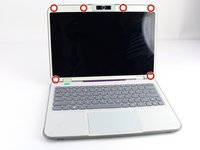
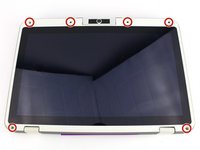
      • Flip open the laptop so that the screen is exposed.

      • We found it convenient to flip the laptop into tablet mode for added support.

      • Using a spudger, remove the six screw covers along the bezel of the screen.

      crwdns2952109:0crwdne2952109:0

      crwdns2917038:0crwdne2917038:0

    2. One Education Infinity Upper Hinge Assembly Replacement: crwdns2935265:07crwdnd2935265:01crwdnd2935265:02crwdne2935265:0 One Education Infinity Upper Hinge Assembly Replacement: crwdns2935265:07crwdnd2935265:02crwdnd2935265:02crwdne2935265:0
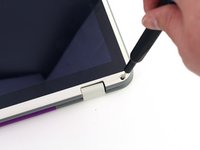
      • Remove the six 2.8 mm Phillips #00 screws along the bezel.

      crwdns2952109:0crwdne2952109:0

      crwdns2917038:0crwdne2917038:0

    3. One Education Infinity Upper Hinge Assembly Replacement: crwdns2935265:08crwdnd2935265:01crwdnd2935265:03crwdne2935265:0 One Education Infinity Upper Hinge Assembly Replacement: crwdns2935265:08crwdnd2935265:02crwdnd2935265:03crwdne2935265:0 One Education Infinity Upper Hinge Assembly Replacement: crwdns2935265:08crwdnd2935265:03crwdnd2935265:03crwdne2935265:0
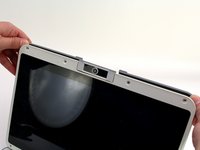
      • Use the two tabs on the top edge of the screen to pry the case apart.

      • Once the two top clips have been disengaged, start to work your way around the rest of the screen.

      crwdns2952109:0crwdne2952109:0

      crwdns2917038:0crwdne2917038:0

    4. One Education Infinity Upper Hinge Assembly Replacement: crwdns2935265:09crwdnd2935265:01crwdnd2935265:01crwdne2935265:0
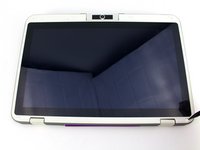
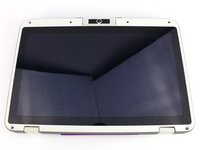
      • Once all the clips have been popped off, remove the upper case from the back of the display assembly.

      • You may want to close the laptop while disconnecting the hinge-side edge, as it will give you extra clearance for the upper case.

      crwdns2952109:0crwdne2952109:0

      crwdns2917038:0crwdne2917038:0

    1. One Education Infinity Upper Hinge Assembly Replacement, Upper Hinge Assembly: crwdns2935265:010crwdnd2935265:01crwdnd2935265:02crwdne2935265:0 One Education Infinity Upper Hinge Assembly Replacement, Upper Hinge Assembly: crwdns2935265:010crwdnd2935265:02crwdnd2935265:02crwdne2935265:0
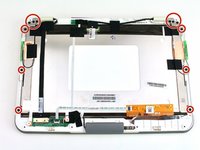
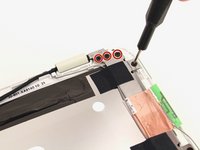
      • Remove the twelve 3.8 mm Phillips #00 screws from the hinge brackets extending along the height of the display.

      crwdns2952109:0crwdne2952109:0

      crwdns2917038:0crwdne2917038:0

    2. One Education Infinity Upper Hinge Assembly Replacement: crwdns2935265:011crwdnd2935265:01crwdnd2935265:03crwdne2935265:0 One Education Infinity Upper Hinge Assembly Replacement: crwdns2935265:011crwdnd2935265:02crwdnd2935265:03crwdne2935265:0 One Education Infinity Upper Hinge Assembly Replacement: crwdns2935265:011crwdnd2935265:03crwdnd2935265:03crwdne2935265:0
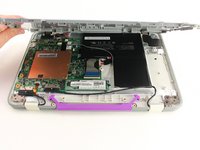
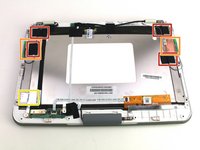
      • Peel back the four pieces of black tape.

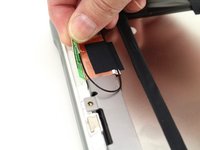
      • Peel back the antenna cable boards off of the display hinges.

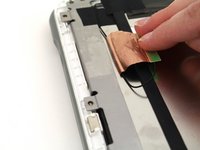
      • Peel off the silver tape from the display hinges.

      crwdns2952109:0crwdne2952109:0

      crwdns2917038:0crwdne2917038:0

    3. One Education Infinity Upper Hinge Assembly Replacement: crwdns2935265:012crwdnd2935265:01crwdnd2935265:03crwdne2935265:0 One Education Infinity Upper Hinge Assembly Replacement: crwdns2935265:012crwdnd2935265:02crwdnd2935265:03crwdne2935265:0 One Education Infinity Upper Hinge Assembly Replacement: crwdns2935265:012crwdnd2935265:03crwdnd2935265:03crwdne2935265:0
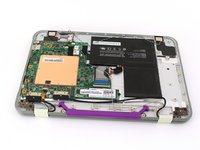
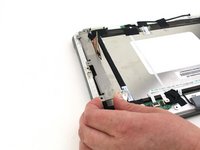
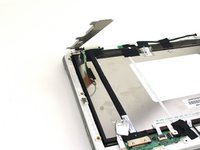
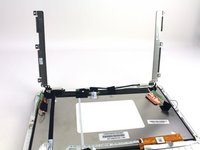
      • Lift up both hinges, ensuring that they clear all tape and wires.

      crwdns2952109:0crwdne2952109:0

      crwdns2917038:0crwdne2917038:0

crwdns2915888:0crwdne2915888:0

To reassemble your device, follow these instructions in reverse order.

crwdns2935221:0crwdne2935221:0

Austin Blakely

crwdns2935283:003/11/19crwdne2935283:0

23,150 crwdns2915208:0crwdne2915208:0

crwdns2935297:053crwdne2935297:0

crwdns2935287:0crwdne2935287:0

iFixit crwdns2935289:0iFixitcrwdne2935289:0

Staff

crwdns2931471:0123crwdne2931471:0

crwdns2935297:068,989crwdne2935297:0

crwdns2947412:00crwdne2947412:0

crwdns2917038:0crwdne2917038:0

crwdns2936625:0crwdne2936625:0:

crwdns2936751:024crwdne2936751:0 1

crwdns2936753:07crwdne2936753:0 5

crwdns2936753:030crwdne2936753:0 18

crwdns2942667:0crwdne2942667:0 183