crwdns2933423:0crwdne2933423:0
crwdns2947577:0crwdnd2947577:0crwdne2947577:0

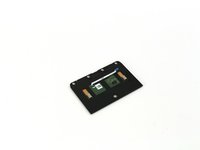
One Education Infinity Touchpad Replacement

crwdns2942213:0crwdne2942213:0

    1. One Education Infinity Touchpad Replacement, Back Case: crwdns2935265:01crwdnd2935265:01crwdnd2935265:03crwdne2935265:0 One Education Infinity Touchpad Replacement, Back Case: crwdns2935265:01crwdnd2935265:02crwdnd2935265:03crwdne2935265:0 One Education Infinity Touchpad Replacement, Back Case: crwdns2935265:01crwdnd2935265:03crwdnd2935265:03crwdne2935265:0
      • Always power off your device before beginning disassembly.

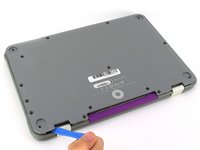
      • Remove the screw covers and rubber feet from the bottom of the laptop with a metal spudger.

      crwdns2952109:0crwdne2952109:0

      crwdns2917038:0crwdne2917038:0

    2. One Education Infinity Touchpad Replacement: crwdns2935265:02crwdnd2935265:01crwdnd2935265:02crwdne2935265:0 One Education Infinity Touchpad Replacement: crwdns2935265:02crwdnd2935265:02crwdnd2935265:02crwdne2935265:0
      • Using a Phillips #00 screwdriver, remove the sixteen 5.0 mm black screws from the back panel.

      crwdns2952109:0crwdne2952109:0

      crwdns2917038:0crwdne2917038:0

    3. One Education Infinity Touchpad Replacement: crwdns2935265:03crwdnd2935265:01crwdnd2935265:03crwdne2935265:0 One Education Infinity Touchpad Replacement: crwdns2935265:03crwdnd2935265:02crwdnd2935265:03crwdne2935265:0 One Education Infinity Touchpad Replacement: crwdns2935265:03crwdnd2935265:03crwdnd2935265:03crwdne2935265:0
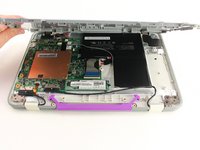
      • Using the iFixit plastic opening tool or spudger, start near the white hinge of the device and lift along the outer edges of the device until all clips are released.

      • Lift the back case off of the device.

      • Removing the back may create a loud snapping noise.

      crwdns2952109:0crwdne2952109:0

      crwdns2917038:0crwdne2917038:0

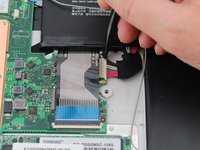
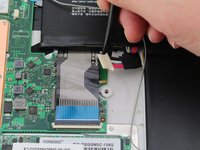
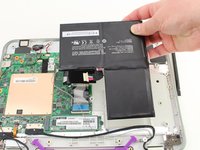
    1. One Education Infinity Touchpad Replacement, Battery: crwdns2935265:04crwdnd2935265:01crwdnd2935265:03crwdne2935265:0 One Education Infinity Touchpad Replacement, Battery: crwdns2935265:04crwdnd2935265:02crwdnd2935265:03crwdne2935265:0 One Education Infinity Touchpad Replacement, Battery: crwdns2935265:04crwdnd2935265:03crwdnd2935265:03crwdne2935265:0
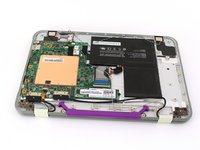
      • There may be black tape inside your device covering components or holding down wires. This tape is unimportant for the function of the device, and can be removed.

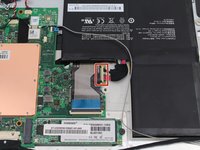
      • Carefully wiggle the battery cable to the right and out of the port with a plastic spudger.

      crwdns2952109:0crwdne2952109:0

      crwdns2917038:0crwdne2917038:0

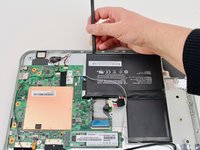
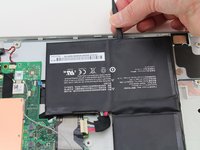
    2. One Education Infinity Touchpad Replacement: crwdns2935265:05crwdnd2935265:01crwdnd2935265:03crwdne2935265:0 One Education Infinity Touchpad Replacement: crwdns2935265:05crwdnd2935265:02crwdnd2935265:03crwdne2935265:0 One Education Infinity Touchpad Replacement: crwdns2935265:05crwdnd2935265:03crwdnd2935265:03crwdne2935265:0
      • Wedge a plastic spudger underneath the battery from the upper edge and slide it carefully along the length of the battery to separate it from the case.

      • There is a mild adhesive holding down the battery. Take care not to puncture or excessively bend the battery while freeing it from the adhesive.

      • Lift the battery out from the internal case.

      crwdns2952109:0crwdne2952109:0

      crwdns2917038:0crwdne2917038:0

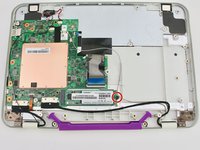
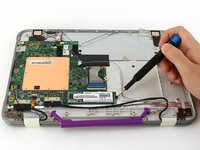
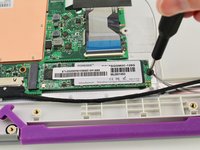
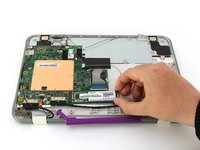
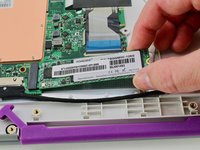
    1. One Education Infinity Touchpad Replacement, Solid State Drive: crwdns2935265:06crwdnd2935265:01crwdnd2935265:03crwdne2935265:0 One Education Infinity Touchpad Replacement, Solid State Drive: crwdns2935265:06crwdnd2935265:02crwdnd2935265:03crwdne2935265:0 One Education Infinity Touchpad Replacement, Solid State Drive: crwdns2935265:06crwdnd2935265:03crwdnd2935265:03crwdne2935265:0
      • Use a Phillips #00 screwdriver to remove the single 2mm black screw from the SSD.

      crwdns2952109:0crwdne2952109:0

      crwdns2917038:0crwdne2917038:0

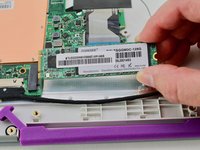
    2. One Education Infinity Touchpad Replacement: crwdns2935265:07crwdnd2935265:01crwdnd2935265:03crwdne2935265:0 One Education Infinity Touchpad Replacement: crwdns2935265:07crwdnd2935265:02crwdnd2935265:03crwdne2935265:0 One Education Infinity Touchpad Replacement: crwdns2935265:07crwdnd2935265:03crwdnd2935265:03crwdne2935265:0
      • Grab the SSD with your fingers and slide it slowly to the right and out of its port.

      crwdns2952109:0crwdne2952109:0

      crwdns2917038:0crwdne2917038:0

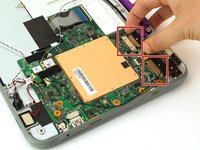
    1. One Education Infinity Touchpad Replacement, Motherboard: crwdns2935265:08crwdnd2935265:01crwdnd2935265:02crwdne2935265:0 One Education Infinity Touchpad Replacement, Motherboard: crwdns2935265:08crwdnd2935265:02crwdnd2935265:02crwdne2935265:0
      • Using your fingers, carefully pull the two ribbon cable locking clips out from their ports.

      crwdns2952109:0crwdne2952109:0

      crwdns2917038:0crwdne2917038:0

    2. One Education Infinity Touchpad Replacement: crwdns2935265:09crwdnd2935265:01crwdnd2935265:01crwdne2935265:0
      • Using your fingers, carefully lift up the black tab and then unplug the gold ribbon cable.

      crwdns2952109:0crwdne2952109:0

      crwdns2917038:0crwdne2917038:0

    3. One Education Infinity Touchpad Replacement: crwdns2935265:010crwdnd2935265:01crwdnd2935265:01crwdne2935265:0
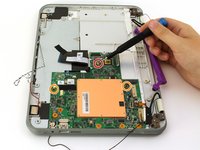
      • Using a spudger, carefully unplug the black and grey wires by popping them up off the wireless card.

      crwdns2952109:0crwdne2952109:0

      crwdns2917038:0crwdne2917038:0

    4. One Education Infinity Touchpad Replacement: crwdns2935265:011crwdnd2935265:01crwdnd2935265:01crwdne2935265:0
      • Using your fingers, carefully unplug the two speaker wires from the motherboard.

      crwdns2952109:0crwdne2952109:0

      crwdns2917038:0crwdne2917038:0

    5. One Education Infinity Touchpad Replacement: crwdns2935265:012crwdnd2935265:01crwdnd2935265:02crwdne2935265:0 One Education Infinity Touchpad Replacement: crwdns2935265:012crwdnd2935265:02crwdnd2935265:02crwdne2935265:0
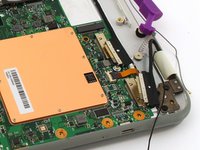
      • Using your fingers or an iFixit opening tool, carefully lift the black tab on top of the ZIF connector and remove the ribbon cable.

      crwdns2952109:0crwdne2952109:0

      crwdns2917038:0crwdne2917038:0

    6. One Education Infinity Touchpad Replacement: crwdns2935265:013crwdnd2935265:01crwdnd2935265:01crwdne2935265:0
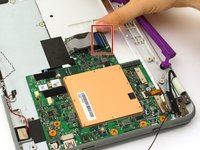
      • Using your fingers, carefully lift up the black tab and then unplug the blue ribbon cable.

      crwdns2952109:0crwdne2952109:0

      crwdns2917038:0crwdne2917038:0

    7. One Education Infinity Touchpad Replacement: crwdns2935265:014crwdnd2935265:01crwdnd2935265:02crwdne2935265:0 One Education Infinity Touchpad Replacement: crwdns2935265:014crwdnd2935265:02crwdnd2935265:02crwdne2935265:0
      • Using a Phillips #00 screwdriver, remove the single 4 mm silver screw from beneath the ribbon cable.

      • Using a Phillips #00 screwdriver, remove the two 2.5 mm black screws.

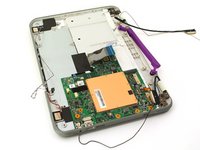
      • Using your fingers, carefully lift the motherboard out of the internal panel.

      crwdns2952109:0crwdne2952109:0

      crwdns2917038:0crwdne2917038:0

    1. One Education Infinity Touchpad Replacement, Touchpad: crwdns2935265:015crwdnd2935265:01crwdnd2935265:01crwdne2935265:0
      • Using a Phillips #00 screwdriver, remove the four 2mm silver screws.

      crwdns2952109:0crwdne2952109:0

      crwdns2917038:0crwdne2917038:0

    2. One Education Infinity Touchpad Replacement: crwdns2935265:016crwdnd2935265:01crwdnd2935265:02crwdne2935265:0 One Education Infinity Touchpad Replacement: crwdns2935265:016crwdnd2935265:02crwdnd2935265:02crwdne2935265:0
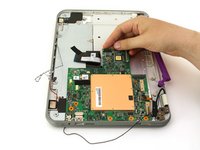
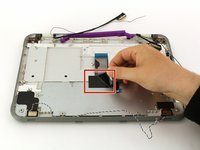
      • Peel back the black tape.

      • Using your fingers, carefully lift the metal plate out of the internal panel.

      crwdns2952109:0crwdne2952109:0

      crwdns2917038:0crwdne2917038:0

    3. One Education Infinity Touchpad Replacement: crwdns2935265:017crwdnd2935265:01crwdnd2935265:01crwdne2935265:0
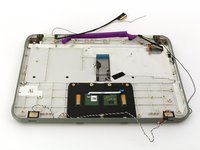
      • Using a Phillips #00 screwdriver, remove the two 2mm silver screws.

      crwdns2952109:0crwdne2952109:0

      crwdns2917038:0crwdne2917038:0

    4. One Education Infinity Touchpad Replacement: crwdns2935265:018crwdnd2935265:01crwdnd2935265:02crwdne2935265:0 One Education Infinity Touchpad Replacement: crwdns2935265:018crwdnd2935265:02crwdnd2935265:02crwdne2935265:0
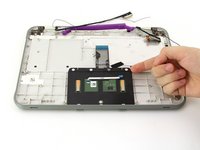
      • Using your fingers, carefully lift the touch-pad out of the internal panel.

      crwdns2952109:0crwdne2952109:0

      crwdns2917038:0crwdne2917038:0

crwdns2915888:0crwdne2915888:0

To reassemble your device, follow these instructions in reverse order.

crwdns2935221:0crwdne2935221:0

Jason Childers

crwdns2935283:010/10/19crwdne2935283:0

109 crwdns2915208:0crwdne2915208:0

crwdns2935295:0crwdne2935295:0

crwdns2935287:0crwdne2935287:0

Cal Poly, Team S11-G4, Regan Fall 2019 crwdns2935289:0Cal Poly, Team S11-G4, Regan Fall 2019crwdne2935289:0

CPSU-REGAN-F19S11G4

crwdns2931471:03crwdne2931471:0

crwdns2935297:048crwdne2935297:0

crwdns2947412:00crwdne2947412:0

crwdns2917038:0crwdne2917038:0

crwdns2936625:0crwdne2936625:0:

crwdns2936751:024crwdne2936751:0 1

crwdns2936753:07crwdne2936753:0 9

crwdns2936753:030crwdne2936753:0 28

crwdns2942667:0crwdne2942667:0 586